> ## Documentation Index
> Fetch the complete documentation index at: https://sudomock.com/docs/llms.txt
> Use this file to discover all available pages before exploring further.
> ## Agent Instructions
> The base URL is https://api.sudomock.com.
> Authenticate every request with the x-api-key header. Keys begin with sm_.
> A render returns the finished image at data.print_files[0].export_path. A request sent with is_async true returns a job_id to poll at GET /api/v1/jobs/{job_id}.
> Prefer the official SDKs over hand-written HTTP calls: npm install sudomock for Node, pip install sudomock for Python.
# Create and revoke your API keys
> Issue keys, watch usage, bind a domain.
A key is how the API knows the account. This page is where one is issued,
where you watch what it has been spending, and where you take it out of
service. Two moments on it run one way: the secret is shown in full once, at
creation, and a revoked key stays revoked.
## API keys
A key is a secret token that authenticates a request. Keys begin with `sm_`
and travel in the `x-api-key` header on every call.
Issue more than one. A key per integration, named after the thing that holds
it, is what lets you read the usage chart and know which integration is
spending, and what lets you revoke a leak without taking the rest of your
business offline.
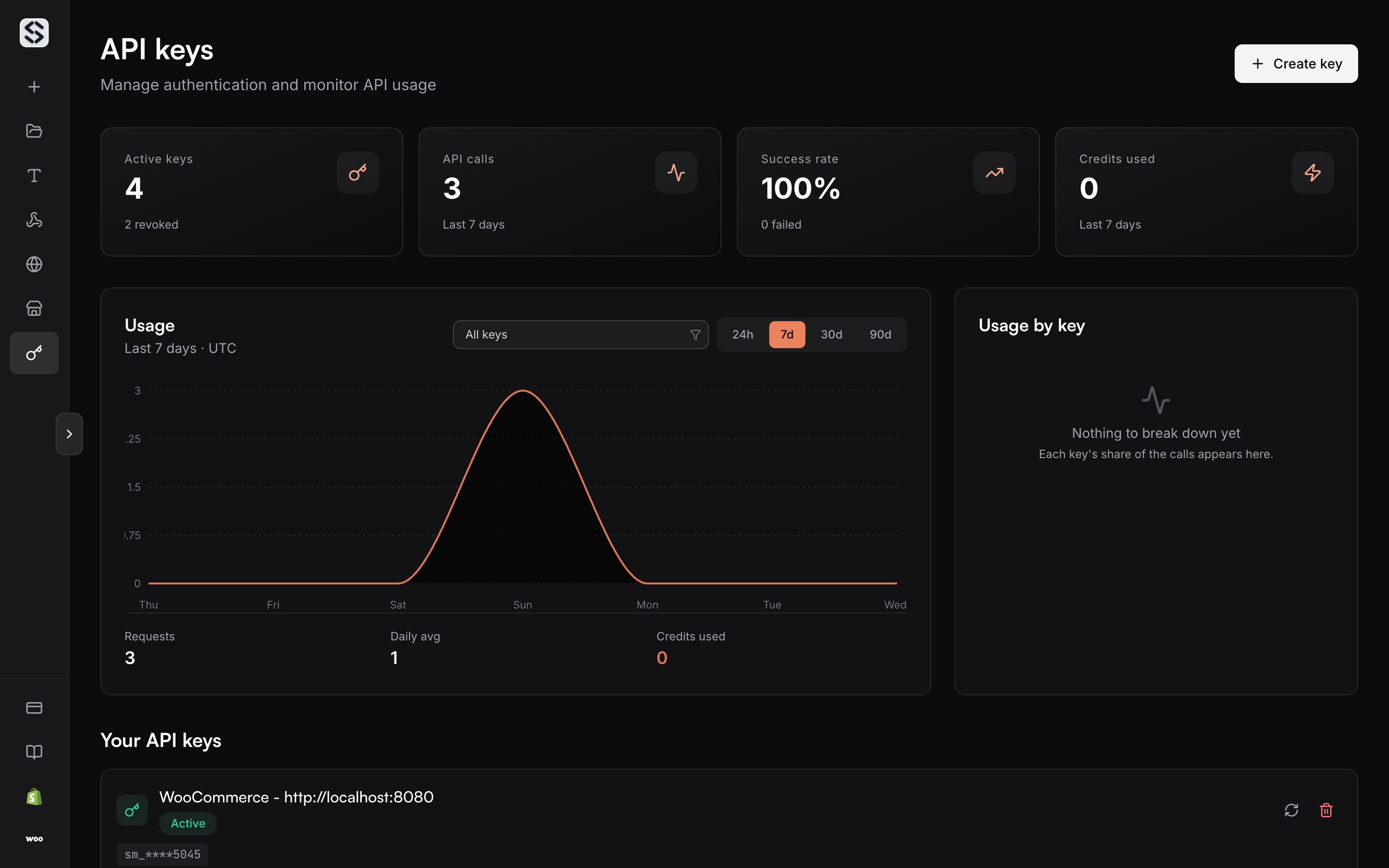
## API key management
Keys live on the [API keys](https://sudomock.com/dashboard/api-keys) page of
the dashboard. That page is the only place a key is issued, regenerated or
revoked.
The API reports the key behind the current request rather than the list.
[`GET /api/v1/me`](/docs/api-reference/account/retrieve-the-current-account)
returns an `api_key` block for the key that signed the call, which is how a
deployed service confirms at boot that it holds the key you think it holds.
Keys belong to the organization rather than to the member who created them, so
a key issued by one Editor keeps working when another takes over the
integration. Owners and Editors issue, bind and revoke keys; a Viewer sees the
page without being able to change anything on it. [Members](/docs/dashboard/members)
covers the roles.
## Create a key
Name the key after the thing that will hold it, not after yourself. A key
called `storefront-production` tells you what breaks when you revoke it. A key
called `key 2` does not, and the name is the only label the usage chart and the
account endpoint give you when you later have to decide which key to retire.
The key is shown in full once, at creation. Copy it then and put it where the
service that uses it reads its secrets. If you lose it, regenerate the key
rather than issuing a second one beside it.
## Read a key's record
Every key carries a small record, and the account endpoint returns it for the
key that signed the call:
| Field | What it says |
| ---------------- | ------------------------------------------------------------------------ |
| `name` | The label given to the key at creation. |
| `created_at` | When the key was issued. |
| `last_used_at` | The last call made with the key. Null on a key that has never been used. |
| `total_requests` | Credit-consuming operations recorded for this key. |
The last field is not a raw request count. It counts the operations that spend
credits, which is the figure worth comparing against an invoice rather than
against your own request logs.
## Watch what a key spends
The chart above the list plots requests over time, and it can be filtered to a
single key. That is the fastest way to answer two questions: whether an
integration is actually calling, and which key is spending the credits.
A key that has never been used says so rather than drawing an empty chart, so
an integration deployed with the wrong secret shows up as silence rather than
as a flat line you have to interpret.
 ## Bind a key to a domain
A key can render to one of your [custom domains](/docs/dashboard/custom-domains).
Set it here and every render made with that key serves its images from that
domain, with nothing to pass per request.
This is how one account serves two brands. Each key renders to its own domain,
and neither integration has to know that the other exists.
Binding reads the plan before it offers itself, because custom domains are a
paid-plan surface. Verify the domain first; the binding control on this page
expects a domain that is already live.
## Revoke or regenerate a key
Revoking a key stops it immediately and does not touch the others. It cannot be
undone: the entry stays in the list as revoked, and a call made with it answers
`401`, the same answer a missing or malformed key gets.
Regenerating issues a new secret for the same entry. That is the right move
when a key leaked but the integration holding it should keep its identity: the
entry stays, the secret changes, and you update one environment variable
instead of rewiring a deployment.
Treat a key in a repository, a browser bundle or a support ticket as leaked.
Revoke it and issue a new one rather than hoping it was not read.
## API reference
Keys are issued here. The contract they authenticate is documented next door.
* [Retrieve the current account](/docs/api-reference/account/retrieve-the-current-account) returns the `api_key` block for the key that signed the call, alongside the plan and the remaining credits
* [Authentication](/docs/authentication) covers where the header goes and what a rejected key answers
* [Usage limits](/docs/api-reference/usage-limits) covers the request rate and the concurrency ceiling a key works inside
* [Errors](/docs/errors) lists every status code and the error shape that carries it
## Bind a key to a domain
A key can render to one of your [custom domains](/docs/dashboard/custom-domains).
Set it here and every render made with that key serves its images from that
domain, with nothing to pass per request.
This is how one account serves two brands. Each key renders to its own domain,
and neither integration has to know that the other exists.
Binding reads the plan before it offers itself, because custom domains are a
paid-plan surface. Verify the domain first; the binding control on this page
expects a domain that is already live.
## Revoke or regenerate a key
Revoking a key stops it immediately and does not touch the others. It cannot be
undone: the entry stays in the list as revoked, and a call made with it answers
`401`, the same answer a missing or malformed key gets.
Regenerating issues a new secret for the same entry. That is the right move
when a key leaked but the integration holding it should keep its identity: the
entry stays, the secret changes, and you update one environment variable
instead of rewiring a deployment.
Treat a key in a repository, a browser bundle or a support ticket as leaked.
Revoke it and issue a new one rather than hoping it was not read.
## API reference
Keys are issued here. The contract they authenticate is documented next door.
* [Retrieve the current account](/docs/api-reference/account/retrieve-the-current-account) returns the `api_key` block for the key that signed the call, alongside the plan and the remaining credits
* [Authentication](/docs/authentication) covers where the header goes and what a rejected key answers
* [Usage limits](/docs/api-reference/usage-limits) covers the request rate and the concurrency ceiling a key works inside
* [Errors](/docs/errors) lists every status code and the error shape that carries it