> ## Documentation Index
> Fetch the complete documentation index at: https://sudomock.com/docs/llms.txt
> Use this file to discover all available pages before exploring further.
> ## Agent Instructions
> The base URL is https://api.sudomock.com.
> Authenticate every request with the x-api-key header. Keys begin with sm_.
> A render returns the finished image at data.print_files[0].export_path. A request sent with is_async true returns a job_id to poll at GET /api/v1/jobs/{job_id}.
> Prefer the official SDKs over hand-written HTTP calls: npm install sudomock for Node, pip install sudomock for Python.
# The library of mockups you saved
> Find, rename and delete your saved mockups.
Every template you upload lands here, whether it arrived through the browser
or through the API. The library is where you find a UUID, rename a template
that was named badly, and clear out what you no longer render.
## Template management
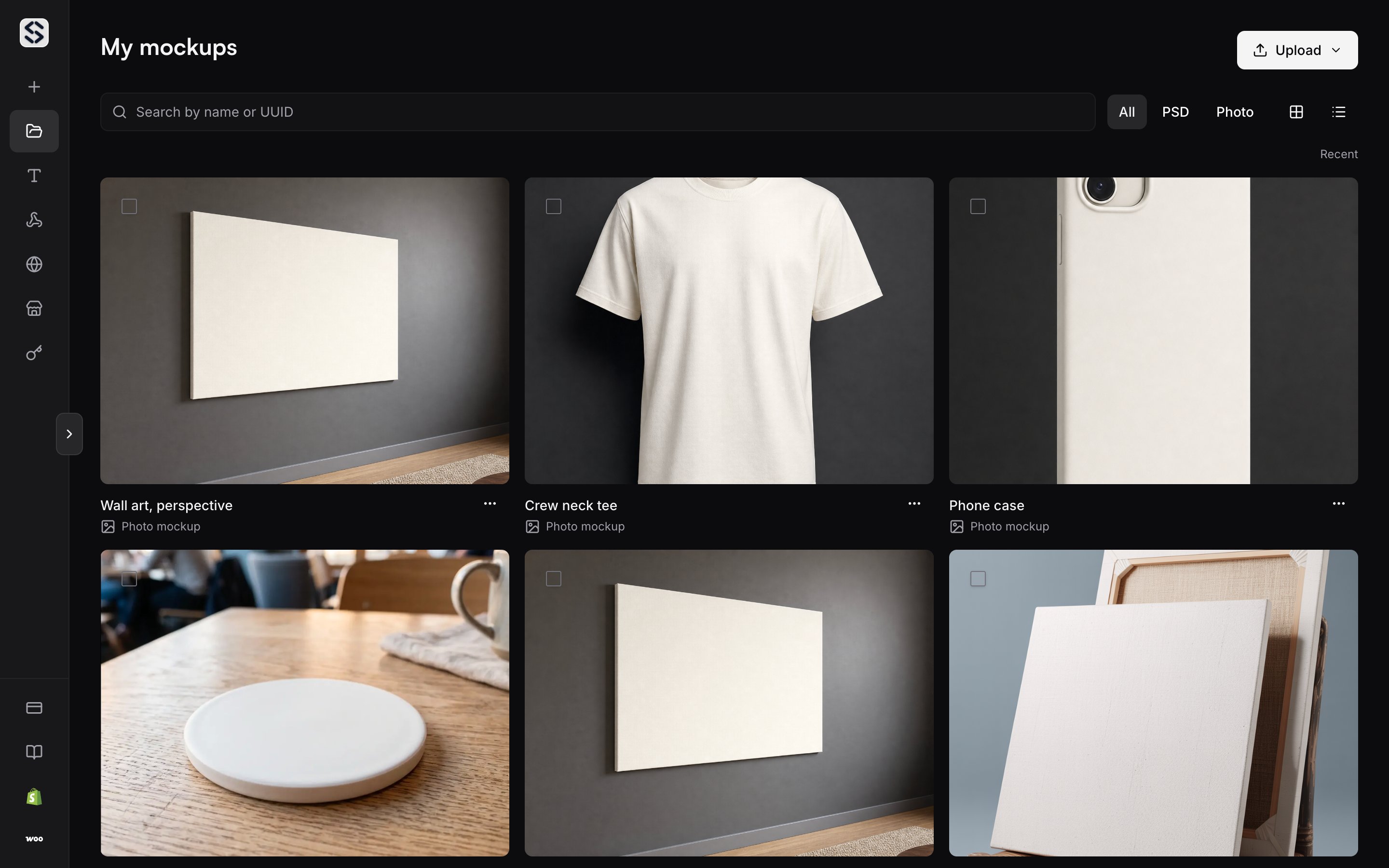
The library holds everything the [Create](/docs/dashboard/create) page produces:
Photoshop templates, mockups built from a product photo, and scenes you
generated. One shelf, one search field, one set of actions. The shelf belongs
to the organization rather than to the person who uploaded, so every
[member](/docs/dashboard/members) opens the same set.
 Over HTTP that one shelf reads as two collections, because the two kinds of
mockup answer to different routes. Photoshop templates are listed by
[Retrieve a list of PSD mockups](/docs/api-reference/psd-mockups/retrieve-a-list-of-psd-mockups)
and photo mockups by
[Retrieve a list of photo mockups](/docs/api-reference/photo-mockups/retrieve-a-list-of-photo-mockups).
Each kind carries its own read, update and delete route, and the UUID you copy
in the browser is the identifier every one of them takes.
Your plan sets how many PSD templates the account stores at once. At the
ceiling, a new upload is refused with `403` and `psd_limit_reached` while
every stored template keeps rendering. Delete one, or move to a plan with a
higher limit.
## Find a template
Search by name or by UUID. The grid and the list view show the same set, so
pick whichever reads better for the number of templates you keep.
The PSD list endpoint takes the same handles. `name` matches a fragment rather
than the whole string and ignores case, `created_after` and `created_before`
narrow the window, and `sort` accepts `name`, `created_at` or `updated_at`
with `order` set to `asc` or `desc`. Either list is walked with `limit` and
`offset`, which [Pagination](/docs/api-reference/pagination) covers in full.
## View template details
Opening a template shows what the upload found in it: the canvas size, the
thumbnails generated from it, the image settings it was saved with, and the
UUID to copy into a render request. This is the fastest path from a picture of
a template to the identifier the API wants.
A Photoshop template lists three kinds of layer, and each one carries its own
UUID that a render can address:
* `smart_objects`: the design areas artwork lands in. [Smart objects](/docs/psd-mockups/smart-objects) covers how one is addressed and what it accepts.
* `text_layers`: the wording a render can replace, along with the font, size and colour it is set in. [Text layers](/docs/text/text-layers) covers the fields.
* `group_layers`: outlines that can be recoloured as a set, so everything inside the group follows the change.
A layer hidden in Photoshop is not offered here, and
[Hidden layers](/docs/faq/why-did-my-hidden-layer-not-render) explains which kinds
are still reachable. A mockup built from a product photo lists print areas
instead of layers; see
[Print areas and surfaces](/docs/photo-mockups/print-areas).
## Rename a template
A template uploaded over HTTP takes the name you sent with it, and an upload
that sent no name is given one. A template uploaded in the browser takes the
file name, which is why a library filled from a folder of exports often reads
as a column of serial numbers.
The name is what search matches and what the API hands back in `name`, so it
is worth spending a moment on. Renaming here changes what you see in both
places, and it does not change the UUID, so a rename never breaks a render
already in production.
The same edit is available over HTTP through
[Update an existing PSD mockup](/docs/api-reference/psd-mockups/update-an-existing-psd-mockup)
and
[Update an existing photo mockup](/docs/api-reference/photo-mockups/update-an-existing-photo-mockup).
## Name a template's colours
A template can carry a named set of colours, so a colour a shopper picks in
the editor has a label rather than a hex value. Every colour needs a name
before the set will save.
A render then asks for `blue jean` where it would otherwise send a hex code.
Setting the colours over HTTP replaces the whole set rather than adding to it,
so send every colour you mean to keep, and send an empty list to clear the set
entirely.
## Upload several at once
Drop a set of files on the library to register them in one pass rather than
one at a time. Each file is checked on its own, so one rejected file does not
take the batch with it, and each file arrives as its own template with its own
UUID. Nothing is merged, and a set dropped together is a set you can rename or
delete one by one afterwards.
The API registers one file per call. [Upload a PSD](/docs/psd-mockups/upload-a-psd)
covers that call and the background mode, which hands back a job to poll
instead of holding the connection open while a large file is read.
## Delete a template
Deleting is permanent and the confirmation says so. The template and the files
that belong to it go together, a deleted template cannot be restored, and a
render request that still holds its UUID answers `404`.
Deleting also frees a slot against the stored template ceiling, which is the
quickest way back under it. The same removal runs over HTTP through
[Remove an existing PSD mockup](/docs/api-reference/psd-mockups/remove-an-existing-psd-mockup)
and
[Remove an existing photo mockup](/docs/api-reference/photo-mockups/remove-an-existing-photo-mockup).
## API reference
For the full contract behind this page, see the PSD mockups endpoints starting
at
[Retrieve a single PSD mockup](/docs/api-reference/psd-mockups/retrieve-a-single-psd-mockup),
and the photo mockup endpoints starting at
[Retrieve a single photo mockup](/docs/api-reference/photo-mockups/retrieve-a-single-photo-mockup).
[Errors](/docs/errors) lists every code these routes can answer with.
Over HTTP that one shelf reads as two collections, because the two kinds of
mockup answer to different routes. Photoshop templates are listed by
[Retrieve a list of PSD mockups](/docs/api-reference/psd-mockups/retrieve-a-list-of-psd-mockups)
and photo mockups by
[Retrieve a list of photo mockups](/docs/api-reference/photo-mockups/retrieve-a-list-of-photo-mockups).
Each kind carries its own read, update and delete route, and the UUID you copy
in the browser is the identifier every one of them takes.
Your plan sets how many PSD templates the account stores at once. At the
ceiling, a new upload is refused with `403` and `psd_limit_reached` while
every stored template keeps rendering. Delete one, or move to a plan with a
higher limit.
## Find a template
Search by name or by UUID. The grid and the list view show the same set, so
pick whichever reads better for the number of templates you keep.
The PSD list endpoint takes the same handles. `name` matches a fragment rather
than the whole string and ignores case, `created_after` and `created_before`
narrow the window, and `sort` accepts `name`, `created_at` or `updated_at`
with `order` set to `asc` or `desc`. Either list is walked with `limit` and
`offset`, which [Pagination](/docs/api-reference/pagination) covers in full.
## View template details
Opening a template shows what the upload found in it: the canvas size, the
thumbnails generated from it, the image settings it was saved with, and the
UUID to copy into a render request. This is the fastest path from a picture of
a template to the identifier the API wants.
A Photoshop template lists three kinds of layer, and each one carries its own
UUID that a render can address:
* `smart_objects`: the design areas artwork lands in. [Smart objects](/docs/psd-mockups/smart-objects) covers how one is addressed and what it accepts.
* `text_layers`: the wording a render can replace, along with the font, size and colour it is set in. [Text layers](/docs/text/text-layers) covers the fields.
* `group_layers`: outlines that can be recoloured as a set, so everything inside the group follows the change.
A layer hidden in Photoshop is not offered here, and
[Hidden layers](/docs/faq/why-did-my-hidden-layer-not-render) explains which kinds
are still reachable. A mockup built from a product photo lists print areas
instead of layers; see
[Print areas and surfaces](/docs/photo-mockups/print-areas).
## Rename a template
A template uploaded over HTTP takes the name you sent with it, and an upload
that sent no name is given one. A template uploaded in the browser takes the
file name, which is why a library filled from a folder of exports often reads
as a column of serial numbers.
The name is what search matches and what the API hands back in `name`, so it
is worth spending a moment on. Renaming here changes what you see in both
places, and it does not change the UUID, so a rename never breaks a render
already in production.
The same edit is available over HTTP through
[Update an existing PSD mockup](/docs/api-reference/psd-mockups/update-an-existing-psd-mockup)
and
[Update an existing photo mockup](/docs/api-reference/photo-mockups/update-an-existing-photo-mockup).
## Name a template's colours
A template can carry a named set of colours, so a colour a shopper picks in
the editor has a label rather than a hex value. Every colour needs a name
before the set will save.
A render then asks for `blue jean` where it would otherwise send a hex code.
Setting the colours over HTTP replaces the whole set rather than adding to it,
so send every colour you mean to keep, and send an empty list to clear the set
entirely.
## Upload several at once
Drop a set of files on the library to register them in one pass rather than
one at a time. Each file is checked on its own, so one rejected file does not
take the batch with it, and each file arrives as its own template with its own
UUID. Nothing is merged, and a set dropped together is a set you can rename or
delete one by one afterwards.
The API registers one file per call. [Upload a PSD](/docs/psd-mockups/upload-a-psd)
covers that call and the background mode, which hands back a job to poll
instead of holding the connection open while a large file is read.
## Delete a template
Deleting is permanent and the confirmation says so. The template and the files
that belong to it go together, a deleted template cannot be restored, and a
render request that still holds its UUID answers `404`.
Deleting also frees a slot against the stored template ceiling, which is the
quickest way back under it. The same removal runs over HTTP through
[Remove an existing PSD mockup](/docs/api-reference/psd-mockups/remove-an-existing-psd-mockup)
and
[Remove an existing photo mockup](/docs/api-reference/photo-mockups/remove-an-existing-photo-mockup).
## API reference
For the full contract behind this page, see the PSD mockups endpoints starting
at
[Retrieve a single PSD mockup](/docs/api-reference/psd-mockups/retrieve-a-single-psd-mockup),
and the photo mockup endpoints starting at
[Retrieve a single photo mockup](/docs/api-reference/photo-mockups/retrieve-a-single-photo-mockup).
[Errors](/docs/errors) lists every code these routes can answer with.