> ## Documentation Index
> Fetch the complete documentation index at: https://sudomock.com/docs/llms.txt
> Use this file to discover all available pages before exploring further.
> ## Agent Instructions
> The base URL is https://api.sudomock.com.
> Authenticate every request with the x-api-key header. Keys begin with sm_.
> A render returns the finished image at data.print_files[0].export_path. A request sent with is_async true returns a job_id to poll at GET /api/v1/jobs/{job_id}.
> Prefer the official SDKs over hand-written HTTP calls: npm install sudomock for Node, pip install sudomock for Python.
# Watch deliveries from the panel
> Endpoints, deliveries and the event feed.
A queued render calls you back instead of making you poll. The webhooks page
is where an endpoint is registered, where its signing secret lives, and where
you read what was actually delivered rather than what should have been.
## Webhook management
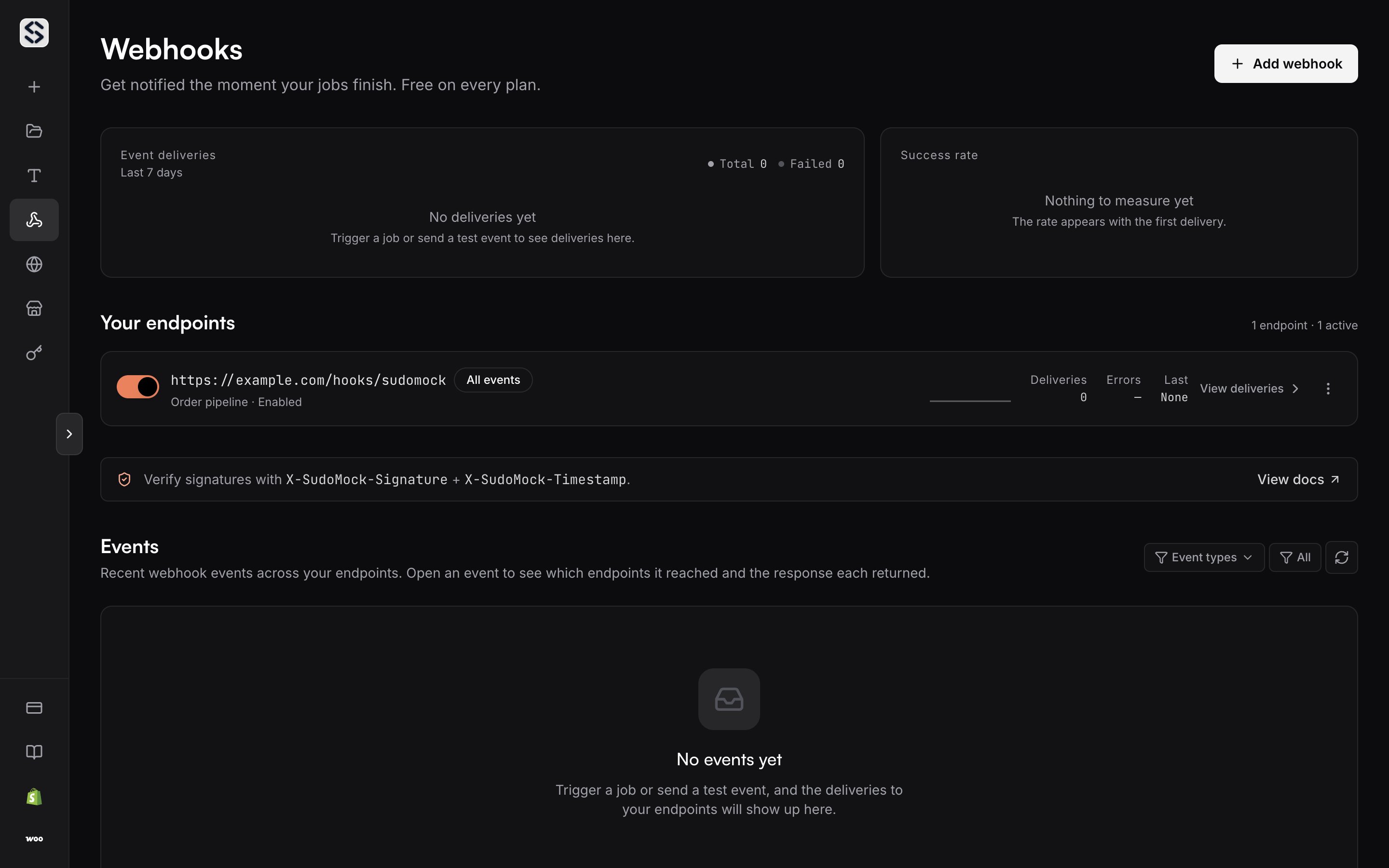
Every endpoint on the account, and the delivery record behind it, lives on the
[**Webhooks** dashboard page](https://sudomock.com/dashboard/webhooks). The page
opens on the delivery counts for the last seven days, then lists your endpoints,
then the account wide event feed. The page opens once the account is paying, by subscription or by prepaid balance.
You can manage the same endpoints from your own backend instead:
* [Create](/docs/api-reference/webhook-endpoints/create-a-new-webhook-endpoint) an
endpoint with a URL, a description and a list of event types
* [List](/docs/api-reference/webhook-endpoints/retrieve-a-list-of-webhook-endpoints)
them, or [read](/docs/api-reference/webhook-endpoints/retrieve-a-single-webhook-endpoint)
one
* [Update](/docs/api-reference/webhook-endpoints/update-an-existing-webhook-endpoint)
a description, an event list, or whether the endpoint is enabled
* [Delete](/docs/api-reference/webhook-endpoints/remove-an-existing-webhook-endpoint)
an endpoint you no longer want called
The Owner and any Editor can add, edit, rotate, test and replay. A Viewer sees
the same endpoints and the same delivery record and cannot change them. Roles
are set in [Members](/docs/dashboard/members).
## Register an endpoint
Select **Add webhook** and give it a public `https://` URL. A plain `http://`
address, `localhost` and private network addresses are refused in the form, so a
development listener needs a public tunnel before it will save.
Pick the events you want, or keep **All events**, which is where a new endpoint
starts and which covers the events we add later. Turn it off and the endpoint
needs at least one event before it will save. A row on **All events** says so in
place of a count. [Webhooks overview](/docs/webhooks/overview) lists each event and
when it fires.
Each row carries a switch. Turning it off stops deliveries to that endpoint and
keeps the endpoint, its secret and its history in place. That is the reversible
version of deleting it, and deleting is not reversible.
 ## Store the signing secret
The secret appears once, in the dialog that opens the moment the endpoint is
created. Copy it there. Every later read of that endpoint masks it down to its
last four characters, and there is no way to ask for it again.
**Rotate secret** in the row menu issues a new one and reveals it the same way,
as does [rotate the signing
secret](/docs/api-reference/webhook-endpoints/rotate-the-signing-secret) from your
backend. The previous secret stops verifying as soon as the new one is issued,
so put the new value in front of your handler first, or accept a short window in
which deliveries arrive and fail your check.
Each endpoint carries its own secret, so one leaked secret reaches one endpoint
rather than all of them. [Verifying
signatures](/docs/webhooks/verifying-signatures) covers what your handler does with
it.
## Watch the success rate
Two cards sit above the endpoint list and both cover the last seven days.
**Event deliveries** plots the daily total with failures drawn over it, so a bad
deploy reads as a divergence rather than a number you have to compare against
memory. **Success rate** states the same window as one percentage, with the
counts it came from underneath.
An account with no deliveries yet says so in words instead of drawing a flat
line at zero. An empty week is a state, not a panel that failed to load. The
same counts are available from [the delivery
overview](/docs/api-reference/webhook-deliveries/retrieve-the-delivery-overview).
## Read one endpoint's deliveries
Select an endpoint row to open its delivery record. Each line is one attempt: the
response status, the event name, the job it belongs to, when it happened, and
which try it was.
Two filters narrow the list, and both run across the whole record rather than the
rows already on screen. **Failed only** drops everything that succeeded. The
event filter keeps the types you pick.
Open a line for the whole attempt. The headers and body we sent are kept for
every attempt. An attempt that did not answer `2xx` also carries the status,
headers and body your server returned, and the last error, which is the
difference between knowing a delivery failed and knowing why. A `2xx` line keeps
its status and says the response body was not captured. The API returns [the same
list](/docs/api-reference/webhook-deliveries/retrieve-a-list-of-deliveries) and [the
same detail](/docs/api-reference/webhook-deliveries/retrieve-a-single-delivery).
## Understand a delivery status
Every attempt is in one of four states. The chip on the row carries the response
code once your server has given one, and the state itself when it has not.
* `pending` is in flight. The attempt has been made or is being retried, and no
final answer has arrived.
* `delivered` means your server answered `2xx`. This is the only outcome that
stops the retries.
* `failed` means the attempt did not answer `2xx`. It will be retried.
* `dead` means the retries for that event are spent. Nothing will send it again
on its own.
The response status and the last error are recorded for `failed` and `dead`
alike, which is what separates an endpoint that is refusing your payload from one
that is simply unreachable.
## Follow the account event feed
Below the endpoints, **Events** is the same record read the other way round:
recent events across every endpoint, newest first, grouped so one event shows
each endpoint it reached and the answer each one gave. Use an endpoint's own
record when you suspect one listener, and this feed when you are chasing one job.
It takes the same two filters. [Retrieve a list of
events](/docs/api-reference/webhook-deliveries/retrieve-a-list-of-events) returns the
same feed.
## Replay a delivery
**Replay** on any line sends that delivery again to the endpoint that was meant
to receive it, so an outage on your side does not have to be repaired at the
source. It works on a delivered line too, which is how you reprocess an event
after a handler change.
When an endpoint has failures, **Replay all failed** appears above its record and
resends every failed delivery for that endpoint, not only the ones currently
loaded. The API does the same for [one
delivery](/docs/api-reference/webhook-deliveries/replay-a-single-delivery) or [all
failed deliveries](/docs/api-reference/webhook-deliveries/replay-all-failed-deliveries).
A replayed delivery can arrive with `result_url` set to `null`. Read the result
with `GET /api/v1/jobs/{job_id}` when that happens.
## Send a test event
**Send test** in the row menu delivers a `webhook.test` event to that endpoint. It
is signed exactly as a real event is, so a signature that verifies here verifies
in production. It also lands in the delivery record, so the attempt and your
server's response are there to read afterwards.
## API reference
Every action on this page has an endpoint behind it. [Webhook
endpoints](/docs/api-reference/webhook-endpoints/create-a-new-webhook-endpoint) covers
registering, updating, rotating and testing. [Webhook
deliveries](/docs/api-reference/webhook-deliveries/retrieve-the-delivery-overview)
covers the overview, the two feeds and the replays. [Send a test
event](/docs/api-reference/webhook-endpoints/send-a-test-event) is the programmatic
form of the row menu action.
## Store the signing secret
The secret appears once, in the dialog that opens the moment the endpoint is
created. Copy it there. Every later read of that endpoint masks it down to its
last four characters, and there is no way to ask for it again.
**Rotate secret** in the row menu issues a new one and reveals it the same way,
as does [rotate the signing
secret](/docs/api-reference/webhook-endpoints/rotate-the-signing-secret) from your
backend. The previous secret stops verifying as soon as the new one is issued,
so put the new value in front of your handler first, or accept a short window in
which deliveries arrive and fail your check.
Each endpoint carries its own secret, so one leaked secret reaches one endpoint
rather than all of them. [Verifying
signatures](/docs/webhooks/verifying-signatures) covers what your handler does with
it.
## Watch the success rate
Two cards sit above the endpoint list and both cover the last seven days.
**Event deliveries** plots the daily total with failures drawn over it, so a bad
deploy reads as a divergence rather than a number you have to compare against
memory. **Success rate** states the same window as one percentage, with the
counts it came from underneath.
An account with no deliveries yet says so in words instead of drawing a flat
line at zero. An empty week is a state, not a panel that failed to load. The
same counts are available from [the delivery
overview](/docs/api-reference/webhook-deliveries/retrieve-the-delivery-overview).
## Read one endpoint's deliveries
Select an endpoint row to open its delivery record. Each line is one attempt: the
response status, the event name, the job it belongs to, when it happened, and
which try it was.
Two filters narrow the list, and both run across the whole record rather than the
rows already on screen. **Failed only** drops everything that succeeded. The
event filter keeps the types you pick.
Open a line for the whole attempt. The headers and body we sent are kept for
every attempt. An attempt that did not answer `2xx` also carries the status,
headers and body your server returned, and the last error, which is the
difference between knowing a delivery failed and knowing why. A `2xx` line keeps
its status and says the response body was not captured. The API returns [the same
list](/docs/api-reference/webhook-deliveries/retrieve-a-list-of-deliveries) and [the
same detail](/docs/api-reference/webhook-deliveries/retrieve-a-single-delivery).
## Understand a delivery status
Every attempt is in one of four states. The chip on the row carries the response
code once your server has given one, and the state itself when it has not.
* `pending` is in flight. The attempt has been made or is being retried, and no
final answer has arrived.
* `delivered` means your server answered `2xx`. This is the only outcome that
stops the retries.
* `failed` means the attempt did not answer `2xx`. It will be retried.
* `dead` means the retries for that event are spent. Nothing will send it again
on its own.
The response status and the last error are recorded for `failed` and `dead`
alike, which is what separates an endpoint that is refusing your payload from one
that is simply unreachable.
## Follow the account event feed
Below the endpoints, **Events** is the same record read the other way round:
recent events across every endpoint, newest first, grouped so one event shows
each endpoint it reached and the answer each one gave. Use an endpoint's own
record when you suspect one listener, and this feed when you are chasing one job.
It takes the same two filters. [Retrieve a list of
events](/docs/api-reference/webhook-deliveries/retrieve-a-list-of-events) returns the
same feed.
## Replay a delivery
**Replay** on any line sends that delivery again to the endpoint that was meant
to receive it, so an outage on your side does not have to be repaired at the
source. It works on a delivered line too, which is how you reprocess an event
after a handler change.
When an endpoint has failures, **Replay all failed** appears above its record and
resends every failed delivery for that endpoint, not only the ones currently
loaded. The API does the same for [one
delivery](/docs/api-reference/webhook-deliveries/replay-a-single-delivery) or [all
failed deliveries](/docs/api-reference/webhook-deliveries/replay-all-failed-deliveries).
A replayed delivery can arrive with `result_url` set to `null`. Read the result
with `GET /api/v1/jobs/{job_id}` when that happens.
## Send a test event
**Send test** in the row menu delivers a `webhook.test` event to that endpoint. It
is signed exactly as a real event is, so a signature that verifies here verifies
in production. It also lands in the delivery record, so the attempt and your
server's response are there to read afterwards.
## API reference
Every action on this page has an endpoint behind it. [Webhook
endpoints](/docs/api-reference/webhook-endpoints/create-a-new-webhook-endpoint) covers
registering, updating, rotating and testing. [Webhook
deliveries](/docs/api-reference/webhook-deliveries/retrieve-the-delivery-overview)
covers the overview, the two feeds and the replays. [Send a test
event](/docs/api-reference/webhook-endpoints/send-a-test-event) is the programmatic
form of the row menu action.