Studio
Embed a live mockup editor in your storefront via iframe. Your server creates a session, your page embeds the editor with the returned token, and your page listens for postMessage events. The same flow powers both PSD customization and product-photo mockups.
Studio is the shared editor for both PSD templates and photo mockups. One iframe, both engines. Your customers design on your storefront, and you never build a rendering pipeline.
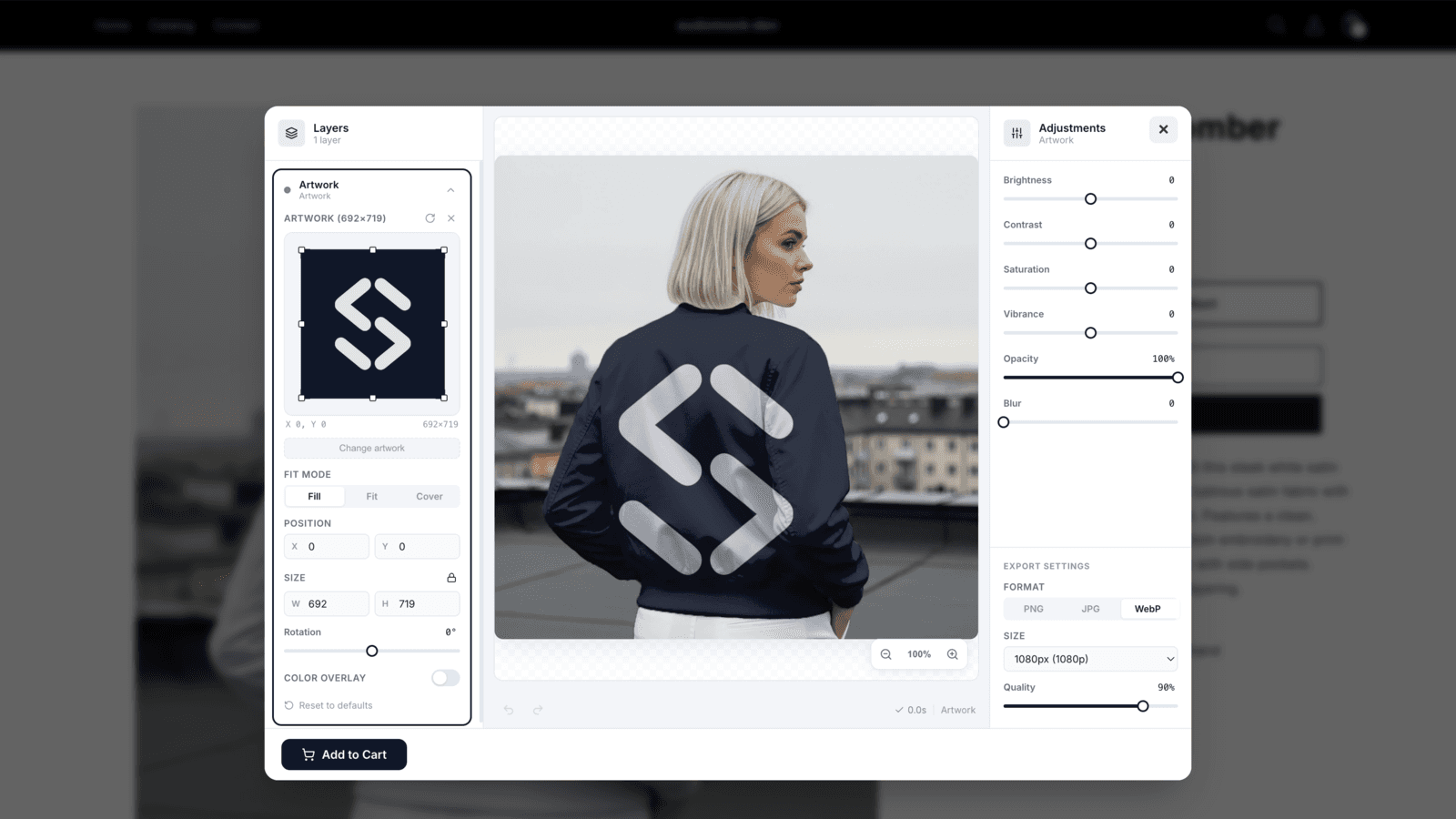
<iframe> and a short-lived session. The customizer stays embedded on your product page and is bound to that page's exact origin.create-session call. Upload, placement, live preview, and the finished image are all handled inside Studio.The integration contract, in three parts
Studio lets your customers customize a mockup directly on your storefront, without leaving your page. It comes in two flavors that share the same integration shape:
PSD customizationmockup_type: psdOpen an iframe editor for a prepared PSD template. Bind the session to an existing mockup_uuid and the exact allowed_origin that embeds it.
Photo Mockupsmockup_type: 2dOpen the photo-mockup customizer. Use setup for full editing access or customize for shoppers working on a ready mockup.
Both are created through the same POST /studio/create-session endpoint and both return an opaque session token for the iframe plus one-time handshake values for the trusted parent page. Only the session token belongs in the iframe URL.
/api/v1/studio/create-sessionAPI Key Never Exposed
sess_ + random characters). Your API key is stored server-side and never included in the token or any client response. Successful use refreshes the idle window, bounded by a four-hour absolute expiry.How It Works
Two 2D session kinds
customize: bind a ready
mockup_uuid. The shopper can place artwork, preview, render, and submit, but cannot edit the product selection or print areas.The typical storefront flow: prepare the mockup with a
setup session or the public Photo Mockups API, then open a customize session on that mockup_uuid with a product_id for every shopper.POST /studio/create-session with your API key (server-to-server). The API verifies ownership and generates an opaque token for one customization session.sess_xxx token to your frontend. The API key stays on your server.studio.sudomock.com/editor?session=sess_xxx in an iframe. The editor verifies the token, proves the parent origin, and loads the merchant config.window message events. Setup returns studio.mockup-saved; customize returns studio.design-submitted. Automatic callbacks also emit nonterminal studio.design-changed events while the session stays open.Setup opens the full editor
setup is a permission profile, not a sequence of stages. Studio prepares a new product automatically and opens the full editor with product editing, print-area editing, artwork placement, preview, render, and save available together.
Customize keeps administrative controls unavailable
customize session opens the same editor surface for a ready mockup_uuid, but it grants only artwork placement, preview, render, and submit. Labels and colors can change presentation; they never change these permissions.Authentication
Studio endpoints use three authentication schemes depending on the endpoint and caller:
| Scheme | Header / Mechanism | Used By |
|---|---|---|
| API Key | x-api-key: sm_your_api_key | Create and confirm Studio sessions from your server |
| Shopify HMAC | Shopify App Proxy signature (query params) | create-session (Shopify storefronts via App Proxy) |
POST /create-session
Generates an opaque session token for the Studio editor. Requires x-api-key header (WooCommerce, custom integrations) or Shopify App Proxy HMAC signature. The API key never leaves the server. One endpoint serves both mockup types, distinguished by the request body.
Headers
x-api-keystringYour SudoMock API key starting with sm_. Required unless using Shopify HMAC authentication. Used server-side only. Never expose it to the browser.
Content-TypestringRequiredMust be application/json
Request Body: PSD customization session
Bind the session to a prepared PSD-backed mockup by its mockup_uuidand embed it from the exact allowed_origin.
mockup_uuidstringRequiredUUID of the mockup to open in Studio. Must belong to the authenticated account.
allowed_originstringRequiredThe exact origin of the page that embeds the Studio iframe, for example https://shop.example.com.
product_idstringProduct identifier from your platform (e.g., Shopify Product GID, WooCommerce product ID). Stored in the session for your reference.
variant_idstringOptional variant identifier. Send the same value in the server-side result confirmation.
configobjectOptional configuration for this session. It accepts the same partial fields listed under Studio Configuration, without config_version. The override is not saved and requires x-api-key authentication.
artworkobjectOptional session-locked artwork. Send target_uuid with an HTTPS url, canonical raw base64, or both; base64 takes precedence. The target must be a Smart Object in this explicit mockup. PSD artwork may be PNG, JPEG, WebP, or GIF up to 15 MB.
artwork[].placementobjectOptional opening placement for that design. See Opening placement.
artwork[].adjustmentsobjectOptional opening appearance for that design. See Opening appearance.
1{2 "mockup_type": "psd",3 "session_kind": "customize",4 "mockup_uuid": "c315f78f-d2c7-4541-b240-a9372842de94",5 "allowed_origin": "https://shop.example.com",6 "product_id": "gid://shopify/Product/123456",7 "variant_id": "gid://shopify/ProductVariant/789",8 "action_id": "add-to-cart",9 "artwork": {10 "target_uuid": "90f1e113-df7a-4ef4-99fe-30b1269c98f9",11 "url": "https://cdn.example.com/customer-artwork.png"12 },13 "config": {14 "theme": "dark",15 "accentColor": "#3366FF",16 "autoDesignCallback": true,17 "psdPrimaryActionLabel": "Add to cart"18 }19}
Request Body: Photo Mockups session
Open the photo-mockup customizer. Set mockup_type to 2d and choose a session_kind. The editor always runs in an iframe embedded by allowed_origin. If your mockup is already prepared and you only want placement and rendering, use customize; product and print-area controls stay unavailable.
| What you want | session_kind | Access |
|---|---|---|
| Create or edit a mockup | setup | Full editing, placement, render, and save |
| Use a ready mockup in a storefront | customize | Artwork placement, render, and submit |
mockup_typeenumRequiredSet to 2d for the 2D customizer.
session_kindenumRequiredOne of setup or customize. Use setup for full editing access. Use customize for a shopper working on a ready mockup_uuid.
allowed_originstringRequiredThe exact origin of the page that will embed the iframe (for example https://shop.example.com). The customizer only runs when it is embedded by this origin.
product_idstringOptional product identifier from your platform. Use it to associate the session with your catalog.
variant_idstringOptional variant identifier. Send the same value in the server-side result confirmation.
mockup_uuidstringRequired for customize. Optional for setup, where omitting it starts a new mockup. Must be a valid UUID.
action_idstringOptional allowlisted routing identifier returned with the result event. Use 1–64 characters from A–Z, a–z, 0–9, dot, underscore, colon, and hyphen.
configobjectOptional configuration for this session. It accepts the same partial fields listed under Studio Configuration, without config_version. Omitted fields use the API key's saved settings. Send null for one field to use its theme default for this session. The override is not saved.
artworkobjectOptional session-locked artwork for customize only. Send target_uuid with an HTTPS url, canonical raw base64, or both; base64 takes precedence. The target must be a saved print area in this explicit mockup. 2D artwork may be PNG, JPEG, or WebP up to 15 MB.
artwork[].placementobjectOptional opening placement for that design. See Opening placement.
artwork[].adjustmentsobjectOptional opening appearance for that design. See Opening appearance.
Locked artwork keeps one source and one target
artwork is supplied, Studio freezes that image for the session. The client can move, resize, rotate, blend, recolor, adjust opacity, and remove its background repeatedly. Render, order submission, and the editor's other normal actions remain available. The client cannot remove or replace it, upload another artwork, or target a different Smart Object or print area. Locked artwork requires a bound customize session; setup sessions reject it.Opening placement
Each locked artwork entry may carry a placement object that says where that design should open. It is a starting point, not a lock: the shopper can move, resize, and rotate it afterwards exactly as before. Leave it out and the editor opens the design the way it does today.
What the numbers are measured in
placement is a percentage of the target's own region: the print area's bounding box for a 2D target, the Smart Object's embedded frame for a PSD target. Offsets run from that region's centre, positive right and positive down. The unit is in the field name, so a value read from an example cannot be mistaken for pixels.Which fields apply to which mockup type
placementitself works on both 2D and PSD targets; only one narrow case of fit is restricted. A field sent to a type that does not read it is refused with 422 PLACEMENT_NOT_SUPPORTED, so a session never opens promising a placement the render cannot produce.boxobjectRequired2D and PSD. How large the design opens. One of two shapes, chosen by mode: { "mode": "auto", "coverage": 80 } gives the design an allowance and keeps its own proportions, or { "mode": "manual", "width_percent": 50, "height_percent": 25 } gives the box itself. A width without a height cannot be written in either shape.
box.coverageinteger2D and PSD. auto only. Percentage of the region the design is allowed to fill, 10 to 100.
box.width_percentnumber2D and PSD. manual only. Percentage of the region's width, above 0 and up to 300. Above 100 the design opens wider than the region, and whatever falls outside the region is not printed.
box.height_percentnumber2D and PSD. manual only. Percentage of the region's height, above 0 and up to 300. Above 100 the design opens taller than the region, and whatever falls outside the region is not printed.
fitenum= fit2D and PSD, with one exception: beside a manual box on a 2D target it is refused, because the box has already decided the size and fit has nothing left to say. How the artwork's pixels meet the box: 'fit', 'crop', or 'fill'. The older names 'contain' and 'cover' are still read, as 'fit' and 'crop'. On a PSD target the default keeps the design's proportions inside the box, so a box larger than the region is filled on one axis only; send 'fill' or 'crop' to have the box itself covered.
offset_x_percentnumber= 02D and PSD. Percentage of the region's width, measured from the region centre, positive to the right (-100 to 100).
offset_y_percentnumber= 02D and PSD. Percentage of the region's height, measured from the region centre, positive downward (-100 to 100).
rotationnumber= 02D and PSD. Degrees about the box centre, clockwise positive (-360 to 360).
flip_horizontalboolean= false2D and PSD. Mirror the design left to right.
flip_verticalboolean= false2D and PSD. Mirror the design top to bottom.
1{2 "mockup_type": "2d",3 "session_kind": "customize",4 "mockup_uuid": "c315f78f-d2c7-4541-b240-a9372842de94",5 "allowed_origin": "https://shop.example.com",6 "artwork": [{7 "target_uuid": "58ca3f7b-cc77-4d9e-8fd3-82cdb02d1e74",8 "url": "https://cdn.example.com/customer-artwork.png",9 "placement": {10 "box": { "mode": "auto", "coverage": 80 },11 "fit": "fit",12 "offset_x_percent": 0,13 "offset_y_percent": -10,14 "rotation": 015 }16 }]17}
1{2 "artwork": [{3 "target_uuid": "58ca3f7b-cc77-4d9e-8fd3-82cdb02d1e74",4 "url": "https://cdn.example.com/customer-artwork.png",5 "placement": {6 "box": { "mode": "manual", "width_percent": 50, "height_percent": 25 }7 }8 }]9}
On a 2D target
manual box on a 2D target is filled by the design it is given, so fit has nothing left to decide there and is refused: send the box on its own. An auto box on a 2D target takes every fit value, and both boxes take rotation, the offsets and the flips. A PSD target takes every field on this page, that one case of fit included. Anything a target cannot open is answered at create-session with 422 PLACEMENT_NOT_SUPPORTED, before a session exists, rather than opening an editor that shows something you did not ask for.Opening appearance
Each locked artwork entry may also carry an adjustments object that says how that design should look when the editor opens. Like the placement, it is a starting point rather than a lock: the shopper can change any of it afterwards. Leave it out and the design opens at the editor's own values.
Carrying a look from one mockup to the next
adjustment_layers for a PSD target and adjustments for a 2D one. Send those values back here on the next session and it opens where the last one left off, instead of at full strength.Which fields apply to which mockup type
create-session with 422 ADJUSTMENTS_NOT_SUPPORTED, before a session exists, rather than opening an editor that quietly ignores it. Every field is optional on its own, and one you leave out keeps the editor's own value rather than being reset.brightnessintegerPSD only. -100 to 100. Omit it to open at the editor's own value.
contrastintegerPSD only. -100 to 100. Omit it to open at the editor's own value.
saturationintegerPSD only. -100 to 100, where -100 is greyscale. Omit it to open at the editor's own value.
vibranceintegerPSD only. -100 to 100. Omit it to open at the editor's own value.
opacityinteger2D and PSD. 0 to 100, where 100 is fully opaque. Omit it to open at the editor's own value.
blurnumberPSD only. 0 to 20, in steps of 0.5. Omit it to open at the editor's own value.
blend_modeenum2D only. How the artwork sits on the product surface: 'multiply', 'normal', 'screen', 'lighten', 'soft_light', 'overlay', or 'darken'. Omit it to open at the editor's own value.
1{2 "mockup_type": "2d",3 "session_kind": "customize",4 "mockup_uuid": "c315f78f-d2c7-4541-b240-a9372842de94",5 "allowed_origin": "https://shop.example.com",6 "artwork": [{7 "target_uuid": "58ca3f7b-cc77-4d9e-8fd3-82cdb02d1e74",8 "url": "https://cdn.example.com/customer-artwork.png",9 "adjustments": {10 "opacity": 90,11 "blend_mode": "multiply"12 }13 }]14}
1{2 "artwork": [{3 "target_uuid": "1f8e2a90-4c31-4a8f-9f0e-2b7c5d6e8a10",4 "url": "https://cdn.example.com/customer-artwork.png",5 "adjustments": {6 "brightness": 7,7 "contrast": -12,8 "opacity": 889 }10 }]11}
These ranges belong to the editor, not the render
Configuration never grants permissions
x-api-keyrequests. It can change appearance, labels, and optional controls, but cannot change the session kind or grant setup capabilities.1{2 "mockup_type": "2d",3 "session_kind": "customize",4 "mockup_uuid": "c315f78f-d2c7-4541-b240-a9372842de94",5 "allowed_origin": "https://shop.example.com",6 "product_id": "SKU-1234",7 "variant_id": "SKU-1234-BLACK-M",8 "action_id": "add-to-cart",9 "artwork": {10 "target_uuid": "58ca3f7b-cc77-4d9e-8fd3-82cdb02d1e74",11 "url": "https://cdn.example.com/customer-artwork.png"12 },13 "config": {14 "theme": "dark",15 "accentColor": "#3366FF",16 "autoDesignCallback": true,17 "twoDCustomizePrimaryActionLabel": "Add to cart"18 }19}
1{2 "mockup_type": "2d",3 "session_kind": "setup",4 "allowed_origin": "https://shop.example.com",5 "product_id": "SKU-1234",6 "variant_id": "SKU-1234-BLACK-M",7 "action_id": "save-mockup",8 "config": {9 "theme": "light",10 "accentColor": "#3366FF",11 "twoDSetupPrimaryActionLabel": "Save mockup"12 }13}
A pre-built mockup is ready for a customize session
setup session) returns a mockup_uuidthat can be used to create a customize session. The shopper opens directly in artwork placement without administrative controls.Response
Every response includes mockup_type, an opaque session, and expires_in. Both PSD and 2D responses return the credentials required by the origin-proof message handshake.
1{2 "success": true,3 "mockup_type": "psd",4 "session": "sess_3_TU1FyqABbmj28yg_-YqENaK-CnvsxBuovgmiT_RHc",5 "expires_in": 900,6 "message_session_id": "fac13800-0273-4ea6-aef6-56c818383f0d",7 "bootstrap_secret": "dtiinV-YkyuD35zTViO2RIBHM4xNCaDJMXC2C4qiPN4"8}
1{2 "success": true,3 "mockup_type": "2d",4 "session": "sess_9adcc8281f4e4a2b9c3d2e6f8b0a1d77",5 "expires_in": 1800,6 "message_session_id": "fac13800-0273-4ea6-aef6-56c818383f0d",7 "bootstrap_secret": "dtiinV-YkyuD35zTViO2RIBHM4xNCaDJMXC2C4qiPN4"8}
successbooleanRequiredAlways true on success. Errors return HTTP exceptions.
sessionstringRequiredOpaque session token. Format: sess_ followed by URL-safe random characters. Pass this to the Studio URL. It carries no API key. Create a fresh session per customization; do not cache or reuse tokens across customers.
expires_inintegerRequiredInitial idle lifetime in seconds: 1,800 for setup and 900 for customize. Successful use refreshes the idle window, bounded by the four-hour absolute expiry.
mockup_typestringRequiredEchoes psd or 2d.
message_session_idstringRequiredBind every postMessage envelope to this session identifier.
bootstrap_secretstringRequiredDeliver to the trusted parent page for the origin-proof handshake. Never put it in the iframe URL or logs.
Studio is iframe-only
allowed_origin. Popup and top-level page modes are not supported because they cannot complete the parent-origin handshake.Error Responses
A required field is missing or a value is invalid: for example, a customize request without a mockup_uuid, an unsupported session kind, or a malformed origin.
1{2 "success": false,3 "error": {4 "code": "INVALID_SESSION_REQUEST",5 "message": "mockup_uuid is required for a customize session.",6 "retryable": false7 }8}
1{2 "success": false,3 "error": {4 "code": "AUTHENTICATION_FAILED",5 "message": "The API key is invalid or inactive.",6 "retryable": false7 }8}
The API key is invalid or has been deactivated. Signed Shopify requests return a standard detail response when the HMAC signature is missing, invalid, or expired.
1{2 "success": false,3 "error": {4 "code": "MOCKUP_NOT_AVAILABLE",5 "message": "The mockup is not available for this account.",6 "retryable": false7 }8}
The requested photo mockup is unavailable to this account. UI overrides on a non-photo mockup or non-API-key session also return a structured 403 response. PSD ownership failures use a standard detail response.
1{2 "success": false,3 "error": {4 "code": "STORE_NOT_CONNECTED",5 "message": "The store is not connected.",6 "retryable": false7 }8}
Shopify HMAC flow only: the shop domain is not linked to any SudoMock account.
1{2 "success": false,3 "error": {4 "code": "SETUP_REQUIRED",5 "message": "The mockup setup must be finalized before customization.",6 "retryable": false7 }8}
A customize session was requested before its photo mockup was ready for shopper use. Finish the mockup in a setup session, then create a new customize session.
Code Examples
Call this endpoint from your backend so your API key stays server-side. The trusted parent page needs message_session_id and bootstrap_secretfor the origin-proof handshake. Put only the session token in the iframe URL and never log the bootstrap secret.
1curl -X POST "https://api.sudomock.com/api/v1/studio/create-session" \2 -H "Content-Type: application/json" \3 -H "x-api-key: sm_your_api_key" \4 -d '{5 "mockup_type": "psd",6 "session_kind": "customize",7 "mockup_uuid": "c315f78f-d2c7-4541-b240-a9372842de94",8 "allowed_origin": "https://shop.example.com",9 "product_id": "product-123",10 "variant_id": "variant-456",11 "action_id": "add-to-cart"12 }'
1curl -X POST "https://api.sudomock.com/api/v1/studio/create-session" \2 -H "Content-Type: application/json" \3 -H "x-api-key: sm_your_api_key" \4 -d '{5 "mockup_type": "2d",6 "session_kind": "customize",7 "mockup_uuid": "c315f78f-d2c7-4541-b240-a9372842de94",8 "allowed_origin": "https://shop.example.com",9 "product_id": "SKU-1234",10 "variant_id": "SKU-1234-BLACK-M"11 }'
Use setup when an administrator needs the complete editor. Omit mockup_uuid to create a new mockup, or provide it to edit an existing one.
1curl -X POST "https://api.sudomock.com/api/v1/studio/create-session" \2 -H "Content-Type: application/json" \3 -H "x-api-key: sm_your_api_key" \4 -d '{5 "mockup_type": "2d",6 "session_kind": "setup",7 "allowed_origin": "https://shop.example.com",8 "product_id": "SKU-1234",9 "variant_id": "SKU-1234-BLACK-M"10 }'
Embed the iframe
Load the customizer with the session token you just created. Size the iframe to fit your layout; the editor is responsive inside it.
1<iframe2 id="sudomock-studio"3 src="https://studio.sudomock.com/editor?session=SESS_TOKEN"4 allow="clipboard-write"5 style="width: 100%; height: 720px; border: 0; border-radius: 12px;"6 title="Customize your product"7></iframe>
Origin must match
allowed_origin you sent when creating the session. If they differ, the customizer will not start.postMessage Event Protocol
The embedded editor communicates with your page through the browser postMessage API. Add a single message listener on your page. Every message the editor sends is an object with a source of sudomock-studio, a type naming the event, and a payload with the event data.
Always verify the sender
event.source === iframe.contentWindow, protocol version, expected message_session_id, and a replay set keyed by request_id. An origin check alone is not enough when a page has more than one Studio frame.Event Reference
| type | When it fires | Payload fields |
|---|---|---|
studio.ready | The customizer has loaded and is interactive. | protocol_version |
studio.mockup-saved | The primary action is used in a setup session. | mockup_uuid, render_uuid, action_id? |
studio.design-submitted | The primary action is used in a customize session. | mockup_uuid, render_uuid, action_id?, render_parameters, artwork_sources? |
studio.design-changed | Automatic callbacks are enabled and a customize edit has settled. | mockup_uuid, edit_generation, render_parameters, artwork_sources?, render_uuid (PSD only) |
studio.close | The customer closed the customizer. | reason (completed | cancelled) |
studio.error | Something went wrong during the session. | code, message, retryable |
Result Events
Setup emits studio.mockup-saved; customize emits studio.design-submitted. Both customize editors carry source-safe render_parameters: the edited placement, adjustment, and export fields used for the result. PSD also includes Smart Object and text fields. Forward the event to your server and confirm it with POST /api/v1/studio/actions/consume, use action_id to route the confirmed result to your own allowlisted action, then acknowledge it with parent.action-result. Session tokens, API keys, proof keys, and inline artwork bytes are never callback fields. Hosted HTTP(S) artwork URLs remain; local, data, blob, and base64 sources become a short URL placeholder.
When a source has a public URL that render_parameters cannot name, studio.design-submitted and studio.design-changed list it separately in artwork_sources, one entry per target; studio.mockup-saved does not carry the field. A background-removed cutout is the case that matters: the shopper approved that image, the render carried its bytes inline, and render_parameters therefore shows only the placeholder. Read the cutout URL from artwork_sources and store it on your cart line or order. Leave render_parameters exactly as received: it is bound to the confirmed render, and editing any part of it makes the confirm call fail.
A browser event is not an authorization result
POST /api/v1/studio/actions/consume with its API key. The endpoint binds the event to the merchant, session, and successful render, then returns the same receipt for an exact retry.mockup_uuidstringThe mockup template this result was produced from.
render_uuidstringIdentifies this exact customized result. Store it on the cart line so the order references the right output.
action_idstringOptional allowlisted routing identifier supplied when the session was created.
render_parametersobjectSource-safe render parameters bound to this render_uuid. PSD is reusable with POST /renders. 2D is reusable as the body for POST /photo-mockups/{mockup_uuid}/render. Maximum canonical JSON size is 256 KiB.
artwork_sourcesarrayPresent when a source has a public URL that render_parameters cannot name, such as a background-removed cutout. Each entry names one target with exactly one of uuid (2D print area), surface_uuid (2D product surface) or smart_object_uuid (PSD), plus its url. Up to 8 entries, one per target. The key is absent, never null and never an empty array, when nothing has a public address. Forward it unchanged when you confirm a studio.design-submitted event; never copy a url from it into render_parameters.
1{2 "version": 1,3 "source": "sudomock-studio",4 "type": "studio.design-submitted",5 "request_id": "9b6964ec-b2d3-4c06-86e8-188875cb43ad",6 "message_session_id": "fac13800-0273-4ea6-aef6-56c818383f0d",7 "payload": {8 "mockup_uuid": "c315f78f-d2c7-4541-b240-a9372842de94",9 "render_uuid": "9adcc828-1f4e-4a2b-9c3d-2e6f8b0a1d77",10 "action_id": "add-to-cart",11 "render_parameters": {12 "mockup_uuid": "c315f78f-d2c7-4541-b240-a9372842de94",13 "smart_objects": [{14 "uuid": "196152dd-479e-46ef-b35f-eb9669c5dcab",15 "asset": {16 "url": "https://your-image-url.com/design.png",17 "fit": "fit",18 "size": { "width": 4459, "height": 4500 },19 "position": { "top": 0, "left": 21 },20 "rotate": 021 }22 }],23 "export_options": {24 "image_format": "png",25 "image_size": 2048,26 "quality": 9527 }28 },29 "artwork_sources": [{30 "smart_object_uuid": "196152dd-479e-46ef-b35f-eb9669c5dcab",31 "url": "https://cdn.sudomock.com/artworks/2f6b81c0-cutout.png"32 }]33 }34}
Automatic Design Callbacks
Set autoDesignCallback to true in the saved configuration or a create-session override. In customize sessions, Studio hides the final primary action and emits studio.design-changed after edits settle. The event is nonterminal, keeps the session open, and must not be sent to /studio/actions/consume or acknowledged with parent.action-result. Setup sessions are unchanged. A cutout URL that render_parameters cannot name arrives in artwork_sources on this event too, and with no final primary action this is the only event that brings it to your page.
PSD and 2D callbacks have different render behavior
render_uuid and exact source-safe render_parameters. 2D sends parameters only, without starting a render, spending credits, or creating stored output, so it omits render_uuid. Use edit_generation to ignore late events and keep only the newest state.1{2 "version": 1,3 "source": "sudomock-studio",4 "type": "studio.design-changed",5 "request_id": "f8bd668c-80b2-44d9-a7cf-e3403ad4f58d",6 "message_session_id": "fac13800-0273-4ea6-aef6-56c818383f0d",7 "payload": {8 "mockup_uuid": "c315f78f-d2c7-4541-b240-a9372842de94",9 "edit_generation": 12,10 "render_parameters": {11 "print_areas": [{12 "uuid": "58ca3f7b-cc77-4d9e-8fd3-82cdb02d1e74",13 "artwork_url": "https://your-image-url.com/design.png",14 "adjustments": { "opacity": 90, "blend_mode": "multiply" },15 "placement": {16 "width": 4459,17 "height": 4500,18 "offset_x": 21,19 "offset_y": 0,20 "rotation": 021 }22 }],23 "export_options": {24 "image_format": "png",25 "image_size": 2048,26 "quality": 9527 }28 },29 "artwork_sources": [{30 "uuid": "58ca3f7b-cc77-4d9e-8fd3-82cdb02d1e74",31 "url": "https://cdn.sudomock.com/artworks/7c4de91a-cutout.png"32 }]33 }34}
Confirming a Result on Your Server
Send the event envelope without its browser-only source field. Add action_context from your authenticated server state, not from browser input. Its product and variant values must exactly match the values bound when the session was created. The API key stays on your server.
Send render_parameters byte for byte as the browser reported it; the endpoint matches it against the confirmed render and returns 409 STALE_RENDER for anything else. artwork_sources is optional and comes back on the receipt unchanged, so it is the safe place for a cutout URL. It is not server-confirmed: treat those URLs as your own input, exactly like action_context.
Reuse the customized placement
receipt.render_parameters from the successful consume response; that server-confirmed object is authoritative. PSD parameters are directly reusable with POST /api/v1/renders for the same PSD. 2D parameters are directly reusable as the body of POST /api/v1/photo-mockups/{mockup_uuid}/render. For another PSD reference, replace its mockup_uuid and corresponding layer UUIDs while keeping the returned fit, size, position, rotation, flips, adjustments, text, and export values. Replace the placeholder URL with your hosted artwork source before rendering.1{2 "version": 1,3 "type": "studio.design-submitted",4 "request_id": "9b6964ec-b2d3-4c06-86e8-188875cb43ad",5 "message_session_id": "fac13800-0273-4ea6-aef6-56c818383f0d",6 "payload": {7 "mockup_uuid": "c315f78f-d2c7-4541-b240-a9372842de94",8 "render_uuid": "9adcc828-1f4e-4a2b-9c3d-2e6f8b0a1d77",9 "action_id": "add-to-cart",10 "action_context": {11 "product_id": "SKU-1234",12 "variant_id": "SKU-1234-BLACK-M"13 },14 "render_parameters": {15 "mockup_uuid": "c315f78f-d2c7-4541-b240-a9372842de94",16 "smart_objects": [{17 "uuid": "196152dd-479e-46ef-b35f-eb9669c5dcab",18 "asset": {19 "url": "https://your-image-url.com/design.png",20 "fit": "fit",21 "size": { "width": 4459, "height": 4500 },22 "position": { "top": 0, "left": 21 },23 "rotate": 024 }25 }],26 "export_options": {27 "image_format": "png",28 "image_size": 2048,29 "quality": 9530 }31 },32 "artwork_sources": [{33 "smart_object_uuid": "196152dd-479e-46ef-b35f-eb9669c5dcab",34 "url": "https://cdn.sudomock.com/artworks/2f6b81c0-cutout.png"35 }]36 }37}
1{2 "success": true,3 "replayed": false,4 "receipt": {5 "version": 1,6 "request_id": "9b6964ec-b2d3-4c06-86e8-188875cb43ad",7 "message_session_id": "fac13800-0273-4ea6-aef6-56c818383f0d",8 "type": "studio.design-submitted",9 "mockup_type": "psd",10 "session_kind": "customize",11 "action_id": "add-to-cart",12 "action_context": {13 "product_id": "SKU-1234",14 "variant_id": "SKU-1234-BLACK-M"15 },16 "mockup_uuid": "c315f78f-d2c7-4541-b240-a9372842de94",17 "render_uuid": "9adcc828-1f4e-4a2b-9c3d-2e6f8b0a1d77",18 "render_parameters": {19 "mockup_uuid": "c315f78f-d2c7-4541-b240-a9372842de94",20 "smart_objects": [{21 "uuid": "196152dd-479e-46ef-b35f-eb9669c5dcab",22 "asset": {23 "url": "https://your-image-url.com/design.png",24 "fit": "fit",25 "size": { "width": 4459, "height": 4500 },26 "position": { "top": 0, "left": 21 },27 "rotate": 028 }29 }],30 "export_options": {31 "image_format": "png",32 "image_size": 2048,33 "quality": 9534 }35 },36 "artwork_sources": [{37 "smart_object_uuid": "196152dd-479e-46ef-b35f-eb9669c5dcab",38 "url": "https://cdn.sudomock.com/artworks/2f6b81c0-cutout.png"39 }]40 }41}
Listening for Events
A single listener handles the whole protocol. Route on message.type and act on the ones your integration needs.
1const STUDIO_ORIGIN = "https://studio.sudomock.com";2const studioFrame = document.querySelector("#sudomock-studio");3const expectedMessageSessionId = createSessionResponse.message_session_id;4const seen = new Set();56// bootstrapSecret is the bootstrap_secret from your server's create-session response.7// Deliver it only to this trusted parent page; never put it in the iframe URL or logs.8// It is relayed to the editor only in the handshake below. A fresh 22-char base64url nonce:9const nonce = () =>10 btoa(String.fromCharCode(...crypto.getRandomValues(new Uint8Array(16))))11 .replace(/\+/g, "-").replace(/\//g, "_").replace(/=+$/, "");1213window.addEventListener("message", async (event) => {14 if (event.origin !== STUDIO_ORIGIN || event.source !== studioFrame.contentWindow) return;1516 const message = event.data;17 if (18 !message ||19 message.version !== 1 ||20 message.source !== "sudomock-studio" ||21 message.message_session_id !== expectedMessageSessionId ||22 typeof message.request_id !== "string" ||23 seen.has(message.request_id)24 ) return;25 seen.add(message.request_id);2627 switch (message.type) {28 case "studio.ready":29 // REQUIRED origin-proof handshake: reply so the editor can open. Skip this and the30 // customizer stays on "The customizer could not be opened." bootstrapSecret comes31 // from your create-session response; child_nonce is echoed back verbatim.32 event.source.postMessage({33 version: 1,34 source: "sudomock-parent",35 type: "parent.bootstrap",36 request_id: message.request_id,37 message_session_id: message.message_session_id,38 payload: {39 child_nonce: message.payload.child_nonce,40 parent_nonce: nonce(),41 bootstrap_secret: bootstrapSecret,42 },43 }, STUDIO_ORIGIN);44 break;4546 case "studio.design-changed":47 // Nonterminal and data-only. Save or forward the latest generation if needed.48 // Do not call actions/consume and do not send parent.action-result.49 updateCustomizationParameters(message.payload);50 break;5152 case "studio.mockup-saved":53 case "studio.design-submitted": {54 const p = message.payload;55 const { source: _source, ...actionEvent } = message;56 const response = await fetch("/api/studio/action", {57 method: "POST",58 headers: { "content-type": "application/json" },59 body: JSON.stringify({ event: actionEvent }),60 });61 const success = response.ok;62 if (!success) seen.delete(message.request_id);63 event.source.postMessage({64 version: 1,65 source: "sudomock-parent",66 type: "parent.action-result",67 request_id: message.request_id,68 message_session_id: expectedMessageSessionId,69 payload: { render_uuid: p.render_uuid, success },70 }, STUDIO_ORIGIN);71 break;72 }7374 case "studio.close":75 // The customer closed the customizer (reason: completed | cancelled).76 closeCustomizerModal();77 break;7879 case "studio.error":80 // Something went wrong. retryable tells you if a retry may help.81 console.error(message.payload.code, message.payload.message);82 break;83 }84});
Make it yours
Your logo, your colors, your buttons, your theme. It looks like part of your store, not a plugin. Set each through the config below. See White-label configuration for the full key reference.
Studio Configuration
Store the default appearance and controls per API key with GET /api/v1/studio/config and PUT /api/v1/studio/config. Both calls require your x-api-key header and belong on your server. The same settings are available in Dashboard → Studio settings.
| Method | Behavior |
|---|---|
GET /api/v1/studio/config | Returns the complete effective configuration and its config_version. |
PUT /api/v1/studio/config | Sends config_version plus a partial config. Send null to reset one override to its default. |
Updates are versioned
config_version returned by GET or PUT. A stale write returns 409 without changing the saved configuration.1{2 "config_version": 4,3 "config": {4 "theme": "light",5 "accentColor": "#DA7756",6 "psdPrimaryActionLabel": "Add to Cart",7 "twoDSetupPrimaryActionLabel": "Save Mockup",8 "twoDCustomizePrimaryActionLabel": "Add to Cart",9 "autoDesignCallback": false,10 "twoDShowExport": false11 }12}
1{2 "config_version": 5,3 "config": {4 "theme": "light",5 "primaryColor": "#0F172A",6 "accentColor": "#DA7756",7 "backgroundColor": "#F1F5F9",8 "panelBackground": "#FFFFFF",9 "textColor": "#0F172A",10 "borderColor": "#E2E8F0",11 "successColor": "#16A34A",12 "borderRadius": 10,13 "logoUrl": null,14 "fontFamily": null,15 "headerText": "Customize Your Design",16 "uploadText": "Drop image or click to upload",17 "loadingText": "Adding...",18 "successText": "Added!",19 "secondaryActionLabel": "Render Preview",20 "psdPrimaryActionLabel": "Add to Cart",21 "twoDSetupPrimaryActionLabel": "Save Mockup",22 "twoDCustomizePrimaryActionLabel": "Add to Cart",23 "autoDesignCallback": false24 }25}
Shared branding and labels
Panels supply their own wording. See the Studio Panel Reference for every default label.
| Key | Default | What it controls |
|---|---|---|
theme | light | Light or dark base palette. Explicit colors take precedence. |
primaryColor | #0F172A | Primary UI color. |
accentColor | #DA7756 | Actions and selected states. |
backgroundColor | #F1F5F9 | Editor page background. |
panelBackground | #FFFFFF | Editor panel background. |
textColor | #0F172A | Editor text. |
borderColor | #E2E8F0 | Borders and dividers. |
successColor | #16A34A | Successful final action. |
borderRadius | 10 | Corner radius from 0 to 20 pixels. |
logoUrl | null | HTTPS logo URL. |
fontFamily | null | Font family or fallback list. |
headerText | Customize Your Design | Editor heading. Empty hides it. |
showClose | true | Close control in the editor header. Hiding it makes your page responsible for closing the iframe. |
uploadText | Drop image or click to upload | Upload prompt. |
loadingText | Adding... | Final-action loading state. |
successText | Added! | Final-action success state. |
secondaryActionLabel | Render Preview | PSD preview action. |
autoDesignCallback | false | In customize sessions, send settled parameters automatically and hide the final primary action. Setup stays unchanged. |
maxFileSize | 15 | Maximum PSD and 2D upload size in MB, from 1 to 50. |
PSD Mockups settings
| Key | Default | What it controls |
|---|---|---|
psdPrimaryActionLabel | Add to Cart | Final action label. |
psdShowAdjustments | true | Adjustment controls. |
psdShowColorOverlay | true | Color overlay controls. |
psdShowTextLayers | true | Editable text layer controls. |
psdShowFitMode | true | Artwork fit choices. |
psdShowPosition | true | Position controls. |
psdShowSize | true | Size controls. |
psdShowRotation | true | Rotation control. |
psdShowFlip | true | Flip actions. |
psdShowExportOptions | true | Format, size, and quality controls. |
psdShowZoomControls | true | Canvas zoom controls. |
psdShowUndoRedo | true | Undo and redo. |
psdAutoRender | true | Render after edits settle. |
psdAutoRenderDelay | 800 | Auto-render delay from 300 to 3000 ms. |
psdLayout | full | Full or compact layout. |
Photo Mockups settings
| Key | Default | What it controls |
|---|---|---|
twoDSetupPrimaryActionLabel | Save Mockup | Final action label in setup sessions. |
twoDCustomizePrimaryActionLabel | Add to Cart | Final action label in customize sessions. |
twoDShowArtwork | true | Artwork upload and replacement. |
twoDShowFill | true | Solid fill control. Artwork or fill must remain available. |
colorPalette | null | The colors this product exists in: up to 96 entries of hex plus an optional label. Read by the 2D fill control and the PSD color overlay alike, so you declare the list once and whichever editor opens offers it. Omit it and each control offers its standard swatches with free color entry. Supply it and only your colors are offered, by name when you name them. Hex is #rrggbb, a label is at most 32 characters, and a color may not repeat. |
twoDShowBlend | true | Blend choices. |
twoDShowOpacity | true | Artwork opacity. |
twoDShowTransform | true | Position, size, and rotation controls. |
twoDShowZoom | true | Canvas zoom controls. |
twoDShowExport | true | Preview download action. |
twoDShowBackgroundRemoval | true | Background removal when the session allows it. |
The editor header adapts to what you leave visible: when no logo, heading, or control remains for it to show, the header is not rendered at all. The editor still reports studio.close in other situations, such as an unrecoverable error, so keep handling that event.
To adapt one iframe to the parent page's current theme, send a partial config in POST /api/v1/studio/create-session. It accepts the same keys above, does not use config_version, and is not saved. Omitted keys keep the API key's saved settings; null restores that field's theme default for this session.
Capabilities stay server-controlled
Security Model
Studio sessions are designed with a zero-trust approach to API key protection:
Shopify and WooCommerce
The pattern is identical on hosted platforms. Create the session from your platform backend so the API key stays server-side, then embed the iframe on the product page and route the result event to your platform backend.
ShopifypatternCreate the session from your app backend, bind action_id to an allowlisted cart action, and resolve the returned render_uuid on your server before adding the line item.
WooCommercepatternCreate the session from PHP on your server, bind action_id to an allowlisted cart action, and store the returned render_uuid in cart-item metadata.