Polo Shirt Mockups: A Client Logo on the Left Chest, Every Color
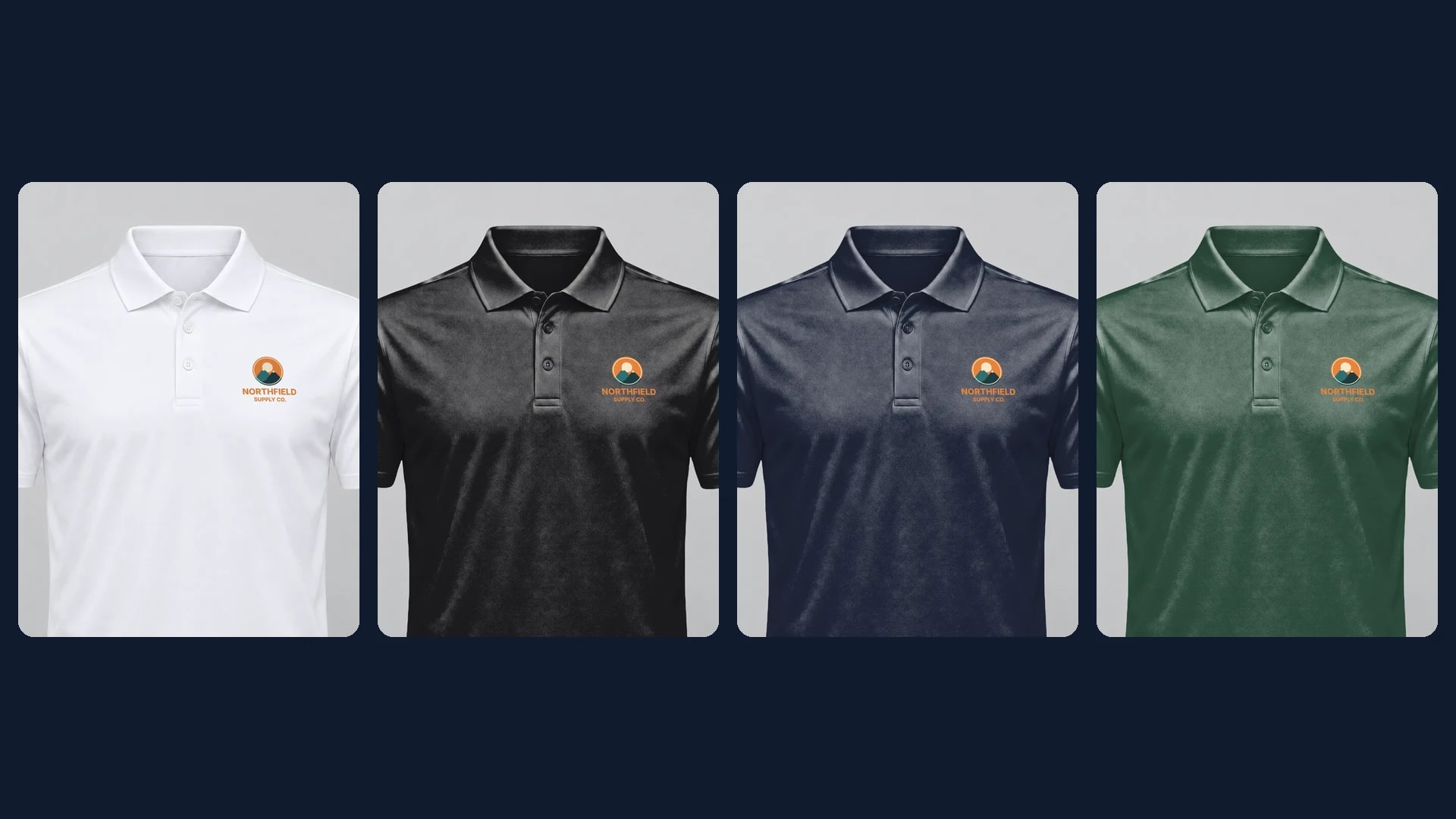
A polo logo goes on the left chest, about 3 to 3.5 inches wide and clear of the placket, because the buttons take the spot where a tee print would sit. Save one white polo photo with that area, and each client logo renders on every polo color with one request per color.
Published 6 min readBeck
Key takeaways
- Draw the left chest area with its lower edge level with the bottom of the placket.
- Left chest means the wearer's left, which is the right side of a front photo.
- A stacked logo fills a near-square chest area; a long wordmark comes out small.
Where a logo goes on a polo
On the left chest, beside the placket. That is the wearer's left, the right-hand side of a front photo, and the logo there is a few inches across rather than a full front print.
Print shops give it a standard size and place. 4OVER4's polo printing guide (published 4 September 2026, updated 15 September 2026, read 13 November 2026) says: "Size the logo 3 to 3.5 inches wide and set it 7.5 to 9 inches below the left shoulder seam, centered between the placket edge and the side seam." The same guide adds that a logo "bigger than 4 inches starts to look like a costume rather than a uniform."
Draw the left chest area on a white polo photo
Save one straight-on photo of a white polo as a photo mockup with a print area on the left chest at the logo's printed size, 3 to 3.5 inches wide on the shirt. A white or light polo works best, because each render can then paint the shirt in the color the client orders.
Our photo is a plain white polo in a smooth performance knit on an invisible mannequin, 1,536 by 1,920 pixels, generated with no logo, text or person in it. We drew the left chest area at 164 by 144 pixels, centered between the placket edge and the side seam, with its lower edge level with the bottom of the placket. For the comparison in the next section we also drew a tee-size area across the center of the chest. A photo from your own supplier works the same way, and the polo templates hold a ready polo for a logo on that polo's own color.
curl -X POST https://api.sudomock.com/api/v1/photo-mockups \-H "x-api-key: $SUDOMOCK_API_KEY" \-H "Content-Type: application/json" \-d '{"source_url": "https://cdn.example.com/photos/white-polo-front.png","name": "White polo, front","print_areas": [{ "points": [[913, 536], [1077, 536], [1077, 680], [913, 680]], "name": "Left chest" }]}'
const response = await fetch('https://api.sudomock.com/api/v1/photo-mockups', {method: 'POST',headers: {'x-api-key': process.env.SUDOMOCK_API_KEY,'Content-Type': 'application/json',},body: JSON.stringify({"source_url": "https://cdn.example.com/photos/white-polo-front.png","name": "White polo, front","print_areas": [{"points": [[913,536],[1077,536],[1077,680],[913,680]],"name": "Left chest"}]}),});const data = await response.json();console.log(data);
import osimport requestsresponse = requests.post("https://api.sudomock.com/api/v1/photo-mockups",headers={"x-api-key": os.environ["SUDOMOCK_API_KEY"],"Content-Type": "application/json",},json={"source_url": "https://cdn.example.com/photos/white-polo-front.png","name": "White polo, front","print_areas": [{"points": [[913,536,],[1077,536,],[1077,680,],[913,680,],],"name": "Left chest",},],},)print(response.json())
package mainimport ("bytes""fmt""io""net/http""os")func main() {payload := []byte(`{"source_url": "https://cdn.example.com/photos/white-polo-front.png","name": "White polo, front","print_areas": [{"points": [[913,536],[1077,536],[1077,680],[913,680]],"name": "Left chest"}]}`)req, err := http.NewRequest("POST", "https://api.sudomock.com/api/v1/photo-mockups", bytes.NewBuffer(payload))if err != nil {panic(err)}req.Header.Set("x-api-key", os.Getenv("SUDOMOCK_API_KEY"))req.Header.Set("Content-Type", "application/json")resp, err := http.DefaultClient.Do(req)if err != nil {panic(err)}defer resp.Body.Close()body, _ := io.ReadAll(resp.Body)fmt.Println(string(body))}
<?php$payload = <<<'JSON'{"source_url": "https://cdn.example.com/photos/white-polo-front.png","name": "White polo, front","print_areas": [{"points": [[913,536],[1077,536],[1077,680],[913,680]],"name": "Left chest"}]}JSON;$ch = curl_init('https://api.sudomock.com/api/v1/photo-mockups');curl_setopt_array($ch, [CURLOPT_CUSTOMREQUEST => 'POST',CURLOPT_RETURNTRANSFER => true,CURLOPT_HTTPHEADER => ['x-api-key: ' . getenv('SUDOMOCK_API_KEY'),'Content-Type: application/json',],CURLOPT_POSTFIELDS => $payload,]);$response = curl_exec($ch);curl_close($ch);echo $response;
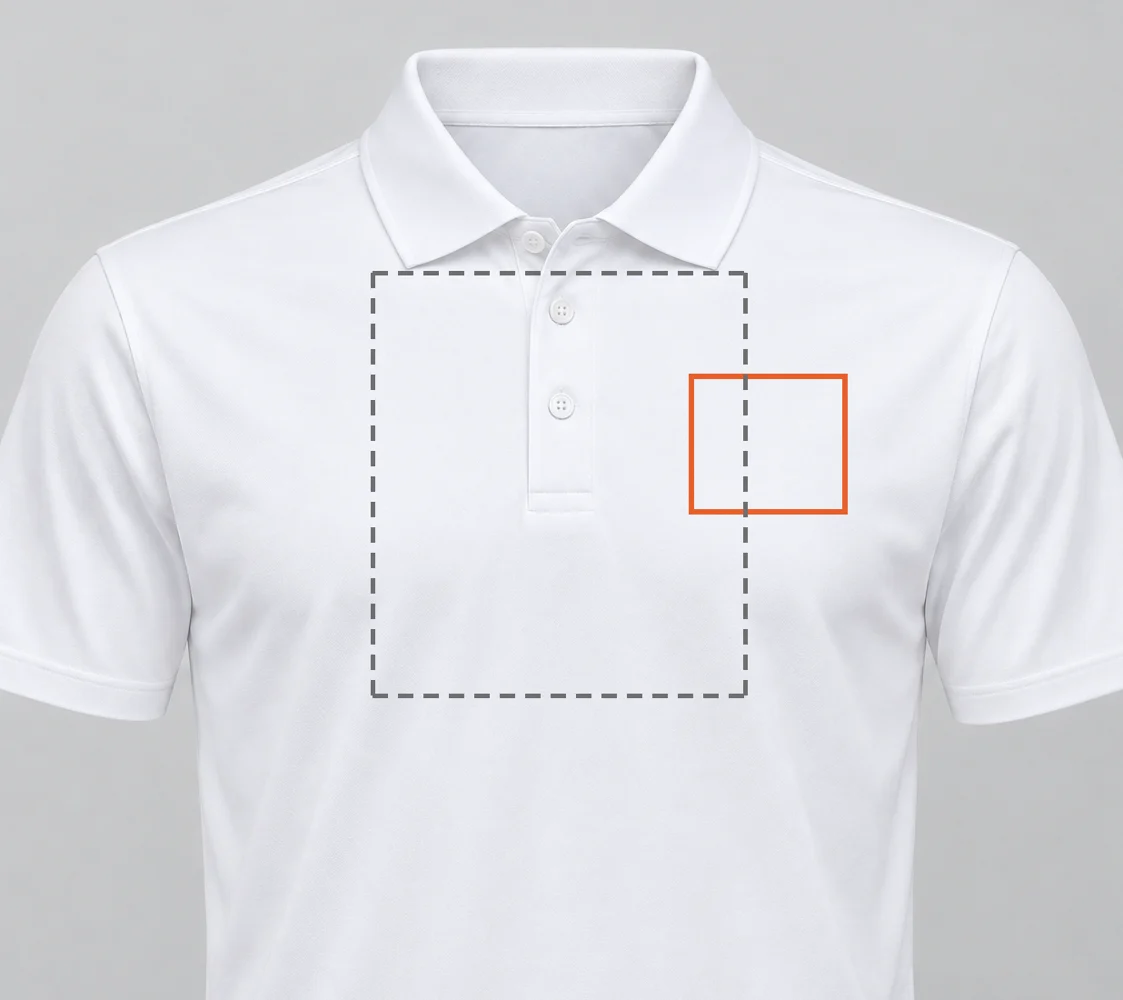 Solid: the 164 by 144 pixel left chest area. Dashed: the tee-size center area we drew only for the comparison. Generated product photo, 13 November 2026.
The response returns the mockup as ready, with data.mockup_id, the print_area_id of the quad named Left chest in data.quads and the polo's data.surfaces[0].surface_uuid. On 13 November 2026 our call came back with both areas and the whole shirt as one surface, labeled white polo shirt. The points are pixels of the source photo, listed clockwise from the top left, as the print areas guide describes.
What a center chest print does on a polo
A logo rendered across the center of a polo's chest runs over the placket, and a button shows through the middle of the badge. On the left chest, the same logo sits on flat fabric at the size the shirt will carry.
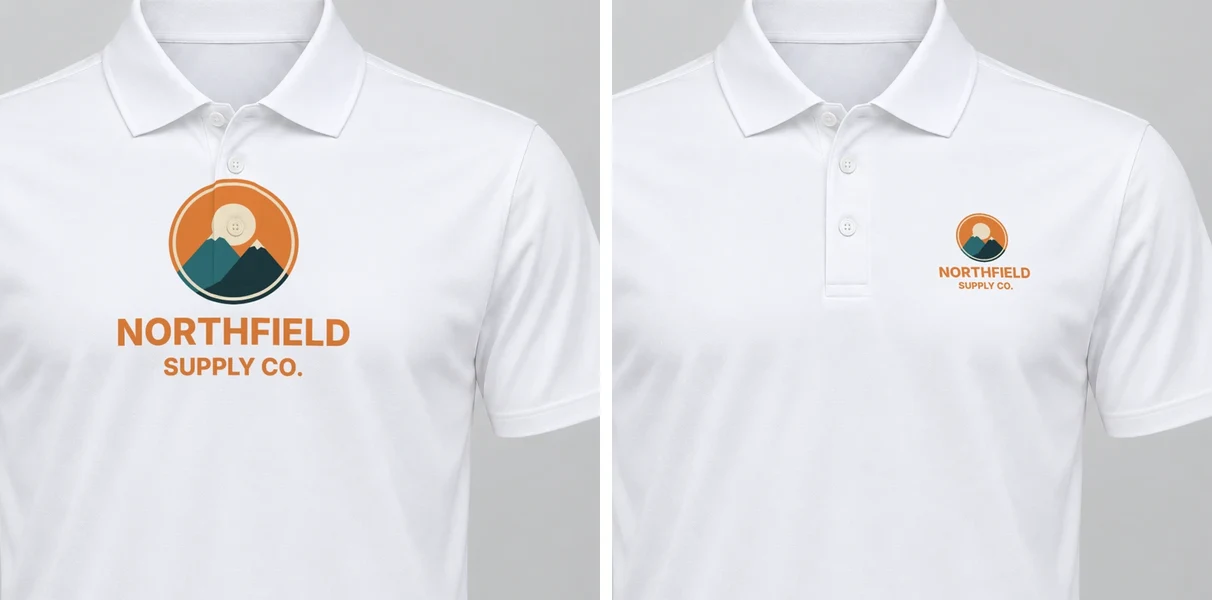 Left: the logo in the tee-size center area, over the placket and a button. Right: the same file in the left chest area. SudoMock renders, 13 November 2026.
A client who approves the center version approves a print that runs over the buttons. The left chest version is the one to send.
Render one logo on the left chest
The render request names the left chest area and the client's logo. The logo here is one transparent PNG of 1,200 by 1,050 pixels, the badge stacked above the name, which is close to the area's own shape, so the default fit fills it without empty bands.
curl -X POST https://api.sudomock.com/api/v1/photo-mockups/MOCKUP_ID/render \-H "x-api-key: $SUDOMOCK_API_KEY" \-H "Content-Type: application/json" \-d '{"print_areas": [{"uuid": "LEFT_CHEST_AREA_ID","artwork_url": "https://cdn.example.com/logos/northfield.png","placement": { "fit": "fit" }}],"export_options": { "image_format": "jpg", "image_size": 1024 }}'
const response = await fetch('https://api.sudomock.com/api/v1/photo-mockups/MOCKUP_ID/render', {method: 'POST',headers: {'x-api-key': process.env.SUDOMOCK_API_KEY,'Content-Type': 'application/json',},body: JSON.stringify({"print_areas": [{"uuid": "LEFT_CHEST_AREA_ID","artwork_url": "https://cdn.example.com/logos/northfield.png","placement": {"fit": "fit"}}],"export_options": {"image_format": "jpg","image_size": 1024}}),});const data = await response.json();console.log(data);
import osimport requestsresponse = requests.post("https://api.sudomock.com/api/v1/photo-mockups/MOCKUP_ID/render",headers={"x-api-key": os.environ["SUDOMOCK_API_KEY"],"Content-Type": "application/json",},json={"print_areas": [{"uuid": "LEFT_CHEST_AREA_ID","artwork_url": "https://cdn.example.com/logos/northfield.png","placement": {"fit": "fit",},},],"export_options": {"image_format": "jpg","image_size": 1024,},},)print(response.json())
package mainimport ("bytes""fmt""io""net/http""os")func main() {payload := []byte(`{"print_areas": [{"uuid": "LEFT_CHEST_AREA_ID","artwork_url": "https://cdn.example.com/logos/northfield.png","placement": {"fit": "fit"}}],"export_options": {"image_format": "jpg","image_size": 1024}}`)req, err := http.NewRequest("POST", "https://api.sudomock.com/api/v1/photo-mockups/MOCKUP_ID/render", bytes.NewBuffer(payload))if err != nil {panic(err)}req.Header.Set("x-api-key", os.Getenv("SUDOMOCK_API_KEY"))req.Header.Set("Content-Type", "application/json")resp, err := http.DefaultClient.Do(req)if err != nil {panic(err)}defer resp.Body.Close()body, _ := io.ReadAll(resp.Body)fmt.Println(string(body))}
<?php$payload = <<<'JSON'{"print_areas": [{"uuid": "LEFT_CHEST_AREA_ID","artwork_url": "https://cdn.example.com/logos/northfield.png","placement": {"fit": "fit"}}],"export_options": {"image_format": "jpg","image_size": 1024}}JSON;$ch = curl_init('https://api.sudomock.com/api/v1/photo-mockups/MOCKUP_ID/render');curl_setopt_array($ch, [CURLOPT_CUSTOMREQUEST => 'POST',CURLOPT_RETURNTRANSFER => true,CURLOPT_HTTPHEADER => ['x-api-key: ' . getenv('SUDOMOCK_API_KEY'),'Content-Type: application/json',],CURLOPT_POSTFIELDS => $payload,]);$response = curl_exec($ch);curl_close($ch);echo $response;
The rendered polo comes back as a URL in data.print_files[0].export_path, and the average SudoMock render finishes in under a second. A one-line wordmark keeps its proportions under fit too, so in this near-square area it spans the full width but only a sliver of the height; a client with both versions should send the stacked one for the chest.
Every polo color from the same photo
The polo's color is a second target in the same request: the shirt's surface with a hex color. On black, navy and forest green we also set blend_mode to normal in the logo entry's adjustments, which keeps the logo's orange as it is in the file on dark fabric.
{ "surface_uuid": "POLO_SURFACE_ID", "color": "#2C4A3B" }
| Polo color | Left chest logo |
|---|---|
| White | 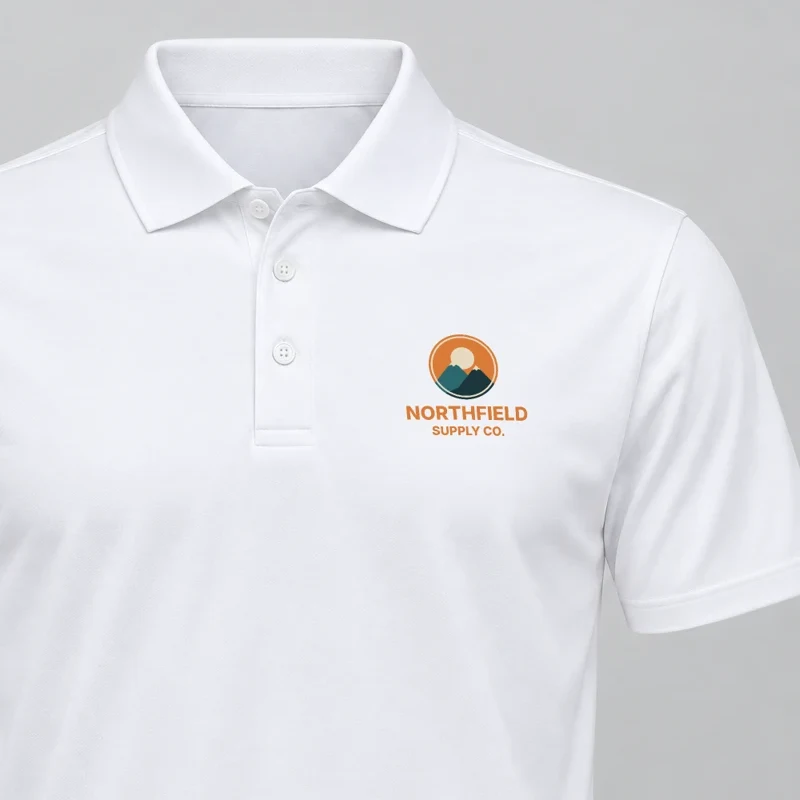 |
| Black #1B1B1D | 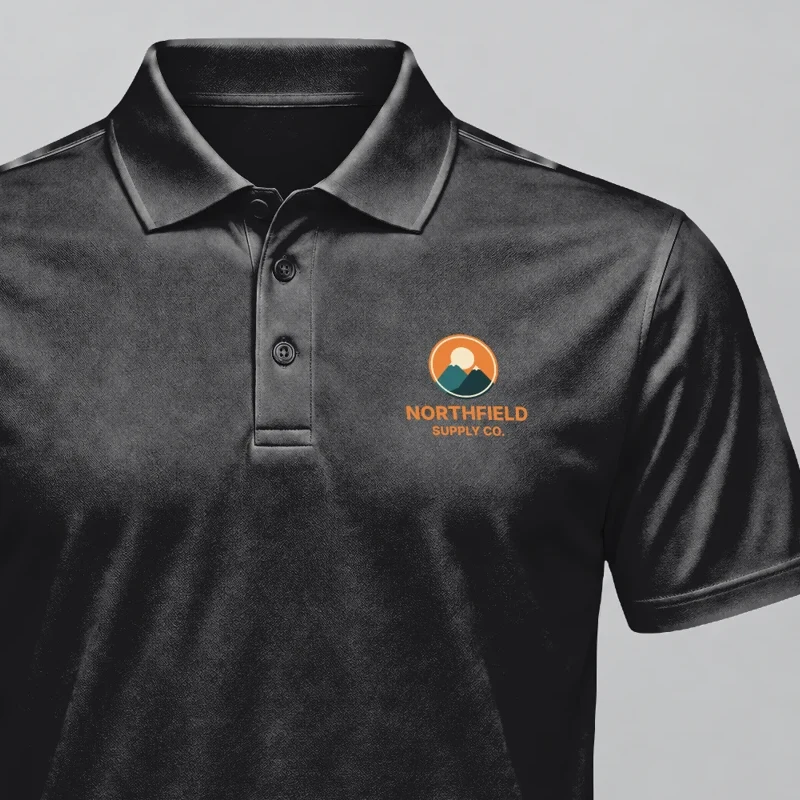 |
| Navy #1F2537 | 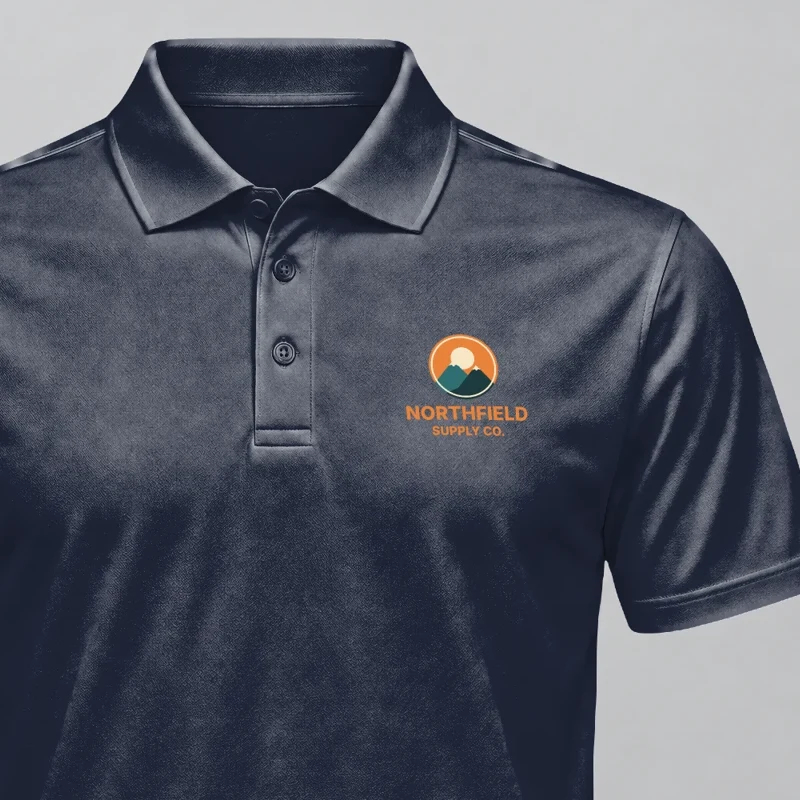 |
| Forest green #2C4A3B | 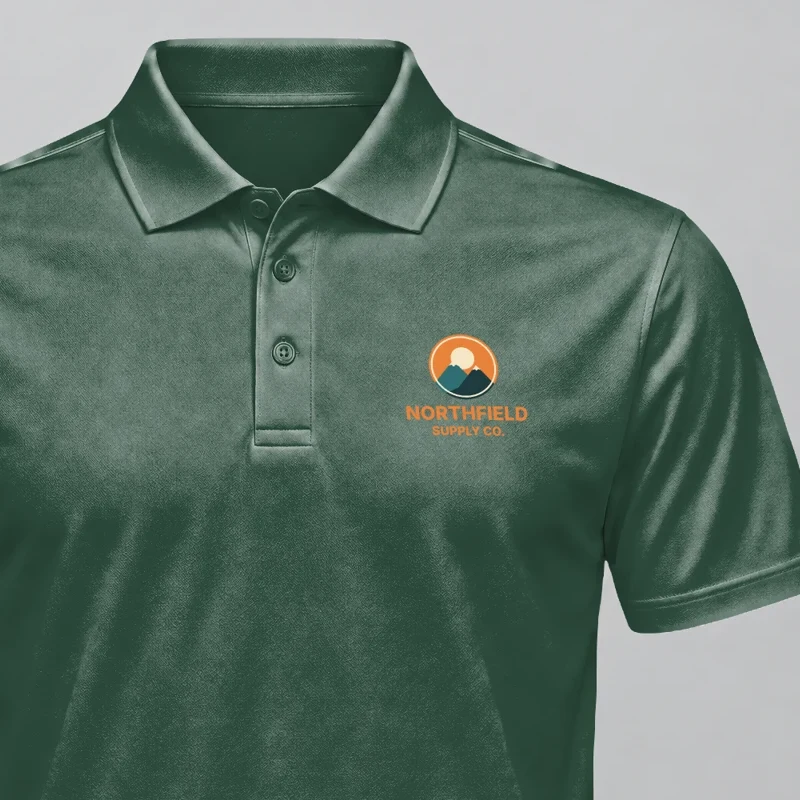 |
| Sport grey #A3A5A7 | 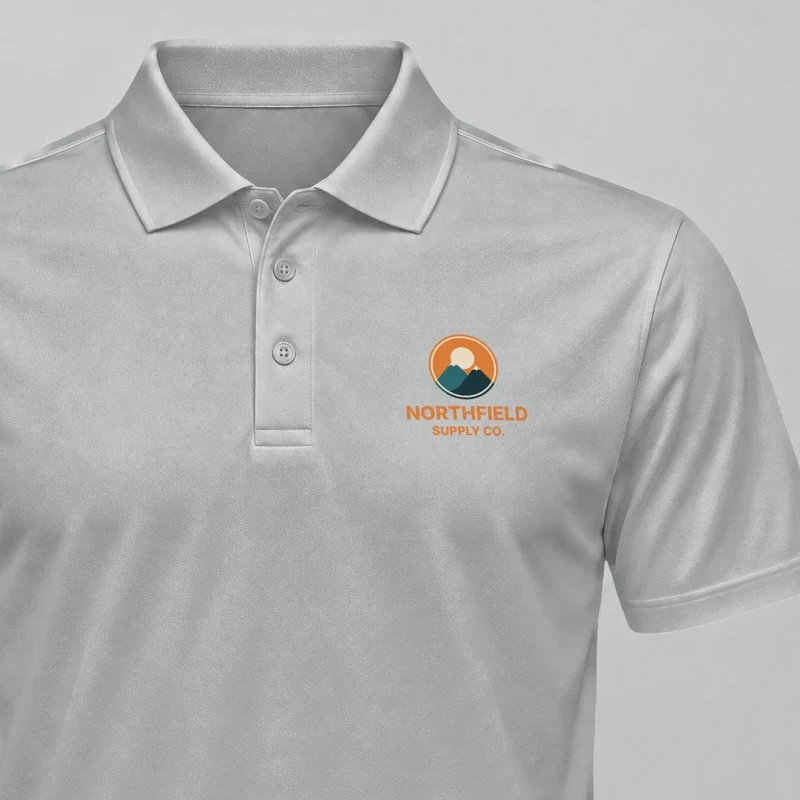 |
All five are SudoMock renders of one white polo photo, made on 13 November 2026 and shown from the collar to the chest. The hex values stand in for a supplier's color card; a real order uses the values of the polo blank the client picks.
A polo set for every client
A distributor or uniform shop sends the same set for each new client: the client's logo on every polo color it offers. The script reads a CSV with one client and logo link per row and writes one image per client and color, such as northfield-forest-green.jpg.
client,logo_urlnorthfield,https://cdn.example.com/logos/northfield.pngharbor-dental,https://cdn.example.com/logos/harbor-dental.png
Set MOCKUP_ID, AREA_ID and SURFACE_ID from the create response and the key in SUDOMOCK_API_KEY, then run python polos.py clients.csv.
import csv, os, sys, timeimport requestsMOCKUP_ID, AREA_ID, SURFACE_ID = "MOCKUP_ID", "AREA_ID", "SURFACE_ID"COLORS = {"white": None, "black": "#1B1B1D", "navy": "#1F2537", "forest-green": "#2C4A3B", "sport-grey": "#A3A5A7"}DARK = {"black", "navy", "forest-green"}URL = f"https://api.sudomock.com/api/v1/photo-mockups/{MOCKUP_ID}/render"HEADERS = {"x-api-key": os.environ["SUDOMOCK_API_KEY"]}def body(logo, color):logo_entry = {"uuid": AREA_ID, "artwork_url": logo, "placement": {"fit": "fit"}}if color in DARK:logo_entry["adjustments"] = {"blend_mode": "normal"}entries = [logo_entry]if COLORS[color]:entries.insert(0, {"surface_uuid": SURFACE_ID, "color": COLORS[color]})return {"print_areas": entries, "export_options": {"image_format": "jpg", "image_size": 1024}}with open(sys.argv[1], newline="") as f:for row in csv.DictReader(f):for color in COLORS:res = requests.post(URL, json=body(row["logo_url"], color), headers=HEADERS, timeout=120)if res.status_code == 429:time.sleep(int(res.headers.get("Retry-After", 5)))res = requests.post(URL, json=body(row["logo_url"], color), headers=HEADERS, timeout=120)if not res.ok:print(row["client"], color, "failed", res.status_code, res.text)continueimage = requests.get(res.json()["data"]["print_files"][0]["export_path"], timeout=60)if not image.ok:print(row["client"], color, "download failed", image.status_code)continuewith open(f"{row['client']}-{color}.jpg", "wb") as out:out.write(image.content)print(row["client"], color, "saved")
The script renders one polo after another, which suits a new client's set of five. A whole client list at once runs the same requests in parallel, and the render guide covers "is_async": true for long lists. A quote that mixes polos with mugs, pens and totes is the job of virtual samples for promotional products.
Next step
Save a straight-on photo of the white polo you sell with a left chest area between the placket edge and the side seam, and render one client logo on two colors. For a logo on a polo in its own color, the polo templates hold a ready polo shown flat, folded and on a hanger. The surface color and blend_mode fields the polo set uses are in the render reference. Polos with a large back print use the same tall back area as a tee, shown in front and back t-shirt mockups.
Frequently asked questions
Where should a logo go on a polo shirt?
On the left chest, the wearer's left, between the placket and the side seam. 4OVER4's 2026 polo guide puts it 3 to 3.5 inches wide and 7.5 to 9 inches below the left shoulder seam.
How big should the logo be on a polo mockup?
Draw the print area at the size the logo will have on the shirt in the photo, about 3 to 3.5 inches wide on an adult polo. A logo drawn larger reads as a front print in the mockup and does not match the polo the client receives.
Can one polo photo show a logo on every polo color?
Yes. Start from a photo of a white or light polo: saved as a photo mockup, it comes back with the shirt as a surface, and each render that sends a hex color for that surface returns the polo in that color with the logo on the left chest. A five-color set is five renders.
Sources
- Screen Printed Polos Guide to Placement and Team Orders (opens in new tab), 4OVER4
- Create a mockup from a product photo (opens in new tab), SudoMock docs
- Print areas and surfaces (opens in new tab), SudoMock docs
- Render a photo mockup (opens in new tab), SudoMock docs
- Render artwork onto a photo mockup (opens in new tab), SudoMock docs
- Usage limits (opens in new tab), SudoMock docs
Beck
CTO
Related articles
Virtual Samples for Promotional Products: One Client Logo on Every Quote Line
One client logo, one saved imprint area per supplier product and one render request per quote line, with real renders on a mug, a tote and a tumbler.
6 min read
Front and Back T-Shirt Mockups: Both Prints in One Render
Put the chest badge and the back print of every design pair on one mockup, in every shirt color, with one render request each.
6 min read
Hat Mockups for Every Design and Cap Color by API
Save one cap photo with a front print area, recolor the cap in each request, and render every design on every color by API.
7 min read
Explore by use case
See SudoMock in action for your specific product category
Your own PSD, rendered via API
Render your own PSD through the API. Start with 500 one-time credits, no card.