Wall Art Mockups for Every Print Size, Rendered by API
A wall art mockup shows the print edge to edge only when the file has the same proportions as the frame's opening. Read the opening from the template, send the artwork file cut to that ratio (2:3, 3:4, 4:5, 11:14 or ISO A) with fit, and render one request per artwork and frame, on your own frame PSDs, library templates or a room photo.
Published 7 min readBeck
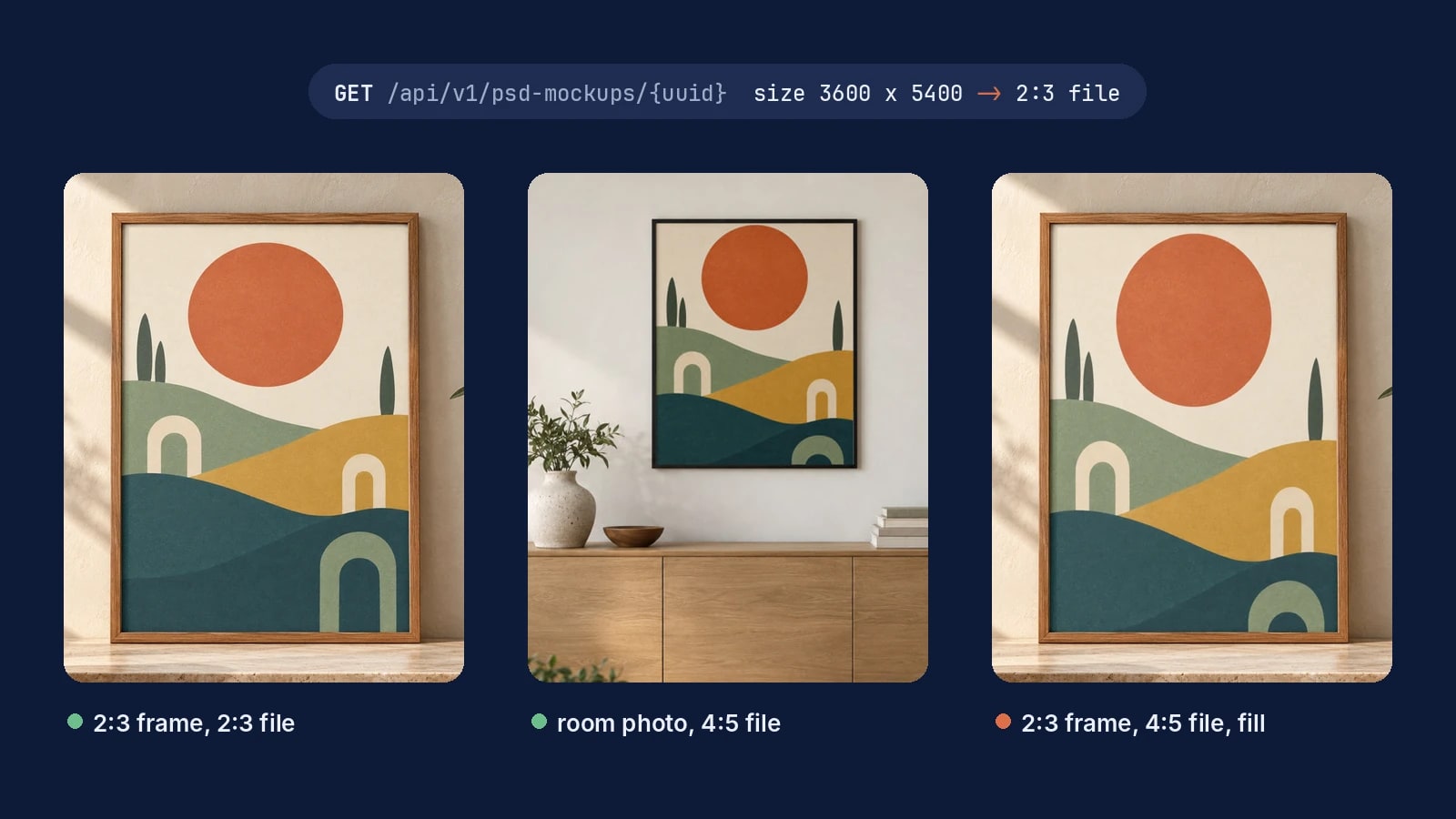
Key takeaways
- With a file that matches the opening, fit, crop and fill render the same image.
- A frame between two ratios takes the closest file with crop, which trims only a sliver.
- A 3,600 by 5,400 pixel area is a 12 by 18 inch print at 300 DPI.
Why does art look cropped or stretched in a frame mockup?
A frame's opening has fixed proportions, and a file with other proportions cannot fill it as drawn. The render then has three ways out, and each one shows the buyer something they will not get: empty paper, missing edges or a distorted print. A file cut to the opening's ratio removes the problem, so the mockup and the print the buyer hangs are the same picture.
We rendered one artwork into the same framed poster template four ways on 10 November 2026. The template's opening is 3,600 by 5,400 pixels, a 2:3 frame. The first render sends the 2:3 file of the artwork. The other three send its 4:5 file, once with each value of fit.
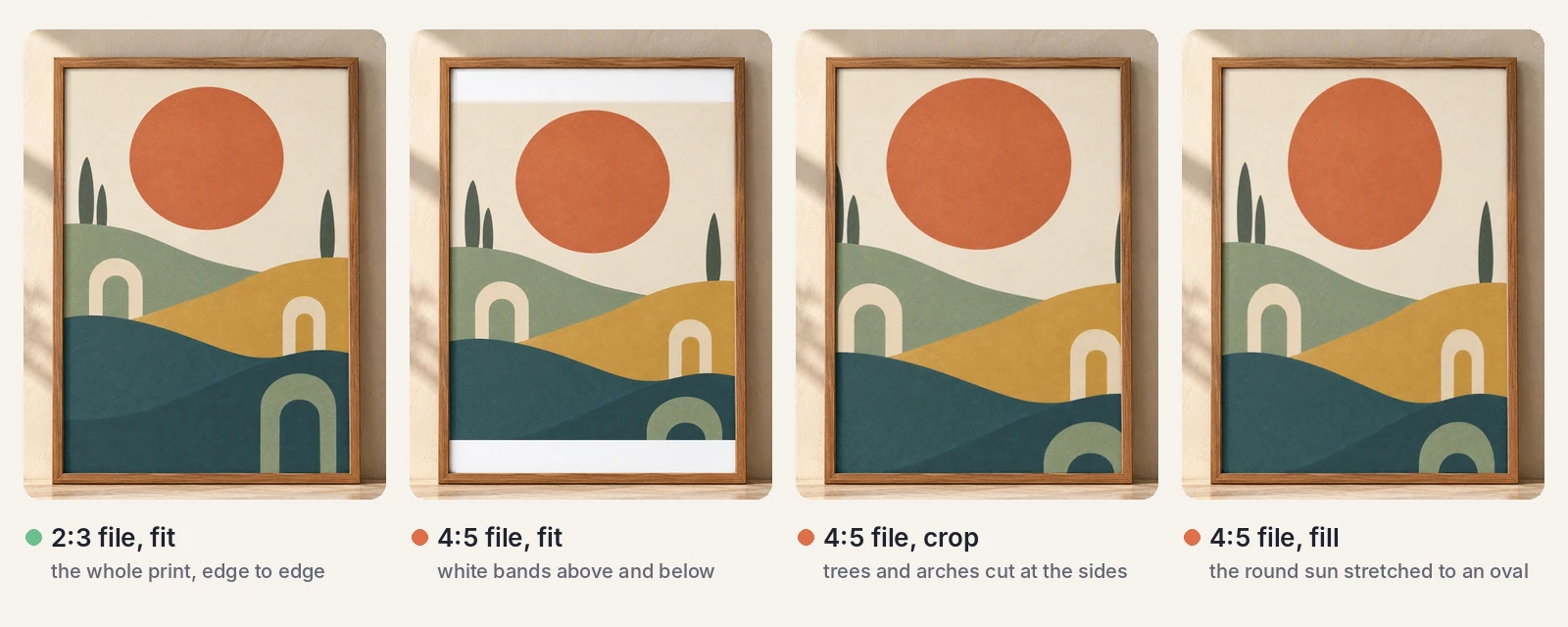 One artwork in a 2:3 framed poster template: the 2:3 file with fit, then the 4:5 file with fit, crop and fill. SudoMock renders, 10 November 2026.
fit value | What a file of another ratio does in the frame |
|---|---|
fit (the default) | The whole file shows, scaled until it fits, and the rest of the opening stays empty |
crop | The file covers the opening and the overflow is cut off |
fill | The file is stretched to the opening's bounds and its proportions change |
With a file that matches the opening, all three values give the same image. The file decides the result, and the setting only matters when the file is off. Fit and blend modes describes each value.
Which ratio file goes in which frame?
Most frames sold in the US fall into five ratios, and A size frames add a sixth. Keep one file per ratio for each artwork, all cut from a master drawn with room around the subject, so every version can be recomposed without losing a key element.
| Ratio | Frame and print sizes | Width divided by height |
|---|---|---|
| 2:3 | 4x6, 8x12, 12x18, 16x24, 20x30, 24x36 in | 0.667 |
| 3:4 | 6x8, 9x12, 12x16, 18x24 in | 0.75 |
| 4:5 | 8x10, 16x20 in | 0.8 |
| 11:14 | 11x14 in | 0.786 |
| 5:7 | 5x7 in | 0.714 |
| ISO A | A5, A4, A3, A2, A1 | 0.707 |
The A sizes all share one ratio of 1 to the square root of 2, so one A file serves every A frame (International standard paper sizes, read 10 November 2026). Two pairs sit close together: 11:14 and 4:5 are less than 2 percent apart, and 5:7 and ISO A about 1 percent. A frame between two of your files takes the closer one with crop, which trims a sliver along two edges.
How do you read a frame template's ratio?
Every PSD template reports the size of its design areas, and that size is the opening's ratio. Read it once per template with one GET request and store it with the template.
curl -X GET https://api.sudomock.com/api/v1/psd-mockups/YOUR_FRAME_MOCKUP_UUID \-H "x-api-key: YOUR_API_KEY"
const response = await fetch('https://api.sudomock.com/api/v1/psd-mockups/YOUR_FRAME_MOCKUP_UUID', {method: 'GET',headers: {'x-api-key': 'YOUR_API_KEY',},});const data = await response.json();console.log(data);
import requestsresponse = requests.get("https://api.sudomock.com/api/v1/psd-mockups/YOUR_FRAME_MOCKUP_UUID",headers={"x-api-key": "YOUR_API_KEY",},)print(response.json())
package mainimport ("fmt""io""net/http")func main() {req, err := http.NewRequest("GET", "https://api.sudomock.com/api/v1/psd-mockups/YOUR_FRAME_MOCKUP_UUID", nil)if err != nil {panic(err)}req.Header.Set("x-api-key", "YOUR_API_KEY")resp, err := http.DefaultClient.Do(req)if err != nil {panic(err)}defer resp.Body.Close()body, _ := io.ReadAll(resp.Body)fmt.Println(string(body))}
<?php$ch = curl_init('https://api.sudomock.com/api/v1/psd-mockups/YOUR_FRAME_MOCKUP_UUID');curl_setopt_array($ch, [CURLOPT_CUSTOMREQUEST => 'GET',CURLOPT_RETURNTRANSFER => true,CURLOPT_HTTPHEADER => ['x-api-key: YOUR_API_KEY',],]);$response = curl_exec($ch);curl_close($ch);echo $response;
This is the design area of the framed poster above, read on 10 November 2026 and shortened to the fields you use:
"smart_objects": [{ "uuid": "44f6a757-e4c7-410e-b2b6-59a00dc9c87f", "name": "print_area","size": { "width": 3600, "height": 5400 } }]
3,600 divided by 5,400 is 0.667, the 2:3 row. The same numbers set the export size of the file: 3,600 by 5,400 pixels is a 12 by 18 inch print at 300 DPI. Artwork placement recommends authoring artwork at the area's own size and sending only fit. Your own frame PSDs upload in the dashboard up to 300 MB, or over the API with no file size limit, and the upload response carries the same size.
Render the matching file into the frame
A render is one request: the template, its design area and the URL of the file that matches its ratio. Leave fit at fit, and the whole print shows edge to edge.
curl -X POST https://api.sudomock.com/api/v1/renders \-H "x-api-key: YOUR_API_KEY" \-H "Content-Type: application/json" \-d '{"mockup_uuid": "YOUR_FRAME_MOCKUP_UUID","smart_objects": [{"uuid": "YOUR_SMART_OBJECT_UUID","asset": {"url": "https://example.com/sun-hills-2x3.png","fit": "fit"}}],"export_options": { "image_format": "jpg", "image_size": 1024 }}'
const response = await fetch('https://api.sudomock.com/api/v1/renders', {method: 'POST',headers: {'x-api-key': 'YOUR_API_KEY','Content-Type': 'application/json',},body: JSON.stringify({"mockup_uuid": "YOUR_FRAME_MOCKUP_UUID","smart_objects": [{"uuid": "YOUR_SMART_OBJECT_UUID","asset": {"url": "https://example.com/sun-hills-2x3.png","fit": "fit"}}],"export_options": {"image_format": "jpg","image_size": 1024}}),});const data = await response.json();console.log(data);
import requestsresponse = requests.post("https://api.sudomock.com/api/v1/renders",headers={"x-api-key": "YOUR_API_KEY","Content-Type": "application/json",},json={"mockup_uuid": "YOUR_FRAME_MOCKUP_UUID","smart_objects": [{"uuid": "YOUR_SMART_OBJECT_UUID","asset": {"url": "https://example.com/sun-hills-2x3.png","fit": "fit",},},],"export_options": {"image_format": "jpg","image_size": 1024,},},)print(response.json())
package mainimport ("bytes""fmt""io""net/http")func main() {payload := []byte(`{"mockup_uuid": "YOUR_FRAME_MOCKUP_UUID","smart_objects": [{"uuid": "YOUR_SMART_OBJECT_UUID","asset": {"url": "https://example.com/sun-hills-2x3.png","fit": "fit"}}],"export_options": {"image_format": "jpg","image_size": 1024}}`)req, err := http.NewRequest("POST", "https://api.sudomock.com/api/v1/renders", bytes.NewBuffer(payload))if err != nil {panic(err)}req.Header.Set("x-api-key", "YOUR_API_KEY")req.Header.Set("Content-Type", "application/json")resp, err := http.DefaultClient.Do(req)if err != nil {panic(err)}defer resp.Body.Close()body, _ := io.ReadAll(resp.Body)fmt.Println(string(body))}
<?php$payload = <<<'JSON'{"mockup_uuid": "YOUR_FRAME_MOCKUP_UUID","smart_objects": [{"uuid": "YOUR_SMART_OBJECT_UUID","asset": {"url": "https://example.com/sun-hills-2x3.png","fit": "fit"}}],"export_options": {"image_format": "jpg","image_size": 1024}}JSON;$ch = curl_init('https://api.sudomock.com/api/v1/renders');curl_setopt_array($ch, [CURLOPT_CUSTOMREQUEST => 'POST',CURLOPT_RETURNTRANSFER => true,CURLOPT_HTTPHEADER => ['x-api-key: YOUR_API_KEY','Content-Type: application/json',],CURLOPT_POSTFIELDS => $payload,]);$response = curl_exec($ch);curl_close($ch);echo $response;
The finished image is at data.print_files[0].export_path. The same request with webp made the first render in the comparison above, and the average SudoMock render finishes in under a second. The request asks for jpg, the format Render artwork onto a photo mockup advises for an Etsy listing. Render a PSD mockup lists every field of the request.
Put the print in your own room photo
A room photo with an empty frame on the wall becomes a reusable frame template. Create a photo mockup from it with the frame's opening as its print area, and every artwork renders into that frame with the room's light kept on the print.
curl -X POST https://api.sudomock.com/api/v1/photo-mockups \-H "x-api-key: YOUR_API_KEY" \-H "Content-Type: application/json" \-d '{"name": "Living room, black frame","source_url": "https://example.com/living-room.jpg","print_areas": [{ "name": "Frame opening", "points": [[656, 81], [974, 81], [974, 469], [656, 469]] }]}'
const response = await fetch('https://api.sudomock.com/api/v1/photo-mockups', {method: 'POST',headers: {'x-api-key': 'YOUR_API_KEY','Content-Type': 'application/json',},body: JSON.stringify({"name": "Living room, black frame","source_url": "https://example.com/living-room.jpg","print_areas": [{"name": "Frame opening","points": [[656,81],[974,81],[974,469],[656,469]]}]}),});const data = await response.json();console.log(data);
import requestsresponse = requests.post("https://api.sudomock.com/api/v1/photo-mockups",headers={"x-api-key": "YOUR_API_KEY","Content-Type": "application/json",},json={"name": "Living room, black frame","source_url": "https://example.com/living-room.jpg","print_areas": [{"name": "Frame opening","points": [[656,81,],[974,81,],[974,469,],[656,469,],],},],},)print(response.json())
package mainimport ("bytes""fmt""io""net/http")func main() {payload := []byte(`{"name": "Living room, black frame","source_url": "https://example.com/living-room.jpg","print_areas": [{"name": "Frame opening","points": [[656,81],[974,81],[974,469],[656,469]]}]}`)req, err := http.NewRequest("POST", "https://api.sudomock.com/api/v1/photo-mockups", bytes.NewBuffer(payload))if err != nil {panic(err)}req.Header.Set("x-api-key", "YOUR_API_KEY")req.Header.Set("Content-Type", "application/json")resp, err := http.DefaultClient.Do(req)if err != nil {panic(err)}defer resp.Body.Close()body, _ := io.ReadAll(resp.Body)fmt.Println(string(body))}
<?php$payload = <<<'JSON'{"name": "Living room, black frame","source_url": "https://example.com/living-room.jpg","print_areas": [{"name": "Frame opening","points": [[656,81],[974,81],[974,469],[656,469]]}]}JSON;$ch = curl_init('https://api.sudomock.com/api/v1/photo-mockups');curl_setopt_array($ch, [CURLOPT_CUSTOMREQUEST => 'POST',CURLOPT_RETURNTRANSFER => true,CURLOPT_HTTPHEADER => ['x-api-key: YOUR_API_KEY','Content-Type: application/json',],CURLOPT_POSTFIELDS => $payload,]);$response = curl_exec($ch);curl_close($ch);echo $response;
The points are the four corners of the opening in the photo's pixels, from the top left, clockwise. The response returns the area as data.quads[0].print_area_id, and it also lists the frame as a surface of its own, 331 by 402 pixels on this photo. The print area you mark stops the print at the opening's inner edge.
Our opening measured 319 by 389 pixels, a ratio of 0.82, a little wider than 4:5. The closest file is 4:5, so the render sends it with crop, which fills the opening and trims a sliver from the top and bottom.
curl -X POST https://api.sudomock.com/api/v1/photo-mockups/YOUR_PHOTO_MOCKUP_ID/render \-H "x-api-key: YOUR_API_KEY" \-H "Content-Type: application/json" \-d '{"print_areas": [{"uuid": "YOUR_PRINT_AREA_ID","artwork_url": "https://example.com/sun-hills-4x5.png","placement": { "fit": "crop" }}],"export_options": { "image_format": "jpg", "image_size": 1024 }}'
const response = await fetch('https://api.sudomock.com/api/v1/photo-mockups/YOUR_PHOTO_MOCKUP_ID/render', {method: 'POST',headers: {'x-api-key': 'YOUR_API_KEY','Content-Type': 'application/json',},body: JSON.stringify({"print_areas": [{"uuid": "YOUR_PRINT_AREA_ID","artwork_url": "https://example.com/sun-hills-4x5.png","placement": {"fit": "crop"}}],"export_options": {"image_format": "jpg","image_size": 1024}}),});const data = await response.json();console.log(data);
import requestsresponse = requests.post("https://api.sudomock.com/api/v1/photo-mockups/YOUR_PHOTO_MOCKUP_ID/render",headers={"x-api-key": "YOUR_API_KEY","Content-Type": "application/json",},json={"print_areas": [{"uuid": "YOUR_PRINT_AREA_ID","artwork_url": "https://example.com/sun-hills-4x5.png","placement": {"fit": "crop",},},],"export_options": {"image_format": "jpg","image_size": 1024,},},)print(response.json())
package mainimport ("bytes""fmt""io""net/http")func main() {payload := []byte(`{"print_areas": [{"uuid": "YOUR_PRINT_AREA_ID","artwork_url": "https://example.com/sun-hills-4x5.png","placement": {"fit": "crop"}}],"export_options": {"image_format": "jpg","image_size": 1024}}`)req, err := http.NewRequest("POST", "https://api.sudomock.com/api/v1/photo-mockups/YOUR_PHOTO_MOCKUP_ID/render", bytes.NewBuffer(payload))if err != nil {panic(err)}req.Header.Set("x-api-key", "YOUR_API_KEY")req.Header.Set("Content-Type", "application/json")resp, err := http.DefaultClient.Do(req)if err != nil {panic(err)}defer resp.Body.Close()body, _ := io.ReadAll(resp.Body)fmt.Println(string(body))}
<?php$payload = <<<'JSON'{"print_areas": [{"uuid": "YOUR_PRINT_AREA_ID","artwork_url": "https://example.com/sun-hills-4x5.png","placement": {"fit": "crop"}}],"export_options": {"image_format": "jpg","image_size": 1024}}JSON;$ch = curl_init('https://api.sudomock.com/api/v1/photo-mockups/YOUR_PHOTO_MOCKUP_ID/render');curl_setopt_array($ch, [CURLOPT_CUSTOMREQUEST => 'POST',CURLOPT_RETURNTRANSFER => true,CURLOPT_HTTPHEADER => ['x-api-key: YOUR_API_KEY','Content-Type: application/json',],CURLOPT_POSTFIELDS => $payload,]);$response = curl_exec($ch);curl_close($ch);echo $response;
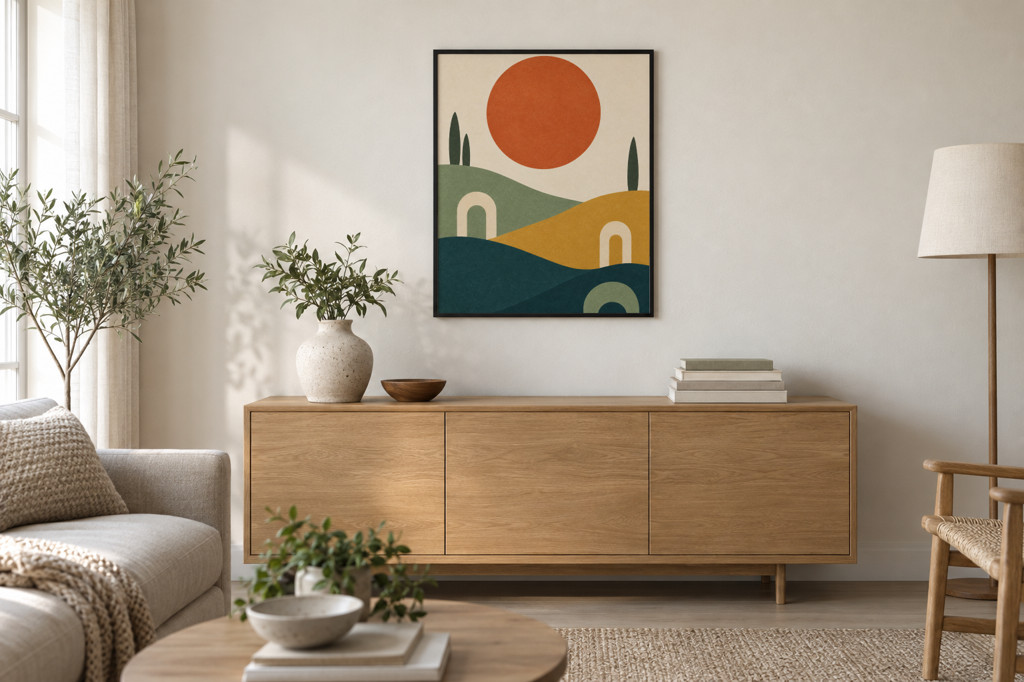 The 4:5 file in a photo mockup made from a generated living room photo, print area on the frame's opening, fit crop. SudoMock render, 10 November 2026.
Print areas and surfaces explains where each id comes from. The same room photo can carry wallpaper on its wall surface too, as wallpaper and mural mockups on your own room photo shows.
Render a catalog of prints in every frame
A catalog is one render per artwork and frame, each with the file that matches that frame. Read every template's ratio once, then let a short script pick the file for each pair.
import requestsAPI = "https://api.sudomock.com/api/v1"HEADERS = {"x-api-key": "YOUR_API_KEY"}# Portrait ratio files for each artwork, all cut from one masterARTWORKS = {"sun-hills": {"2:3": "https://example.com/sun-hills-2x3.png","3:4": "https://example.com/sun-hills-3x4.png","4:5": "https://example.com/sun-hills-4x5.png",},}RATIOS = {"2:3": 2 / 3, "3:4": 3 / 4, "4:5": 4 / 5, "11:14": 11 / 14, "5:7": 5 / 7, "A": 1 / 2 ** 0.5}FRAMES = ["YOUR_FRAME_MOCKUP_UUID_1", "YOUR_FRAME_MOCKUP_UUID_2"]def opening(mockup_uuid):r = requests.get(f"{API}/psd-mockups/{mockup_uuid}", headers=HEADERS)r.raise_for_status()area = r.json()["data"]["smart_objects"][0]w, h = area["size"]["width"], area["size"]["height"]return area["uuid"], w / hfor mockup_uuid in FRAMES:area_uuid, ratio = opening(mockup_uuid)if ratio > 1:print("landscape frame, add landscape files:", mockup_uuid)continuefor name, files in ARTWORKS.items():key = min(files, key=lambda k: abs(RATIOS[k] - ratio))body = {"mockup_uuid": mockup_uuid,"smart_objects": [{"uuid": area_uuid, "asset": {"url": files[key], "fit": "fit"}}],"export_options": {"image_format": "jpg", "image_size": 1024},}r = requests.post(f"{API}/renders", headers=HEADERS, json=body)r.raise_for_status()print(name, mockup_uuid, key, r.json()["data"]["print_files"][0]["export_path"])
The script reads the first design area of each template. When a frame template has more than one, pick the print's area by its name. The script skips a landscape frame, whose width is larger than its height, and names it: give it landscape files and pick them the same way. Plans start at $25/month. Subscriptions from $0.002 per render.
No frame PSDs yet? The wall art templates hold canvas, poster, framed and metal print mockups in room settings. Open one with Use This Mockup and place the file that matches its frame. Without code, n8n's PSD Mockup: Render sets the same value as Fit Mode in a smart object's Additional Options, and Make names it Fit, so one row per artwork and frame in a sheet drives the catalog (n8n, Make).
Next step
Read the size of each frame template you sell, cut one file per ratio from every master, and render one artwork into each frame to check the pairs before you run the catalog. Fit and blend modes and Artwork placement cover the request fields, Print areas and surfaces covers room photos, and the poster mockups use case shows the rest of the wall art workflow.
Frequently asked questions
Why does my art look stretched or cut off in a frame mockup?
The artwork file has different proportions from the frame's opening. Placed with fit it leaves empty space, with crop it loses its edges and with fill it stretches. Send the file whose ratio matches the opening and all three settings show the whole print.
Which print ratios does a wall art listing need?
Frames sold in the US mostly come in 2:3, 3:4, 4:5 and 11:14, with 5x7 as a ratio of its own, and all A size frames share one ratio. Keep one file per ratio for each artwork, cut from a master with room around the subject, and pair each frame mockup with the file that matches it.
Should I use fit or crop for wall art mockups?
With a file that matches the frame, both show the whole print, so fit is the safe default. When a frame sits between two ratios, as a frame in a photo often does, send the closest file with crop: it fills the opening and trims only a sliver. Use fill only for a file that already has the frame's proportions.
Can I make wall art mockups from my own room photo?
Yes. Create a photo mockup from the photo, mark the frame's opening as its print area, and render each artwork into it. The room's light stays on the print, and the same photo serves every artwork you sell.
How many renders does a wall art catalog take?
One render per artwork and frame. A script reads each frame's ratio once and picks the matching file for every pair, and the average SudoMock render finishes in under a second.
Sources
- Fit and blend modes (opens in new tab), SudoMock docs
- Artwork placement (opens in new tab), SudoMock docs
- Retrieve a single PSD mockup (opens in new tab), SudoMock docs
- Render a PSD mockup (opens in new tab), SudoMock docs
- Create a mockup from a product photo (opens in new tab), SudoMock docs
- Print areas and surfaces (opens in new tab), SudoMock docs
- Render artwork onto a photo mockup (opens in new tab), SudoMock docs
- Render mockups with n8n and SudoMock (opens in new tab), SudoMock docs
- Render mockups with Make and SudoMock (opens in new tab), SudoMock docs
- International standard paper sizes (opens in new tab), Wikipedia
Beck
CTO
Related articles
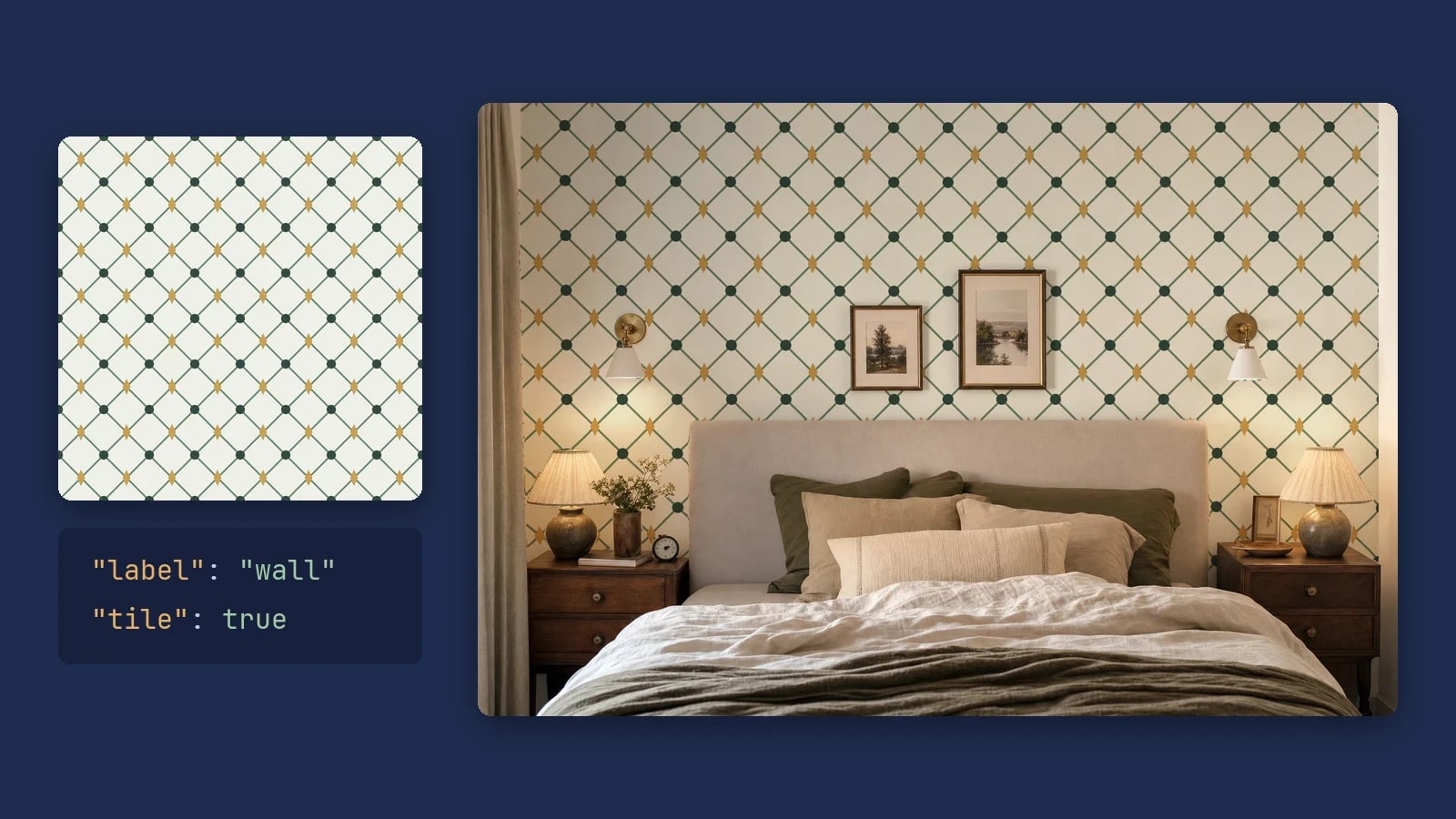
Wallpaper and Mural Mockups on Your Own Room Photo, by API
Render each wallpaper design as a repeat at its printed scale, or one mural across the wall, on your own room photo with one request per design.
6 min read
Wall Calendar Mockups for 2027: Cover, Every Month and Back
Save an open and a closed calendar photo as photo mockups and render the cover, all twelve months and the back of every 2027 design.
9 min read
Greeting Card Mockups: Front Cover and Inside for Every Design
Cut the front cover from each outside file, render it on one saved card photo, and put the inside file on an open card.
9 min read
Explore by use case
See SudoMock in action for your specific product category
Your own PSD, rendered via API
Render your own PSD through the API. Start with 500 one-time credits, no card.