Etsy Listing Generator: Build Your Own With Claude and SudoMock
Add SudoMock to Claude as a custom connector, give it your PSD templates or product photos once, and one prompt per design returns the whole listing: photos rendered on your own mockups, plus a title, 13 tags, a description and alt text written from those photos. A scheduled task can run it every week.
Published 10 min readBeck
Key takeaways
- Render Etsy uploads as JPG, the format SudoMock's docs recommend for marketplace images.
- Etsy requires an AI disclosure in the description when the item itself was made with AI.
- An Etsy Seller App lets a script post drafts to your shop, and eligible sellers get it in minutes.
What the generator does with one design
Etsy sets a limit for every field the generator fills, and the prompt below holds Claude to each one. Claude does the writing and SudoMock does the rendering, through the MCP server Claude connects to.
| Field | Etsy's rule | Who makes it |
|---|---|---|
| Photos | Up to 20 per listing, at least 2000 pixels wide recommended | SudoMock, on your templates |
| Title | Up to 140 characters, Etsy suggests fewer than 15 words and no repeated words | Claude, from the renders |
| Tags | 13 tags, each up to 20 characters | Claude |
| Description | Your product facts, plus an AI disclosure when the item was made with AI | Claude, from your facts |
| Alt text | Up to 250 characters per image, English shop language | Claude, from each render |
| Video | A clip of 5 to 15 seconds | SudoMock, a 6 second clip, optional |
The photo, title and video limits are on Etsy's How to Create a Listing page, the tag limits on How to Use Tags to Get Found in Search and the alt text limit on How to Add a Text Alternative to Your Listing Images, all read on 5 October 2026. The title advice comes from Etsy's title guidance of 2 September 2025: "Consider using less than 15 words" and "Try not to repeat words."
Mockups are a valid listing photo for print on demand. Etsy's Listing Image Requirements, last updated 9 July 2024, say: "If you create an original design (such as artwork or a pattern) that a production partner prints onto a base item (like a t-shirt or mug), you may use a stock photo mockup to illustrate the end product buyers will receive." The Creativity Standards add that "Sellers must disclose that an item is made by a production partner."
Most listing generators start from a photo you already have and write the text. This one makes the photos first, from the templates you already sell with, so a new design goes from file to finished listing in one run.
Connect SudoMock to Claude
SudoMock runs a remote MCP server at https://mcp.sudomock.com, and Claude adds it as a custom connector. You sign in to SudoMock in a browser window and approve access, so no API key goes into the chat.
- In Claude, open Customize, then Connectors, choose + and Add custom connector, and enter
https://mcp.sudomock.com. Claude's help center lists custom connectors using remote MCP for Claude, Cowork and Claude Desktop (Get started with custom connectors using remote MCP, read 5 October 2026). - Sign in to SudoMock in the window that opens and approve access.
- In a chat, turn SudoMock on from + then Connectors, and ask Claude to run
get_account. An authenticated answer means the connection is live, and Claude now lists the SudoMock tools.
In Claude Code the same server is one command, claude mcp add --transport http sudomock https://mcp.sudomock.com, followed by /mcp to sign in. The Connect an agent page has the install for Cursor, Codex CLI and any client that supports remote MCP servers over HTTP with OAuth.
Give it your templates once
The agent renders on mockups that already sit in your SudoMock account, so the setup is a single upload. Use the PSD templates you already list with, or turn a product photo into a photo mockup.
- PSD templates. Upload them in the dashboard (up to 300 MB a file), or ask Claude to run
upload_psdwith a link to the file, which has no file size limit over the API. The design goes into the template's Smart Object layer. - Product photos.
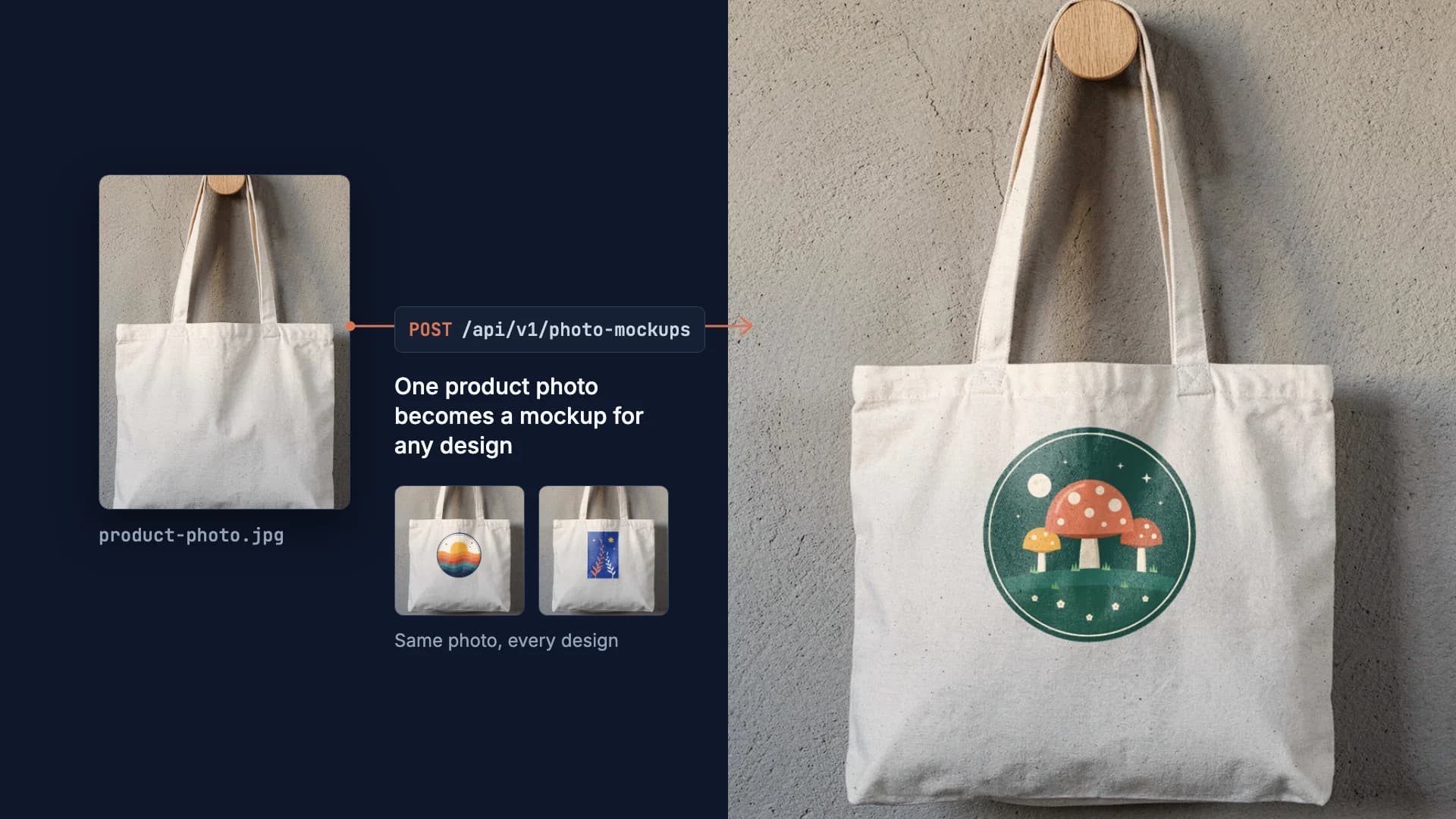
create_photo_mockupturns an HTTPS photo of your product into a reusable mockup and finds its printable surface. Make your own mockup from a product photo walks through it. - No templates yet. Pick from the mockup templates for Etsy sellers and add them to your account with Use This Mockup.
Give each template a name the prompt can find, such as etsy-hoodie or etsy-poster. The hosted server reads no file on your computer, so each design reaches it as an HTTPS link: a file on your disk gets one from create_upload_url first.
The prompt that builds a listing
One prompt does the whole job: it names the templates, the image format and Etsy's limits, and tells Claude where its facts come from. Save it in a Claude project or a scheduled task once, and after that send only the design's link.
You write Etsy listings for my shop.I send each design as an HTTPS link. For each one:1. Find my templates with list_psd_mockups and list_photo_mockups:etsy-hoodie, etsy-poster, etsy-tote.2. Render the design on each template with render_psd_mockup(fit contain) or render_photo_mockup, as jpg, 1024 px wide,keeping the design's proportions. Keep every image URL.3. Look at each render and write one listing per product:- title: under 140 characters and under 15 words, the productnamed once, no word repeated, no gift or recipient phrases(those go in tags)- tags: exactly 13, each 20 characters or fewer, natural phrasesa buyer would type, letters, numbers and spaces only- description: what the buyer sees first, then the product factsbelow and nothing else- alt_text: one per image, 250 characters or fewer, what isvisible in that image4. Use only the product facts below. Never invent materials, sizes,care or shipping times.5. When I say a design was made with AI, add one line to thedescription that says so.Return JSON: one object per product with images, title, tags,description and alt_text.Product facts:- hoodie: unisex pullover hoodie, sizes S to 3XL, made to order- poster: matte art print, frame not included- tote: natural canvas tote, made to order
The JPG choice is deliberate: SudoMock's render guide recommends JPG for images you upload to a marketplace such as Etsy, because a JPG arrives as rendered. The prompt asks for 1024 px. For the files you upload, raise the width toward Etsy's recommended 2000 pixels. The disclosure line follows Etsy's Creativity Standards, last updated 10 June 2025: "Sellers must disclose within their listing description if an item is created with the use of AI."
What came back for one design
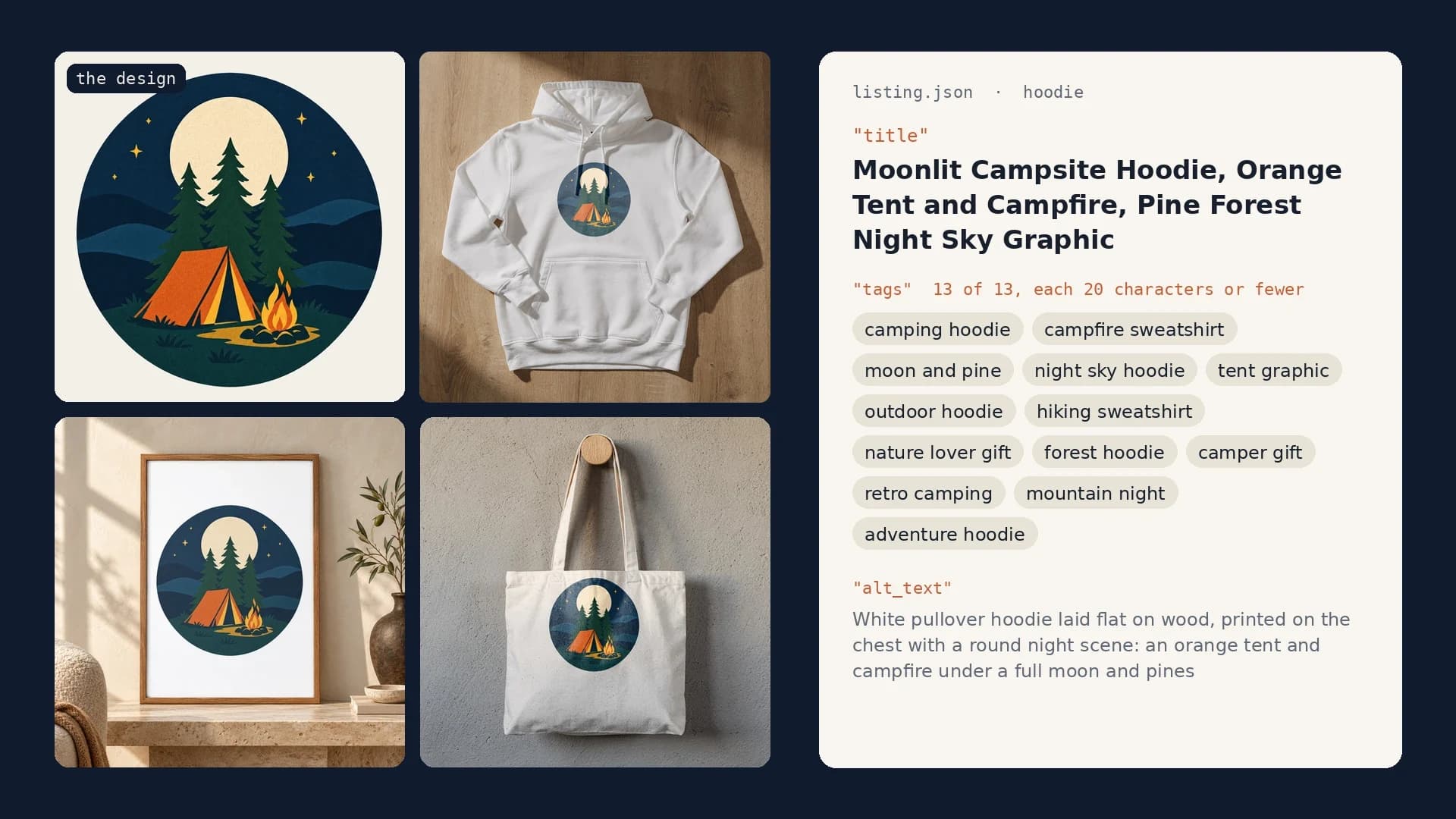
On 5 October 2026 one design was rendered on three templates through the SudoMock API, the same renders the MCP tools make: a framed poster from a PSD template, and a hoodie and a canvas tote from product photos. Claude then wrote the three listings from the three images. The average SudoMock render finishes in under a second, so the photos are ready before Claude starts writing.
 The input design, a 1536 px transparent WebP made with an AI image model for this example.
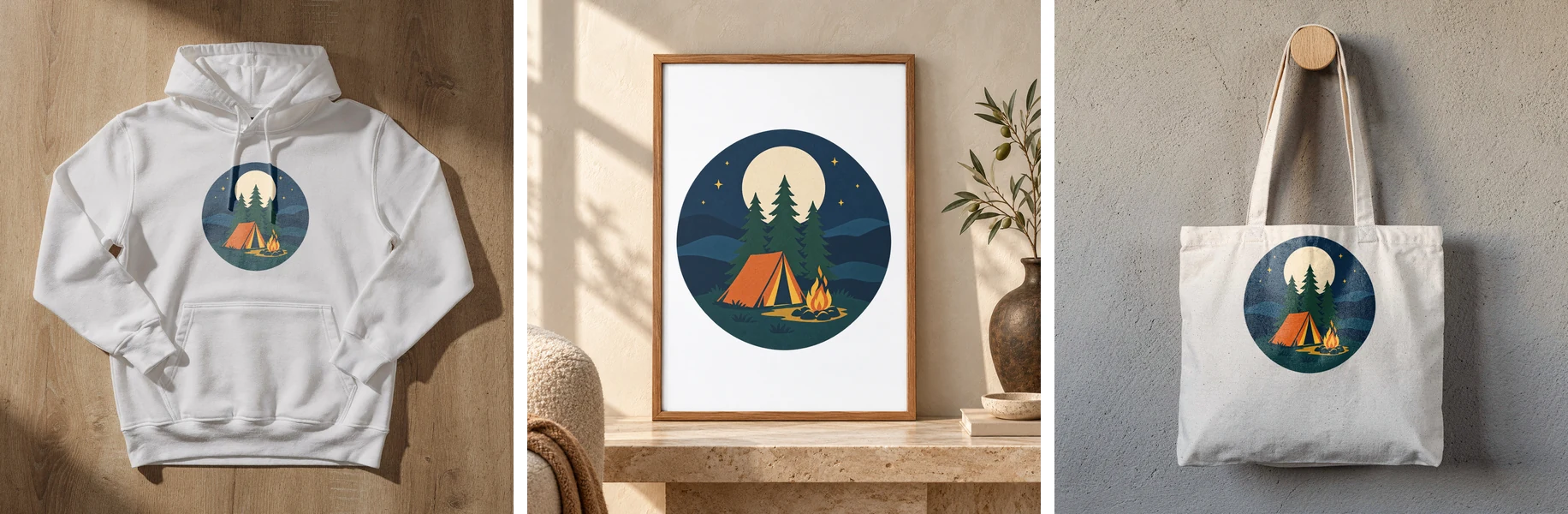 Three SudoMock renders of one design, 2048 px JPG for the Etsy upload, 5 October 2026.
The canvas weave shows through the print on the tote and the hoodie's folds run through the badge, because each render is made inside the product's own photograph. This is what Claude wrote for the hoodie, its image URL shortened to the file name:
{"product": "hoodie","images": ["campsite-hoodie-white.jpg"],"title": "Moonlit Campsite Hoodie, Orange Tent and Campfire, Pine Forest Night Sky Graphic","tags": ["camping hoodie", "campfire sweatshirt", "moon and pine","night sky hoodie", "tent graphic", "outdoor hoodie","hiking sweatshirt", "nature lover gift", "forest hoodie","camper gift", "retro camping", "mountain night", "adventure hoodie"],"description": "An orange tent glows beside a campfire under a full moon, with three pine trees and rolling navy hills inside a round badge, printed on the chest.\n\nUnisex pullover hoodie, sizes S to 3XL, made to order.\n\nThis design was created with an AI image tool.","alt_text": ["White pullover hoodie laid flat on wood, printed on the chest with a round night scene: an orange tent and campfire under a full moon and pines"]}
The title has 12 words and 80 characters with no word repeated, and every tag fits in 20 characters. The gift phrases sit in the tags, where Etsy's guidance puts them. The other two listings came back with their own titles:
| Product | Title Claude wrote |
|---|---|
| Poster | Moonlit Campsite Art Print, Orange Tent and Campfire Under Pine Trees, Cabin Wall Decor |
| Tote | Moonlit Campsite Canvas Tote, Orange Tent and Campfire Night Scene, Pine Forest Design |
Read each draft before it goes live. The agent only knows the facts you gave it, which is why the prompt forbids it to add any.
The same render from a script
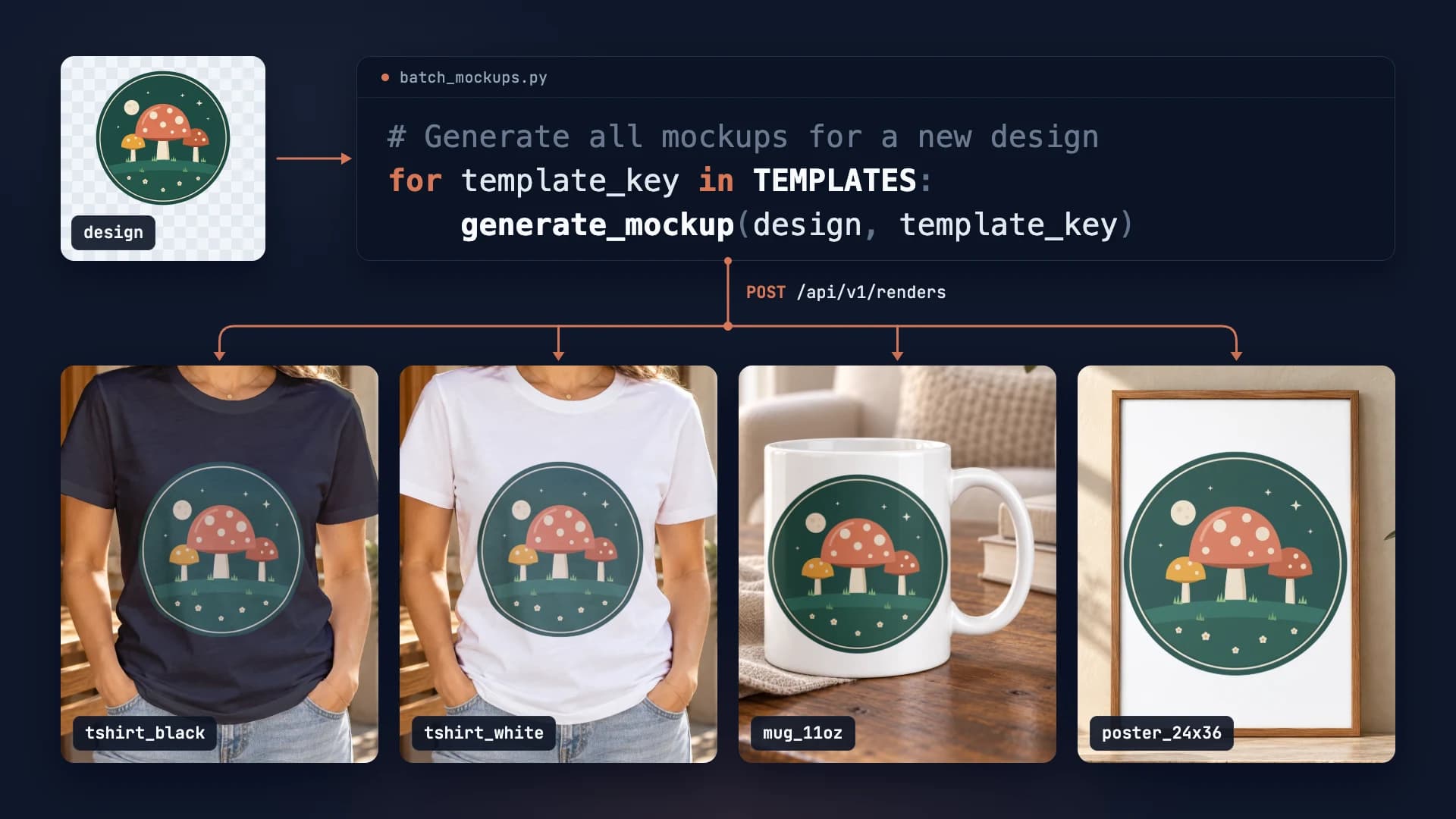
Each image the agent makes is one render call, so a script can produce the same photos without a model in the loop. This is the request behind the poster image, at the size the examples use:
curl -X POST https://api.sudomock.com/api/v1/renders \-H "x-api-key: $SUDOMOCK_API_KEY" \-H "Content-Type: application/json" \-d '{"mockup_uuid": "YOUR_POSTER_MOCKUP_UUID","smart_objects": [{ "uuid": "YOUR_PRINT_AREA_UUID","asset": { "url": "https://example.com/designs/moonlit-campsite.png", "fit": "fit" } }],"export_options": { "image_format": "jpg", "image_size": 1024, "quality": 95 },"export_label": "campsite-poster"}'
const response = await fetch('https://api.sudomock.com/api/v1/renders', {method: 'POST',headers: {'x-api-key': process.env.SUDOMOCK_API_KEY,'Content-Type': 'application/json',},body: JSON.stringify({"mockup_uuid": "YOUR_POSTER_MOCKUP_UUID","smart_objects": [{"uuid": "YOUR_PRINT_AREA_UUID","asset": {"url": "https://example.com/designs/moonlit-campsite.png","fit": "fit"}}],"export_options": {"image_format": "jpg","image_size": 1024,"quality": 95},"export_label": "campsite-poster"}),});const data = await response.json();console.log(data);
import osimport requestsresponse = requests.post("https://api.sudomock.com/api/v1/renders",headers={"x-api-key": os.environ["SUDOMOCK_API_KEY"],"Content-Type": "application/json",},json={"mockup_uuid": "YOUR_POSTER_MOCKUP_UUID","smart_objects": [{"uuid": "YOUR_PRINT_AREA_UUID","asset": {"url": "https://example.com/designs/moonlit-campsite.png","fit": "fit",},},],"export_options": {"image_format": "jpg","image_size": 1024,"quality": 95,},"export_label": "campsite-poster",},)print(response.json())
package mainimport ("bytes""fmt""io""net/http""os")func main() {payload := []byte(`{"mockup_uuid": "YOUR_POSTER_MOCKUP_UUID","smart_objects": [{"uuid": "YOUR_PRINT_AREA_UUID","asset": {"url": "https://example.com/designs/moonlit-campsite.png","fit": "fit"}}],"export_options": {"image_format": "jpg","image_size": 1024,"quality": 95},"export_label": "campsite-poster"}`)req, err := http.NewRequest("POST", "https://api.sudomock.com/api/v1/renders", bytes.NewBuffer(payload))if err != nil {panic(err)}req.Header.Set("x-api-key", os.Getenv("SUDOMOCK_API_KEY"))req.Header.Set("Content-Type", "application/json")resp, err := http.DefaultClient.Do(req)if err != nil {panic(err)}defer resp.Body.Close()body, _ := io.ReadAll(resp.Body)fmt.Println(string(body))}
<?php$payload = <<<'JSON'{"mockup_uuid": "YOUR_POSTER_MOCKUP_UUID","smart_objects": [{"uuid": "YOUR_PRINT_AREA_UUID","asset": {"url": "https://example.com/designs/moonlit-campsite.png","fit": "fit"}}],"export_options": {"image_format": "jpg","image_size": 1024,"quality": 95},"export_label": "campsite-poster"}JSON;$ch = curl_init('https://api.sudomock.com/api/v1/renders');curl_setopt_array($ch, [CURLOPT_CUSTOMREQUEST => 'POST',CURLOPT_RETURNTRANSFER => true,CURLOPT_HTTPHEADER => ['x-api-key: ' . getenv('SUDOMOCK_API_KEY'),'Content-Type: application/json',],CURLOPT_POSTFIELDS => $payload,]);$response = curl_exec($ch);curl_close($ch);echo $response;
The UUIDs come from your upload response or from GET /api/v1/psd-mockups, and the image URL is in data.print_files[0].export_path. The hoodie and the tote are photo mockups, so they render through the photo mockup request in the render guide, with the mockup id in the path. Etsy's uploadListingImage takes the image file, so the script downloads each render first. Three products mean three calls, and they run in parallel.
Send the listing to Etsy as a draft
Etsy's Open API creates a draft listing and attaches its photos, so the JSON can land in your shop as a draft that you publish after a look. Etsy's Seller App is the route for one shop: "Seller App Access is for your own shop use only," and "Eligible sellers are approved within minutes, with no manual review queue" (Etsy Open API v3, read 5 October 2026).
The two calls, as Etsy's API reference gives them (read 5 October 2026):
| Step | Etsy endpoint | What it needs |
|---|---|---|
| Create the draft | createDraftListing, POST /v3/application/shops/{shop_id}/listings | quantity, title, description, price, who_made, when_made and taxonomy_id, plus tags and production_partner_ids as optional fields |
| Attach each photo | uploadListingImage, POST /v3/application/shops/{shop_id}/listings/{listing_id}/images | the image file, its rank and its alt_text |
Both calls need your app's x-api-key header and an OAuth token with the listings_w scope. Etsy's Listings Tutorial, read 5 October 2026, adds that a physical listing also needs shipping_profile_id and readiness_state_id, and that a draft becomes active only with at least one image. The same reference accepts tags made of letters, numbers, spaces, hyphens and apostrophes, which is why the prompt asks for plain phrases.
Run it every week
A scheduled task runs the same prompt on its own, so a sheet of new design links becomes rendered photos and listing JSON without anyone starting it, ready for your Seller App script to send as drafts. In Claude's paid plans, scheduled tasks in Cowork can use connected tools, the SudoMock connector included.
Claude's help center says it directly: "Scheduled tasks have access to the same capabilities as regular Cowork tasks, including connected tools, skills, and installed plugins" (Schedule recurring tasks in Claude Cowork, read 5 October 2026). Give the weekly run three things:
- A source of new designs, such as a sheet that holds each design's HTTPS link and a column the run fills in when the design has its listings.
- The product facts and the template names, kept in the saved prompt so every week uses the same ones.
- A stop rule: when a design has no facts for a product, the run reports it and writes nothing for that product.
The same setup takes more jobs as the shop grows. A seasonal set renders this year's holiday designs on the same templates. For the listing video, ask render_video for a 6 second clip (duration_seconds 6) of a rendered mockup: it runs in the background and returns a job, and get_job or wait_for_job reads the video URL from it. And when a template changes, one run renders the whole catalog again.
Next step
Connect the server with the steps on the Connect an agent page, and see the Claude integration page for the connector in Claude itself. With no templates yet, start from the mockup templates for Etsy sellers or make your own mockup from a product photo. To render Etsy images without an agent, the Etsy mockups use case and How to Automate Etsy Product Mockups cover the render step on its own.
Frequently asked questions
Does Etsy allow AI-written listing titles and descriptions?
Etsy's AI rule is about the item: its Creativity Standards say sellers must disclose in the listing description when an item is created with the use of AI. Etsy's own tools also suggest titles and write image descriptions with AI. Read each draft before you publish it, because the listing is still yours.
How many tags and how long a title does Etsy allow?
Etsy allows 13 tags per listing, each up to 20 characters, and a title of up to 140 characters. Its title guidance from September 2025 also suggests fewer than 15 words and no repeated words, so the prompt asks for all three.
What image format should Etsy listing photos be?
Render them as JPG. SudoMock's render guide recommends JPG for images uploaded to a marketplace such as Etsy, and Etsy recommends images at least 2000 pixels wide. Set the format in the render call or name it in the prompt.
Do I need Photoshop templates to build this?
No. You can turn a photo of your product into a photo mockup in your SudoMock account, or add a ready template from the mockup library. If you already sell with PSD mockups, upload them once and the agent renders on them.
Can the agent post listings to Etsy by itself?
The agent returns the photos and the listing JSON, and a script that holds an Etsy Seller App token posts them as drafts. Etsy's createDraftListing call makes the draft and uploadListingImage adds each photo with its alt text, both with the listings_w scope. Keep publishing as a manual step so every listing gets a final look.
Sources
- How to Create a Listing (opens in new tab), Etsy Help Center
- How to Use Tags to Get Found in Search (opens in new tab), Etsy Help Center
- How to Add a Text Alternative to Your Listing Images (opens in new tab), Etsy Help Center
- New Guidance for Listing Titles, and a Tool to Help (opens in new tab), Etsy Seller Handbook
- Creativity Standards (opens in new tab), Etsy
- Etsy Open API v3 (opens in new tab), Etsy Developers
- Reference (opens in new tab), Etsy Open API v3
- Listings Tutorial (opens in new tab), Etsy Developers
- Get started with custom connectors using remote MCP (opens in new tab), Claude Help Center
- Schedule recurring tasks in Claude Cowork (opens in new tab), Claude Help Center
- Connect an agent (opens in new tab), SudoMock docs
- Render artwork onto a photo mockup (opens in new tab), SudoMock docs
- Listing Image Requirements (opens in new tab), Etsy
- How Etsy Uses AI to Support Sellers (opens in new tab), Etsy Seller Handbook
Beck
CTO
Related articles
How to Automate Etsy Product Mockups in 2026
Step-by-step guide to automating your Etsy listing mockups with SudoMock API. Save hours of manual work.
2 min read
How to Make Your Own Mockup from Any Product Photo
One photo of your own product becomes a reusable mockup: the create call, the render call and real renders of four designs on a canvas tote.
7 min read
SudoMock Now Works with Claude, Cursor, ChatGPT, and Any MCP-Compatible AI Tool
Render product mockups directly from any AI assistant that supports MCP. Claude, Cursor, VS Code, ChatGPT, Windsurf, and more.
7 min read
Explore by use case
See SudoMock in action for your specific product category
Your own PSD, rendered via API
Render your own PSD through the API. Start with 500 one-time credits, no card.