Etsy Webhooks: Render Listing Photos When a Listing Is Created
Etsy has sent listing and inventory webhooks since 13 October 2026, signed with HMAC-SHA256 over the webhook ID, timestamp and raw body. A receiver that checks that signature, maps each SKU to your PSD template and uploads the SudoMock renders gives each new draft listing photos of your product.
Published 6 min readBeck
Key takeaways
- A listing event has four fields, so the photos come from your own SKU to template table.
- createDraftListing takes no SKU, so the photos follow the SKU set by updateListingInventory.
- Each retry keeps the same webhook-id, so one stored ID stops duplicate photos.
Which Etsy webhook events exist
Etsy sends webhooks for orders, listings and inventory to an endpoint you add in its Webhooks Portal, and personal and commercial apps both receive them. The listing and inventory events arrived on 13 October 2026, in Etsy's announcement New Release: Listing and Inventory Webhooks.
| Domain | Events |
|---|---|
| Listing | listing.created, listing.updated, listing.deleted |
| Inventory | inventory.created, inventory.updated, inventory.deleted, inventory.out_of_stock |
| Order | order.paid, order.canceled, order.shipped, order.delivered |
Etsy's webhooks page, read on 19 October 2026, says listing.updated fires on changes to "Title, Description, Personalization, Taxonomy, Images, Attributes, and State." Images are on that list, so the photos your receiver uploads fire a listing.updated of their own. Leave listing.updated out of the photo endpoint's events and those echoes never reach it.
What a listing event carries
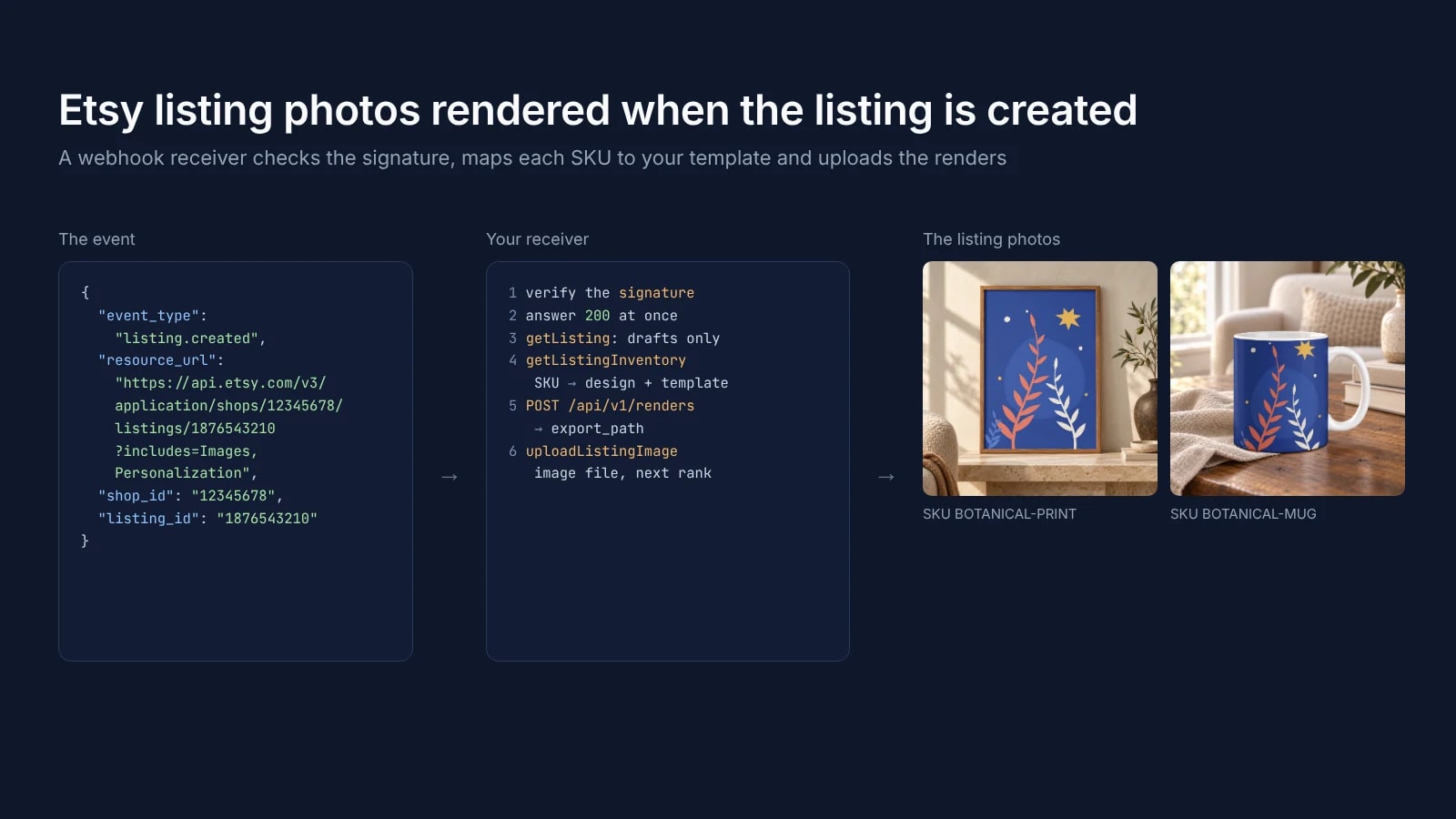
A listing event carries four fields and no image or design file: the event type, a URL to read the listing back, the shop and the listing. Everything the photos need comes from your own records, keyed by the SKUs on the listing.
This is the shape of Etsy's example, with sample IDs:
{"event_type": "listing.created","resource_url": "https://api.etsy.com/v3/application/shops/12345678/listings/1876543210?includes=Images,Personalization","shop_id": "12345678","listing_id": "1876543210"}
resource_url calls getListing with the listing's images and personalization attached, and inventory events carry the same fields plus product_id. Etsy's example writes the IDs as strings, while the order deliveries quoted in discussion 1509 carry shop_id as a number and event_type as ORDER_PAID where Etsy's page writes order.paid. The receiver below reads the IDs as strings and accepts either spelling of the event type.
Which listings the receiver serves
The receiver serves draft listings that your own script or a print on demand platform creates without photos. createDraftListing takes no SKU, so the SKU follows with updateListingInventory, and Etsy lists SKU among the fields whose change fires inventory.updated.
The receiver therefore listens to listing.created, inventory.created and inventory.updated, reads the listing and acts only while its state is draft, so a published listing is never touched. It renders each listing and SKU pair once, whichever of the three events brings the SKU first.
Verify the signature
Every delivery carries three headers, webhook-id, webhook-timestamp and webhook-signature, and the signature is an HMAC-SHA256 of the ID, the timestamp and the raw body joined by dots. Reject a request whose signature does not match or whose timestamp is more than five minutes away from your clock, as Etsy's own example does.
The key is the signing secret from the Webhooks Portal with its whsec_ prefix removed, base64-decoded. Compute the HMAC over the raw body before any JSON parsing, then compare it with each entry of webhook-signature. Each entry starts with a version prefix, v1,, which Etsy's page does not show and a developer confirmed in discussion 1509, so the function compares the part after the comma:
import crypto from 'node:crypto'const SECRET = Buffer.from(process.env.ETSY_WEBHOOK_SECRET.split('_')[1], 'base64')export function verify(id, timestamp, signatureHeader, rawBody) {if (!id || !timestamp || !signatureHeader) return falseif (Math.abs(Date.now() / 1000 - Number(timestamp)) > 300) return falseconst expected = crypto.createHmac('sha256', SECRET).update(`${id}.${timestamp}.${rawBody}`).digest()return signatureHeader.split(' ').some((entry) => {const signature = Buffer.from(entry.split(',').pop(), 'base64')return signature.length === expected.length && crypto.timingSafeEqual(signature, expected)})}
timingSafeEqual compares in constant time, so a wrong signature reveals nothing through the response time.
Map each SKU to a template and render
The receiver reads the listing's SKUs with getListingInventory and looks each one up in a table of its own: the design file, the PSD template and the smart object that takes the design. Each SKU becomes one render, and the image comes back as a URL in data.print_files[0].export_path.
This is the render for the print SKU, with the UUIDs of the poster template used here. Yours come from your template's upload response or its page in the dashboard:
curl -X POST https://api.sudomock.com/api/v1/renders \-H "x-api-key: $SUDOMOCK_API_KEY" \-H "Content-Type: application/json" \-d '{"mockup_uuid": "091de3df-148d-4946-bbfb-ff62603a7e6a","smart_objects": [{ "uuid": "44f6a757-e4c7-410e-b2b6-59a00dc9c87f","asset": { "url": "https://example.com/designs/botanical.png", "fit": "fit" } }],"export_options": { "image_format": "jpg", "image_size": 1024 }}'
const response = await fetch('https://api.sudomock.com/api/v1/renders', {method: 'POST',headers: {'x-api-key': process.env.SUDOMOCK_API_KEY,'Content-Type': 'application/json',},body: JSON.stringify({"mockup_uuid": "091de3df-148d-4946-bbfb-ff62603a7e6a","smart_objects": [{"uuid": "44f6a757-e4c7-410e-b2b6-59a00dc9c87f","asset": {"url": "https://example.com/designs/botanical.png","fit": "fit"}}],"export_options": {"image_format": "jpg","image_size": 1024}}),});const data = await response.json();console.log(data);
import osimport requestsresponse = requests.post("https://api.sudomock.com/api/v1/renders",headers={"x-api-key": os.environ["SUDOMOCK_API_KEY"],"Content-Type": "application/json",},json={"mockup_uuid": "091de3df-148d-4946-bbfb-ff62603a7e6a","smart_objects": [{"uuid": "44f6a757-e4c7-410e-b2b6-59a00dc9c87f","asset": {"url": "https://example.com/designs/botanical.png","fit": "fit",},},],"export_options": {"image_format": "jpg","image_size": 1024,},},)print(response.json())
package mainimport ("bytes""fmt""io""net/http""os")func main() {payload := []byte(`{"mockup_uuid": "091de3df-148d-4946-bbfb-ff62603a7e6a","smart_objects": [{"uuid": "44f6a757-e4c7-410e-b2b6-59a00dc9c87f","asset": {"url": "https://example.com/designs/botanical.png","fit": "fit"}}],"export_options": {"image_format": "jpg","image_size": 1024}}`)req, err := http.NewRequest("POST", "https://api.sudomock.com/api/v1/renders", bytes.NewBuffer(payload))if err != nil {panic(err)}req.Header.Set("x-api-key", os.Getenv("SUDOMOCK_API_KEY"))req.Header.Set("Content-Type", "application/json")resp, err := http.DefaultClient.Do(req)if err != nil {panic(err)}defer resp.Body.Close()body, _ := io.ReadAll(resp.Body)fmt.Println(string(body))}
<?php$payload = <<<'JSON'{"mockup_uuid": "091de3df-148d-4946-bbfb-ff62603a7e6a","smart_objects": [{"uuid": "44f6a757-e4c7-410e-b2b6-59a00dc9c87f","asset": {"url": "https://example.com/designs/botanical.png","fit": "fit"}}],"export_options": {"image_format": "jpg","image_size": 1024}}JSON;$ch = curl_init('https://api.sudomock.com/api/v1/renders');curl_setopt_array($ch, [CURLOPT_CUSTOMREQUEST => 'POST',CURLOPT_RETURNTRANSFER => true,CURLOPT_HTTPHEADER => ['x-api-key: ' . getenv('SUDOMOCK_API_KEY'),'Content-Type: application/json',],CURLOPT_POSTFIELDS => $payload,]);$response = curl_exec($ch);curl_close($ch);echo $response;
Render JPG for Etsy. Etsy's Requirements and Best Practices for Images, read on 19 October 2026, warns that "the transparent parts of the image will appear black on Etsy" and recommends photos with "a width and height of at least 2000 pixels". Etsy Listing Photo Size shows renders at each size.
We rendered both listings from one design on 19 October 2026: the print on a framed poster template, and the mug on a mug template with fit set to crop, so the design covers the visible face of the mug at its own proportions.
 Two listing photos from one design file, 19 October 2026: SKU BOTANICAL-PRINT on the framed poster template, SKU BOTANICAL-MUG on the mug template.
Upload the renders to the listing
Etsy's uploadListingImage takes the image as a file, never as a URL, so the receiver downloads each render and posts it as multipart form data. rank sets the photo's position, with rank 1 the first photo of the listing, and alt_text takes up to 500 characters. The receiver puts its photos after the images the draft already has.
IMG=botanical-print.jpgcurl -X POST "https://openapi.etsy.com/v3/application/shops/$SHOP_ID/listings/$LISTING_ID/images" \-H "x-api-key: $ETSY_KEYSTRING:$ETSY_SHARED_SECRET" \-H "Authorization: Bearer $ETSY_ACCESS_TOKEN" \-H "Content-Type: multipart/form-data" \-F "image=@$IMG" \-F "rank=1" \-F "alt_text=Botanical night print in a wooden frame on a stone shelf"
The receiver's token needs the listings_r scope to read the draft and its inventory and listings_w to upload (Open API specification), and its x-api-key header joins your keystring and shared secret with a colon. A listing holds up to 20 photos since Etsy's change of 10 October 2025 (discussion 1477). Setting a draft to active "will also publish the listing on etsy.com and requires that the listing have an image set", in the specification's words, so the script that created the draft activates it once the photos are on.
The whole receiver
The receiver answers 200 as soon as the signature checks out and renders after, so the Etsy calls and renders that follow never hold up the delivery. Etsy retries a failed delivery on a fixed schedule, and webhook-id stays the same on every retry, so the receiver drops an ID it has already handled.
Etsy sends the first attempt at once and, after each failure, retries after 5 seconds, 5 minutes, 30 minutes, 2 hours, 5 hours, 10 hours and 10 hours, as its webhooks page lists them. Save the receiver as receiver.mjs. It runs on Node.js 18 or later with Express 4:
import express from 'express'import crypto from 'node:crypto'const SECRET = Buffer.from(process.env.ETSY_WEBHOOK_SECRET.split('_')[1], 'base64')const ETSY_API = 'https://openapi.etsy.com/v3/application'const ETSY_HEADERS = {'x-api-key': `${process.env.ETSY_KEYSTRING}:${process.env.ETSY_SHARED_SECRET}`,Authorization: `Bearer ${process.env.ETSY_ACCESS_TOKEN}`,}// Your own table: which design and template make the photo for each SKU.const TEMPLATES = {'BOTANICAL-PRINT': {mockup: '091de3df-148d-4946-bbfb-ff62603a7e6a',smartObject: '44f6a757-e4c7-410e-b2b6-59a00dc9c87f',design: 'https://example.com/designs/botanical.png',fit: 'fit',alt: 'Botanical night print in a wooden frame on a stone shelf',},'BOTANICAL-MUG': {mockup: '1b1ff439-83bd-4719-808c-c7f43c9748a9',smartObject: '18d4567d-b7a3-4268-ad6a-6a14b42e2474',design: 'https://example.com/designs/botanical.png',fit: 'crop',alt: 'White mug with the botanical night design on a wooden table',},}export function verify(id, timestamp, signatureHeader, rawBody) {if (!id || !timestamp || !signatureHeader) return falseif (Math.abs(Date.now() / 1000 - Number(timestamp)) > 300) return falseconst expected = crypto.createHmac('sha256', SECRET).update(`${id}.${timestamp}.${rawBody}`).digest()return signatureHeader.split(' ').some((entry) => {const signature = Buffer.from(entry.split(',').pop(), 'base64')return signature.length === expected.length && crypto.timingSafeEqual(signature, expected)})}async function etsy(path, init = {}) {const res = await fetch(`${ETSY_API}${path}`, { ...init, headers: ETSY_HEADERS })if (!res.ok) throw new Error(`Etsy ${res.status} on ${path}: ${await res.text()}`)return res.json()}async function renderPhoto(t) {const res = await fetch('https://api.sudomock.com/api/v1/renders', {method: 'POST',headers: { 'x-api-key': process.env.SUDOMOCK_API_KEY, 'Content-Type': 'application/json' },body: JSON.stringify({mockup_uuid: t.mockup,smart_objects: [{ uuid: t.smartObject, asset: { url: t.design, fit: t.fit } }],export_options: { image_format: 'jpg', image_size: 1024 },}),})const body = await res.json()if (!res.ok) throw new Error(`SudoMock ${res.status}: ${JSON.stringify(body)}`)return body.data.print_files[0].export_path}// Webhook IDs and listing:SKU pairs already handled. Keep them in your database in production.const handled = new Set()async function addListingPhotos(shopId, listingId) {const listing = await etsy(`/listings/${listingId}?includes=Images`)if (listing.state !== 'draft') returnconst inventory = await etsy(`/listings/${listingId}/inventory`)let rank = (listing.images ?? []).length + 1for (const sku of new Set(inventory.products.map((p) => p.sku))) {const template = TEMPLATES[sku]const key = `${listingId}:${sku}`if (!template || handled.has(key)) continuehandled.add(key)try {const imageUrl = await renderPhoto(template)const image = await fetch(imageUrl).then((r) => r.blob())const form = new FormData()form.append('image', image, `${sku}.jpg`)form.append('rank', String(rank++))form.append('alt_text', template.alt)await etsy(`/shops/${shopId}/listings/${listingId}/images`, { method: 'POST', body: form })} catch (err) {handled.delete(key) // a later event for this draft tries the SKU againthrow err}}}const TRIGGERS = new Set(['listing.created', 'inventory.created', 'inventory.updated'])const app = express()app.post('/etsy/webhooks', express.raw({ type: '*/*' }), (req, res) => {const id = req.header('webhook-id')if (!verify(id, req.header('webhook-timestamp'), req.header('webhook-signature'), req.body)) {return res.sendStatus(401)}res.sendStatus(200)if (handled.has(id)) returnhandled.add(id)const event = JSON.parse(req.body)// Etsy's page writes listing.created, published order deliveries carried ORDER_PAID: accept both.const type = String(event.event_type).toLowerCase().replace('_', '.')if (TRIGGERS.has(type)) {addListingPhotos(event.shop_id, event.listing_id).catch(console.error)}})app.listen(3000)
The handled set lives in memory, so keep it in your database once the receiver runs in production. Etsy's access token lasts one hour, so a receiver that runs for days refreshes it with the refresh token, valid for 90 days, through the refresh_token grant in Etsy's authentication guide. The SKU table is the part that is yours: one row per product your shop sells, pointing at the template that shows it, with the UUIDs of your own templates.
Next step
Add an endpoint for listing.created, inventory.created and inventory.updated in the Webhooks Portal and send a test event from the event's Testing tab. Then create one draft with createDraftListing, set its SKU with updateListingInventory and check that the photos land on the draft. The render reference lists every render option, and How to Automate Etsy Product Mockups renders photos for the listings you already have. With no template yet, the mockup templates for Etsy sellers are ready to render, and the SudoMock modules for n8n and Make run the render step without code.
Frequently asked questions
Does Etsy have webhooks?
Yes. Etsy sends order, listing and inventory events to an endpoint you add in its Webhooks Portal, and personal and commercial apps both receive them. The listing and inventory events were announced on 13 October 2026.
How do I verify an Etsy webhook signature?
Remove the whsec_ prefix from your signing secret and base64-decode the rest. Compute an HMAC-SHA256 over the webhook-id, the webhook-timestamp and the raw body joined by dots, base64-encode it and compare it with the part after the comma in each webhook-signature entry. Reject a request whose timestamp is more than five minutes away from your clock.
Does uploading a listing image trigger listing.updated?
Etsy lists Images among the fields whose changes fire listing.updated, so your own upload produces one. Leave listing.updated out of the photo endpoint's events, or skip it for listings your receiver has just changed.
Can uploadListingImage take an image URL?
No. It takes the image as a file in the image field, or, in listing_image_id, the ID of an image deleted from the listing before. Download each render from its URL and post the file.
How often does Etsy retry a failed webhook?
Etsy sends the first attempt at once and, after each failure, retries after 5 seconds, 5 minutes, 30 minutes, 2 hours, 5 hours, 10 hours and 10 hours. The webhook-id header stays the same on every retry, so use it to drop duplicates.
Sources
- Webhooks | Etsy Open API v3 (opens in new tab), Etsy Open API
- New Release: Listing and Inventory Webhooks (opens in new tab), Etsy Open API on GitHub
- New Release: Webhooks for Paid Orders (opens in new tab), Etsy Open API on GitHub
- New: OpenAPI Now Accepts Up to 20 Photos (opens in new tab), Etsy Open API on GitHub
- Etsy Open API v3 specification (opens in new tab), Etsy
- Requirements and Best Practices for Images in Your Etsy Shop (opens in new tab), Etsy Help Center
- Render a PSD mockup (opens in new tab)
- Authentication | Etsy Open API v3 (opens in new tab), Etsy Open API
Beck
CTO
Related articles
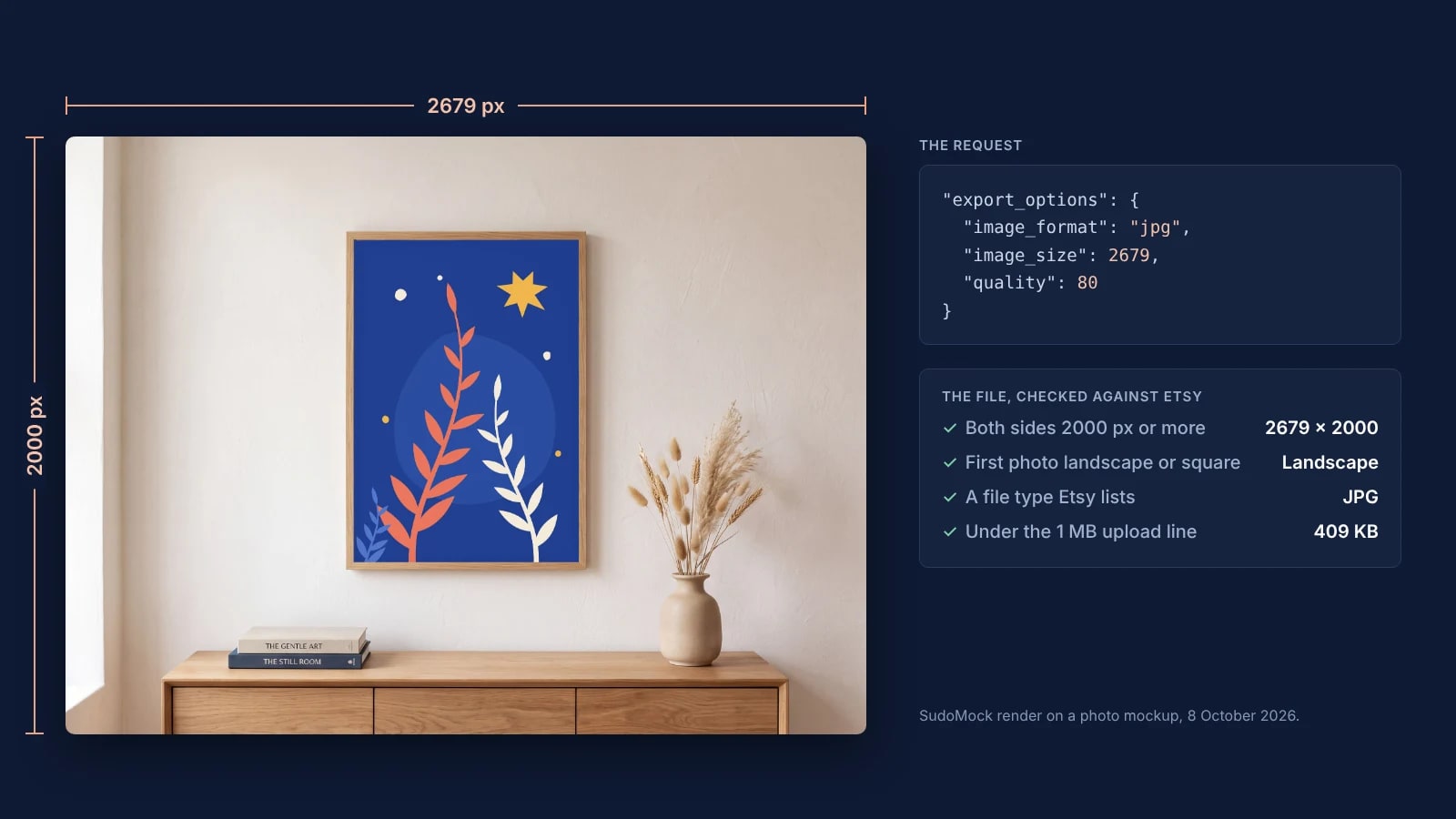
Etsy Listing Photo Size: Etsy's Rules and Files That Meet Them
Etsy's listing photo rules quoted with their dates, the render width for each template shape, and real files measured against the 1 MB line.
7 min read
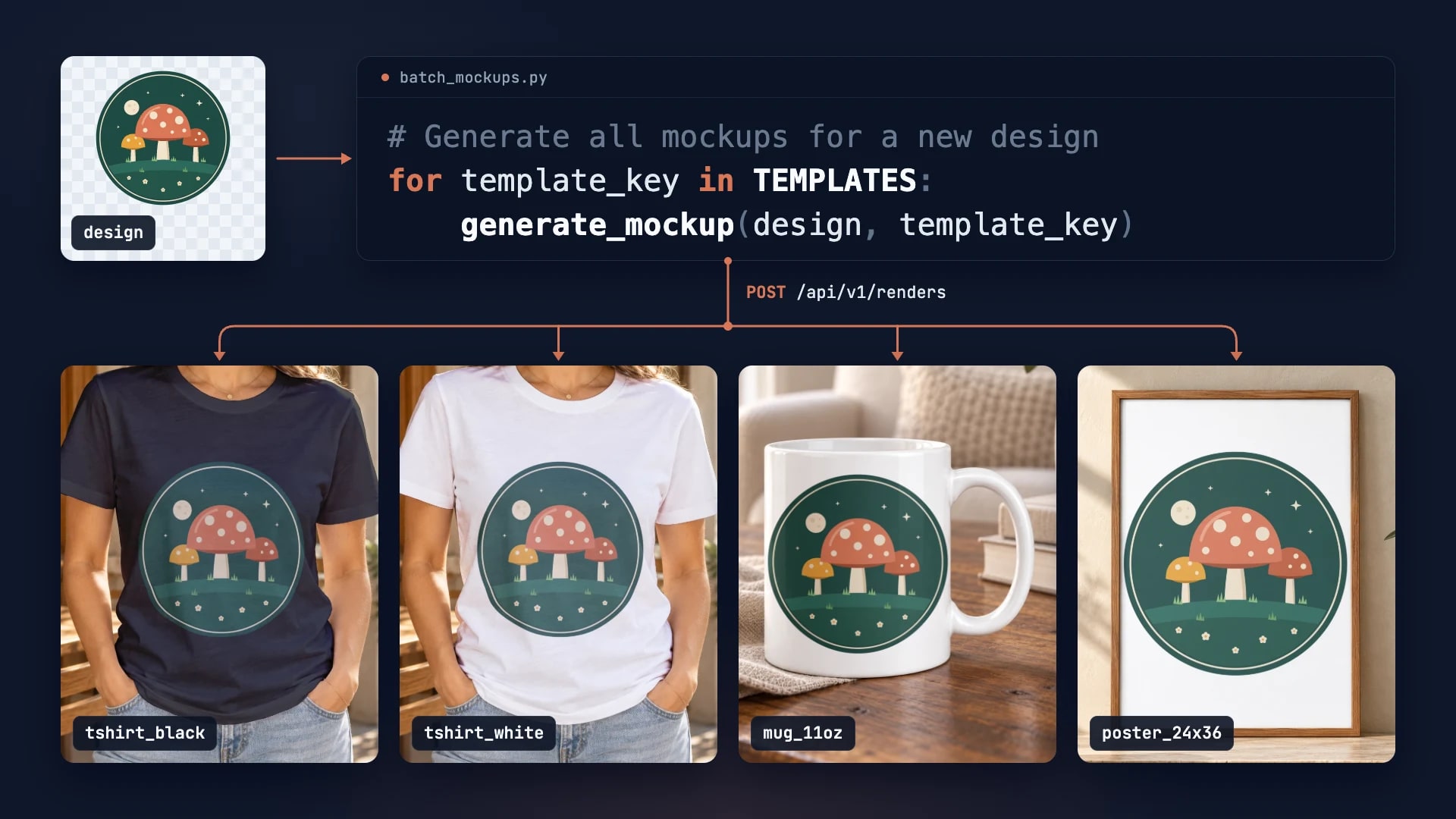
How to Automate Etsy Product Mockups in 2026
Step-by-step guide to automating your Etsy listing mockups with SudoMock API. Save hours of manual work.
2 min read
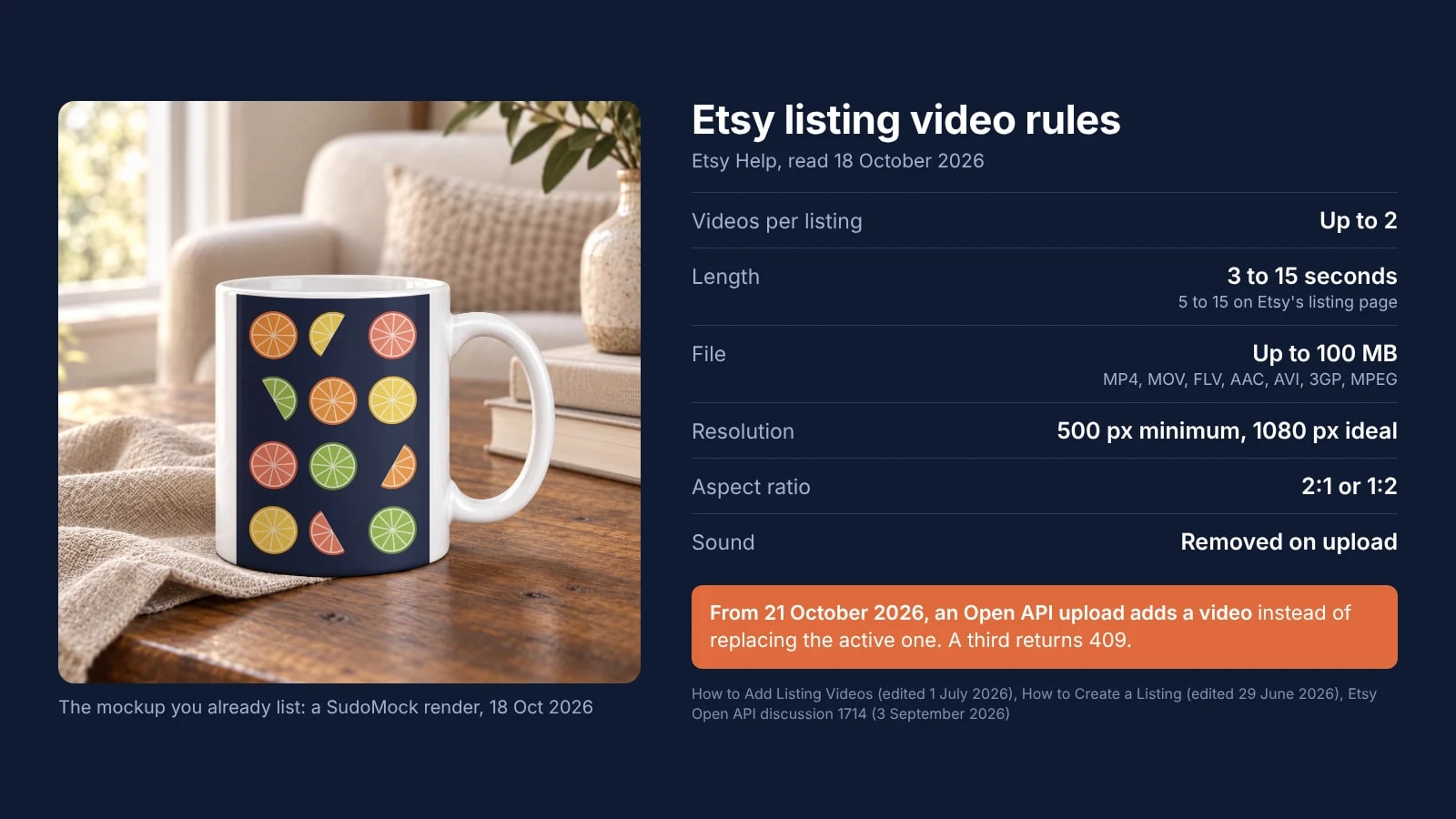
Etsy Video Size and Length: The Listing Video Rules and the 21 October API Change
Etsy's own sentences on listing video size, length, format and sound, and what a script that uploads videos must change on 21 October 2026.
7 min read
Explore by use case
See SudoMock in action for your specific product category
Your own PSD, rendered via API
Render your own PSD through the API. Start with 500 one-time credits, no card.