Sweatpants Mockups: A Leg Print Down the Thigh, Every Color
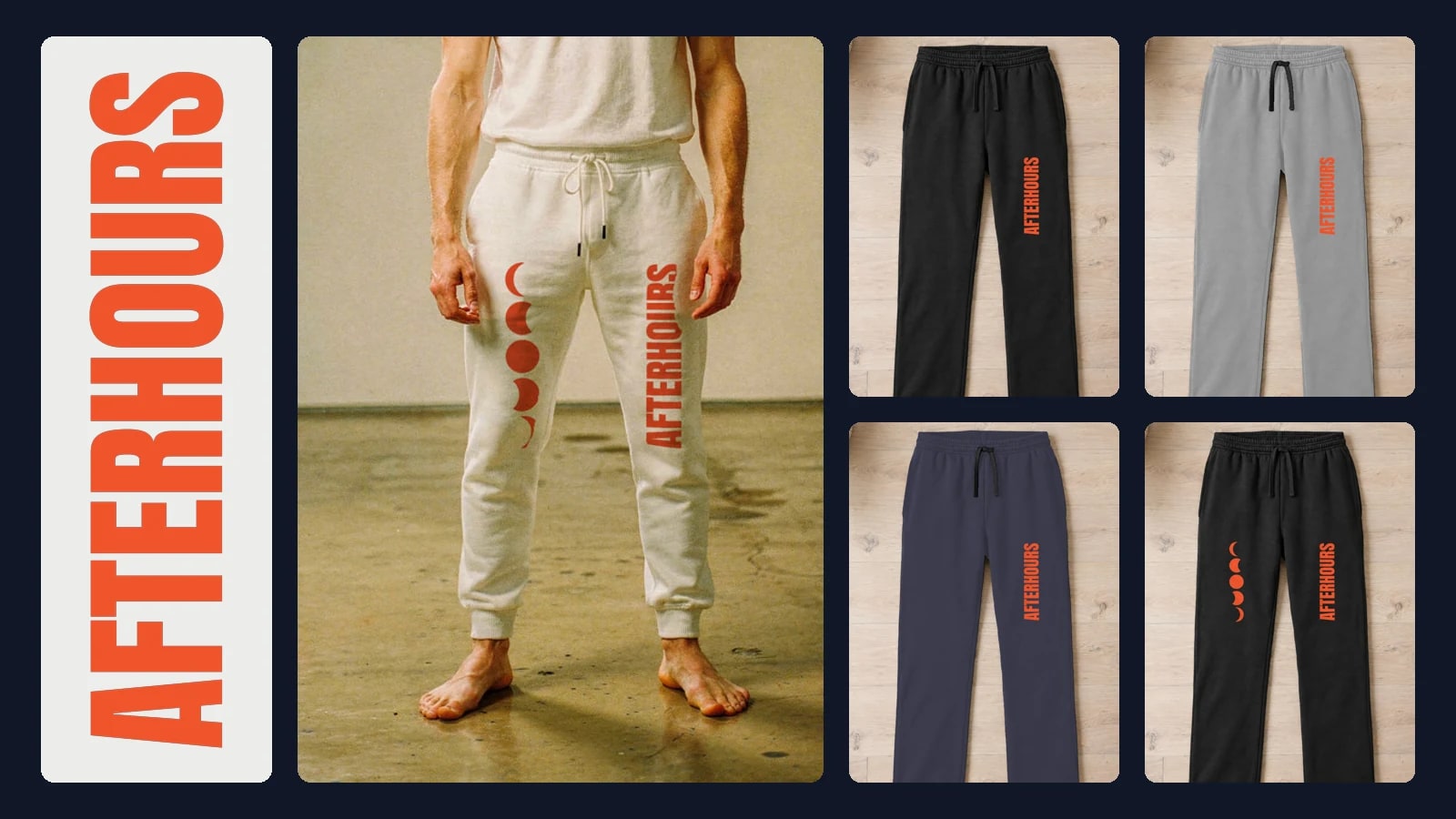
Printify's DTF sweatpants print a tall, narrow file down the front of one leg or both, and on 21 November 2026 their product pages offered no mockups with your design. Save one straight-on sweatpants photo with a leg area at the file's shape, set each word on its side in that file, and render every design and color by API.
Published 8 min readBeck
Key takeaways
- The table's leg files run 2.5 to 4.6 times as tall as wide; draw the area at that shape.
- In a photo taken from the front, the wearer's left leg is the one on the right.
- A leg left out of the request renders as plain fabric, so one-leg designs need no blank file.
Why leg-print sweatpants need mockups you make
The product pages for the Gildan 18400, Sport-Tek ST257, Port and Company PC78SP and PC90P and Hanes P650 sweatpants on Printify list two print areas, Front left leg and Front right leg, and say: "No preview or pre-made mockups with your design in this product. Sell before everyone else by creating mockups yourself." (printify.com product pages, read 21 November 2026) The seller of these blanks makes the listing images.
Printify's help article on mockups for its Early Access catalog (help.printify.com, read 21 November 2026) lists a mockup marketplace, photos of a printed sample, AI image generators and third-party apps. For a generated mockup it calls it "crucial to verify that the generated mockup is realistic, accurately represents the print area size and positioning". A render on a saved sweatpants photo puts your exact file in the leg area you drew, in the same place on every color.
Leg print file sizes on Printify's sweatpants
On the blanks below, each leg prints from its own tall, narrow file, and the shape changes with the blank. In Printify's catalog, read in September 2026, the blanks below run from 2.5 to 4.6 times as tall as they are wide.
| Leg file (pixels) | Height to width | Sweatpants and joggers on Printify |
|---|---|---|
| 1,200 x 3,000 | 2.5 | Sport-Tek ST257 Open Bottom Sweatpant, Independent Trading Co. PRM50PTTD Tie-Dyed Fleece |
| 1,200 x 3,600 | 3 | Gildan 18400 Heavy Blend Open Bottom, Port and Company PC78SP Core Fleece, American Apparel RF491 ReFlex Fleece, Stanley Stella SXU006 Flyer Jogger |
| 1,200 x 4,200 | 3.5 | Port and Company PC90P Essential Fleece with Pockets, Hanes P650, Gildan 18100 Pocket Sweatpants, Shaka Wear SHFJP Fleece Joggers |
| 1,050 x 4,800 | 4.6 | Port and Company LPC140P Cloud Tie-Dye, Independent Trading Co. IND20PNT Midweight Fleece |
| 900 x 3,000 | 3.3 | Gildan SF100 Softstyle Midweight Pocket Sweatpants |
Two DTG sweatpants add the back of each leg: the Gildan 18200 prints four areas of 1,200 by 4,800 pixels and the Bella+Canvas 4737 four of 525 by 2,175. Lay each design out at the size listed for the blank you sell, and draw the leg area on the photo at the same shape, so the default fit fills it from end to end.
Draw the leg areas on a straight-on photo
Save one straight-on sweatpants photo as a photo mockup with a print area down the front of each leg you print. An area is a four-point outline in the photo's own pixels, drawn at the leg file's shape.
Our flat photo is the Surface Close-Up view of the Sport-Tek ST257 sweatpant template: black fleece laid flat and framed close, 1,600 by 2,000 pixels. Each leg got a 160 by 400 pixel area, the 2.5 to 1 shape of the ST257 file, running from below the pocket opening down the thigh, with its lower corners a few pixels outward to follow the leg. In a photo taken from the front, the wearer's left leg is the one on the right of the image.
curl -X POST https://api.sudomock.com/api/v1/photo-mockups \-H "x-api-key: $SUDOMOCK_API_KEY" \-H "Content-Type: application/json" \-d '{"source_url": "https://assets.sudomock.com/library/d9d57ec8feb8fb7f0d65a3e25997d7791e84bca8dbd91ea95a735ffb30d41151.png","name": "ST257 sweatpants, flat, leg areas","print_areas": [{ "points": [[942, 600], [1102, 600], [1110, 1000], [950, 1000]], "name": "Left leg" },{ "points": [[518, 600], [678, 600], [670, 1000], [510, 1000]], "name": "Right leg" }]}'
const response = await fetch('https://api.sudomock.com/api/v1/photo-mockups', {method: 'POST',headers: {'x-api-key': process.env.SUDOMOCK_API_KEY,'Content-Type': 'application/json',},body: JSON.stringify({"source_url": "https://assets.sudomock.com/library/d9d57ec8feb8fb7f0d65a3e25997d7791e84bca8dbd91ea95a735ffb30d41151.png","name": "ST257 sweatpants, flat, leg areas","print_areas": [{"points": [[942,600],[1102,600],[1110,1000],[950,1000]],"name": "Left leg"},{"points": [[518,600],[678,600],[670,1000],[510,1000]],"name": "Right leg"}]}),});const data = await response.json();console.log(data);
import osimport requestsresponse = requests.post("https://api.sudomock.com/api/v1/photo-mockups",headers={"x-api-key": os.environ["SUDOMOCK_API_KEY"],"Content-Type": "application/json",},json={"source_url": "https://assets.sudomock.com/library/d9d57ec8feb8fb7f0d65a3e25997d7791e84bca8dbd91ea95a735ffb30d41151.png","name": "ST257 sweatpants, flat, leg areas","print_areas": [{"points": [[942,600,],[1102,600,],[1110,1000,],[950,1000,],],"name": "Left leg",},{"points": [[518,600,],[678,600,],[670,1000,],[510,1000,],],"name": "Right leg",},],},)print(response.json())
package mainimport ("bytes""fmt""io""net/http""os")func main() {payload := []byte(`{"source_url": "https://assets.sudomock.com/library/d9d57ec8feb8fb7f0d65a3e25997d7791e84bca8dbd91ea95a735ffb30d41151.png","name": "ST257 sweatpants, flat, leg areas","print_areas": [{"points": [[942,600],[1102,600],[1110,1000],[950,1000]],"name": "Left leg"},{"points": [[518,600],[678,600],[670,1000],[510,1000]],"name": "Right leg"}]}`)req, err := http.NewRequest("POST", "https://api.sudomock.com/api/v1/photo-mockups", bytes.NewBuffer(payload))if err != nil {panic(err)}req.Header.Set("x-api-key", os.Getenv("SUDOMOCK_API_KEY"))req.Header.Set("Content-Type", "application/json")resp, err := http.DefaultClient.Do(req)if err != nil {panic(err)}defer resp.Body.Close()body, _ := io.ReadAll(resp.Body)fmt.Println(string(body))}
<?php$payload = <<<'JSON'{"source_url": "https://assets.sudomock.com/library/d9d57ec8feb8fb7f0d65a3e25997d7791e84bca8dbd91ea95a735ffb30d41151.png","name": "ST257 sweatpants, flat, leg areas","print_areas": [{"points": [[942,600],[1102,600],[1110,1000],[950,1000]],"name": "Left leg"},{"points": [[518,600],[678,600],[670,1000],[510,1000]],"name": "Right leg"}]}JSON;$ch = curl_init('https://api.sudomock.com/api/v1/photo-mockups');curl_setopt_array($ch, [CURLOPT_CUSTOMREQUEST => 'POST',CURLOPT_RETURNTRANSFER => true,CURLOPT_HTTPHEADER => ['x-api-key: ' . getenv('SUDOMOCK_API_KEY'),'Content-Type: application/json',],CURLOPT_POSTFIELDS => $payload,]);$response = curl_exec($ch);curl_close($ch);echo $response;
The response lists the areas in photo order, so Right leg came back first here: map each print_area_id in data.quads to its leg by name, and keep data.mockup_id and the pant's surface_uuid from data.surfaces beside them. Both areas came back exactly as drawn, and the pant came back as one surface. GET /api/v1/library/templates/sport-tek-st257-open-bottom-sweatpant-mockup-177b returns the source_url of every view in the set (start from a ready-made template), and a straight-on photo of your own blank works the same way.
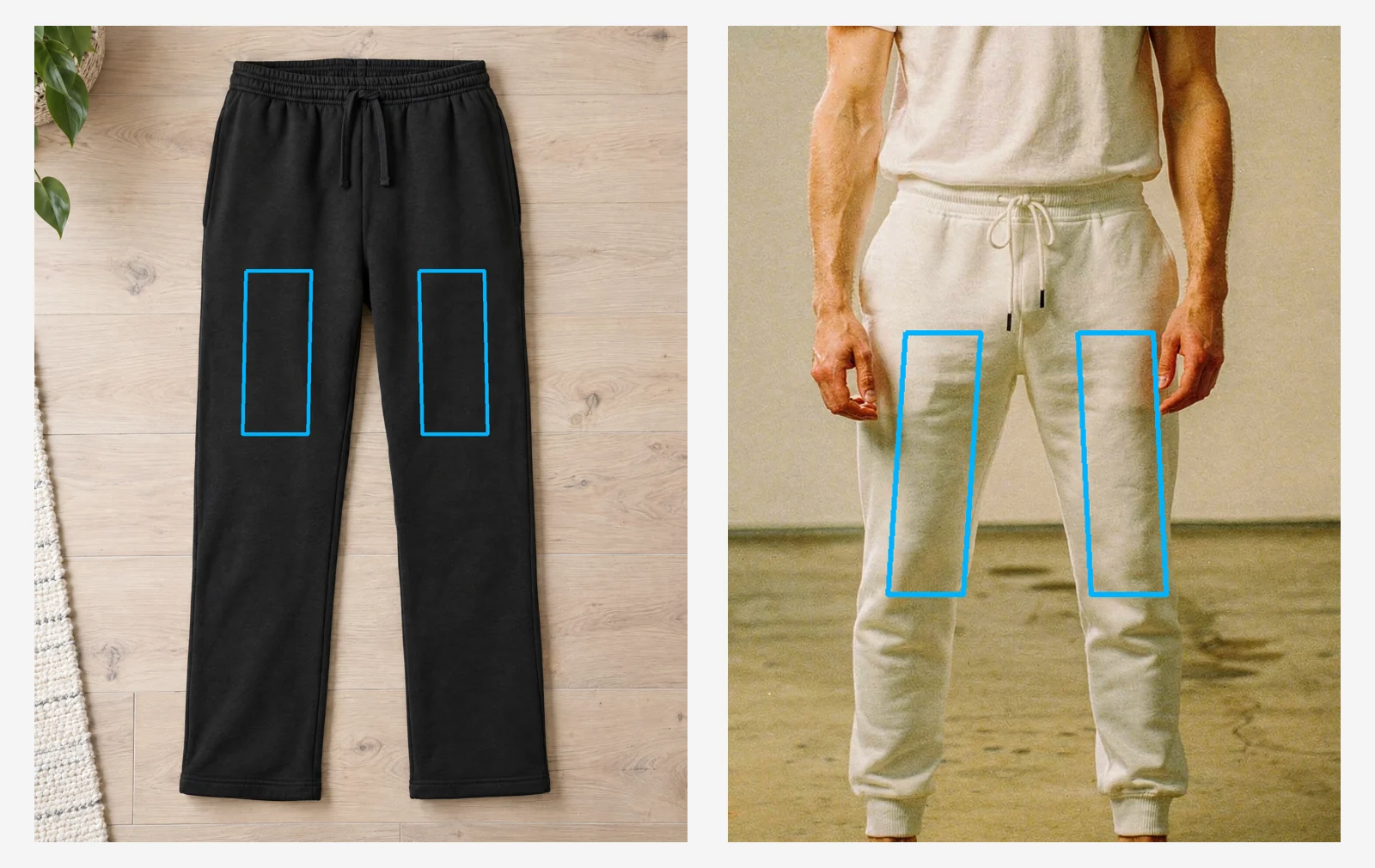 The areas we sent: 160 by 400 pixels per leg on the flat ST257 photo, 85 by 300 pixels per leg on the white joggers. Library photos, 21 November 2026.
For on-model shots in white, the Front Straight View of the white tri-blend joggers template takes the same two areas. Ours are 85 by 300 pixels, the 3.5 to 1 shape of a 1,200 by 4,200 jogger file.
Set the word down the leg in a tall file
A word that runs down the thigh sits on its side inside the leg file, so the file arrives as tall as the area. This script sets a word at the largest size that fits the provider's file and turns it to read from the knee up, in Anton, a Google Fonts typeface under the SIL Open Font License.
import sysfrom PIL import Image, ImageDraw, ImageFontdef leg_file(word, out, width, height, font="Anton-Regular.ttf", color="#F0542C"):# draw the word on its side, on a canvas as wide as the file is tallcanvas = Image.new("RGBA", (height, width), (0, 0, 0, 0))draw = ImageDraw.Draw(canvas)size = 100while True: # largest type that fits 94% of the length and 82% of the widthbox = draw.textbbox((0, 0), word, font=ImageFont.truetype(font, size + 10))if box[2] - box[0] > height * 0.94 or box[3] - box[1] > width * 0.82:breaksize += 10face = ImageFont.truetype(font, size)left, top, right, bottom = draw.textbbox((0, 0), word, font=face)x = (height - (right - left)) / 2 - lefty = (width - (bottom - top)) / 2 - topdraw.text((x, y), word, font=face, fill=color)canvas.rotate(90, expand=True).save(out) # turned so it reads from the knee upif __name__ == "__main__":word, size, out = sys.argv[1], sys.argv[2], sys.argv[3]width, height = (int(n) for n in size.split("x"))leg_file(word, out, width, height)
python legword.py AFTERHOURS 1200x3000 afterhours-st257.png writes the ST257 file, and 1200x4200 in its place writes the jogger file. Keep the font file next to the script, or set font to the typeface your brand uses.
In an area of the same shape, the default fit scales the tall file to the full length of the area, from below the pocket toward the knee.
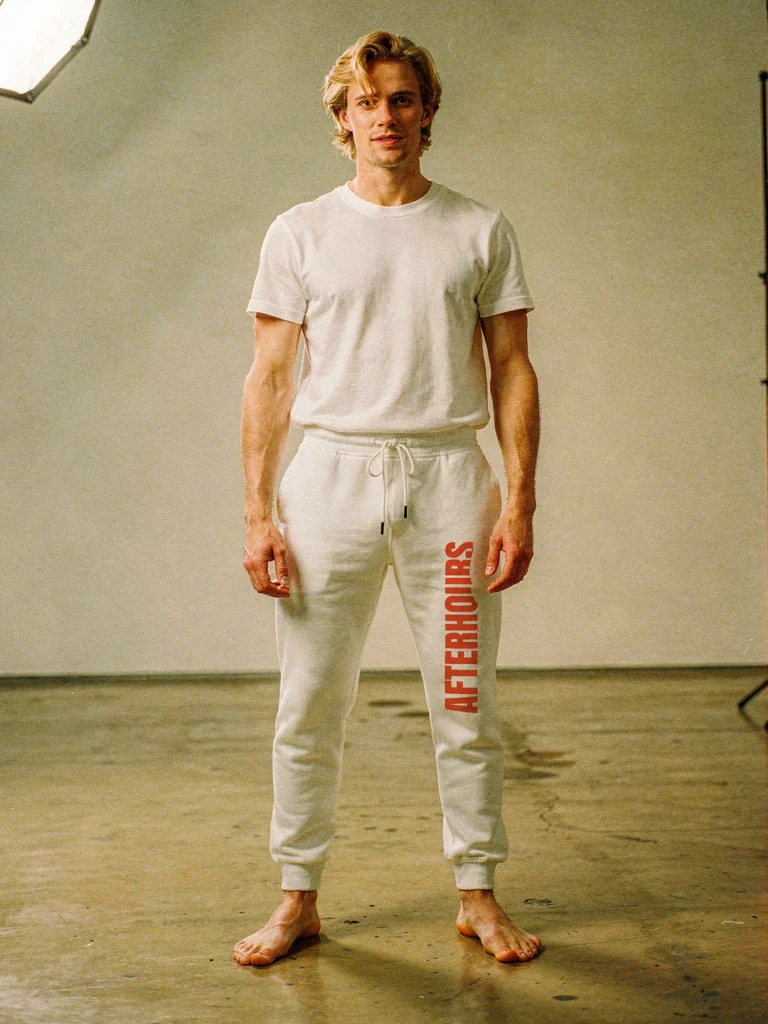 The 1,200 by 4,200 AFTERHOURS file in the left leg area of the white joggers. SudoMock render, 21 November 2026.
Render one leg or both
One render request fills every leg area it names, so a design that uses both legs is still one image. Send each file to its leg's print_area_id, and an area left out of the request renders as plain fabric.
curl -X POST https://api.sudomock.com/api/v1/photo-mockups/MOCKUP_ID/render \-H "x-api-key: $SUDOMOCK_API_KEY" \-H "Content-Type: application/json" \-d '{"print_areas": [{ "uuid": "LEFT_LEG_AREA_ID", "artwork_url": "https://cdn.example.com/legs/afterhours-st257.png", "placement": { "fit": "fit" } },{ "uuid": "RIGHT_LEG_AREA_ID", "artwork_url": "https://cdn.example.com/legs/moons-st257.png", "placement": { "fit": "fit" } }],"export_options": { "image_format": "jpg", "image_size": 1024 }}'
const response = await fetch('https://api.sudomock.com/api/v1/photo-mockups/MOCKUP_ID/render', {method: 'POST',headers: {'x-api-key': process.env.SUDOMOCK_API_KEY,'Content-Type': 'application/json',},body: JSON.stringify({"print_areas": [{"uuid": "LEFT_LEG_AREA_ID","artwork_url": "https://cdn.example.com/legs/afterhours-st257.png","placement": {"fit": "fit"}},{"uuid": "RIGHT_LEG_AREA_ID","artwork_url": "https://cdn.example.com/legs/moons-st257.png","placement": {"fit": "fit"}}],"export_options": {"image_format": "jpg","image_size": 1024}}),});const data = await response.json();console.log(data);
import osimport requestsresponse = requests.post("https://api.sudomock.com/api/v1/photo-mockups/MOCKUP_ID/render",headers={"x-api-key": os.environ["SUDOMOCK_API_KEY"],"Content-Type": "application/json",},json={"print_areas": [{"uuid": "LEFT_LEG_AREA_ID","artwork_url": "https://cdn.example.com/legs/afterhours-st257.png","placement": {"fit": "fit",},},{"uuid": "RIGHT_LEG_AREA_ID","artwork_url": "https://cdn.example.com/legs/moons-st257.png","placement": {"fit": "fit",},},],"export_options": {"image_format": "jpg","image_size": 1024,},},)print(response.json())
package mainimport ("bytes""fmt""io""net/http""os")func main() {payload := []byte(`{"print_areas": [{"uuid": "LEFT_LEG_AREA_ID","artwork_url": "https://cdn.example.com/legs/afterhours-st257.png","placement": {"fit": "fit"}},{"uuid": "RIGHT_LEG_AREA_ID","artwork_url": "https://cdn.example.com/legs/moons-st257.png","placement": {"fit": "fit"}}],"export_options": {"image_format": "jpg","image_size": 1024}}`)req, err := http.NewRequest("POST", "https://api.sudomock.com/api/v1/photo-mockups/MOCKUP_ID/render", bytes.NewBuffer(payload))if err != nil {panic(err)}req.Header.Set("x-api-key", os.Getenv("SUDOMOCK_API_KEY"))req.Header.Set("Content-Type", "application/json")resp, err := http.DefaultClient.Do(req)if err != nil {panic(err)}defer resp.Body.Close()body, _ := io.ReadAll(resp.Body)fmt.Println(string(body))}
<?php$payload = <<<'JSON'{"print_areas": [{"uuid": "LEFT_LEG_AREA_ID","artwork_url": "https://cdn.example.com/legs/afterhours-st257.png","placement": {"fit": "fit"}},{"uuid": "RIGHT_LEG_AREA_ID","artwork_url": "https://cdn.example.com/legs/moons-st257.png","placement": {"fit": "fit"}}],"export_options": {"image_format": "jpg","image_size": 1024}}JSON;$ch = curl_init('https://api.sudomock.com/api/v1/photo-mockups/MOCKUP_ID/render');curl_setopt_array($ch, [CURLOPT_CUSTOMREQUEST => 'POST',CURLOPT_RETURNTRANSFER => true,CURLOPT_HTTPHEADER => ['x-api-key: ' . getenv('SUDOMOCK_API_KEY'),'Content-Type: application/json',],CURLOPT_POSTFIELDS => $payload,]);$response = curl_exec($ch);curl_close($ch);echo $response;
data.print_files[0].export_path in the response is the finished image (render a photo mockup). The average SudoMock render finishes in under a second.
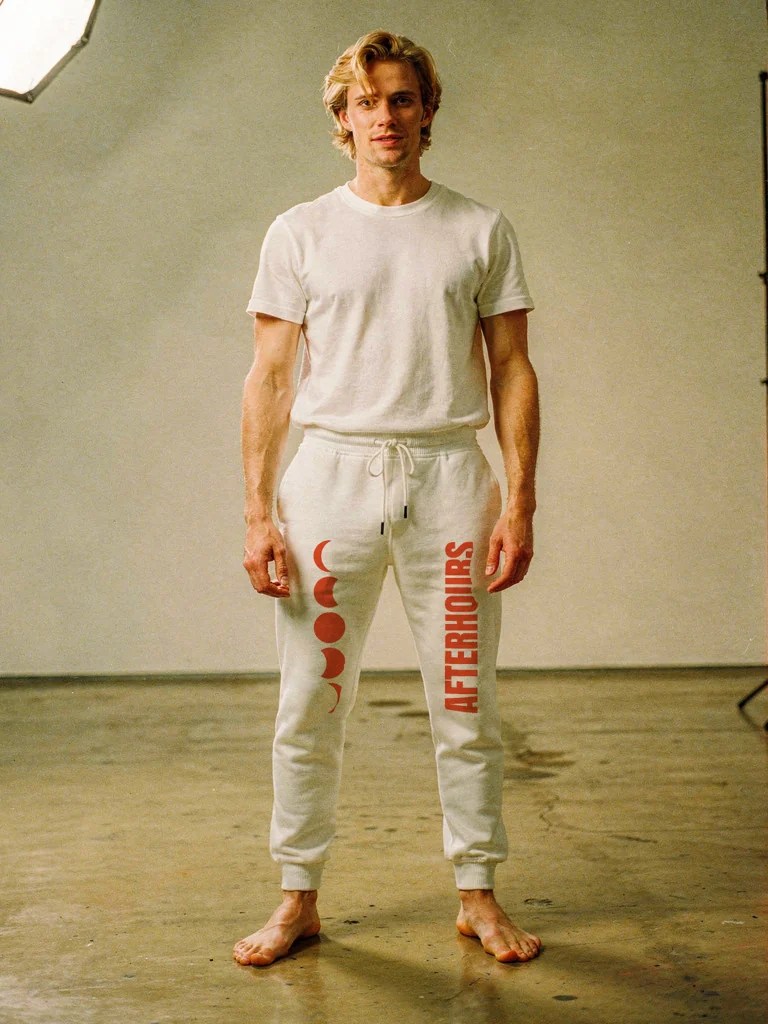 AFTERHOURS on the left leg and a moon phase column on the right, one request on the white joggers. SudoMock render, 21 November 2026.
Every sweatpants color from one photo
Every ST257 color is the same request with another hex on the sweatpants surface. On Printify the ST257 comes in Vintage Heather, Black and True Navy (printify.com catalog, read 21 November 2026), and the library photo is black fleece, so the two renders below send Printify's own swatches for the other two.
{ "surface_uuid": "SWEATPANTS_SURFACE_ID", "color": "#403F51" }
| Color | Render |
|---|---|
| Black, the photo's own | 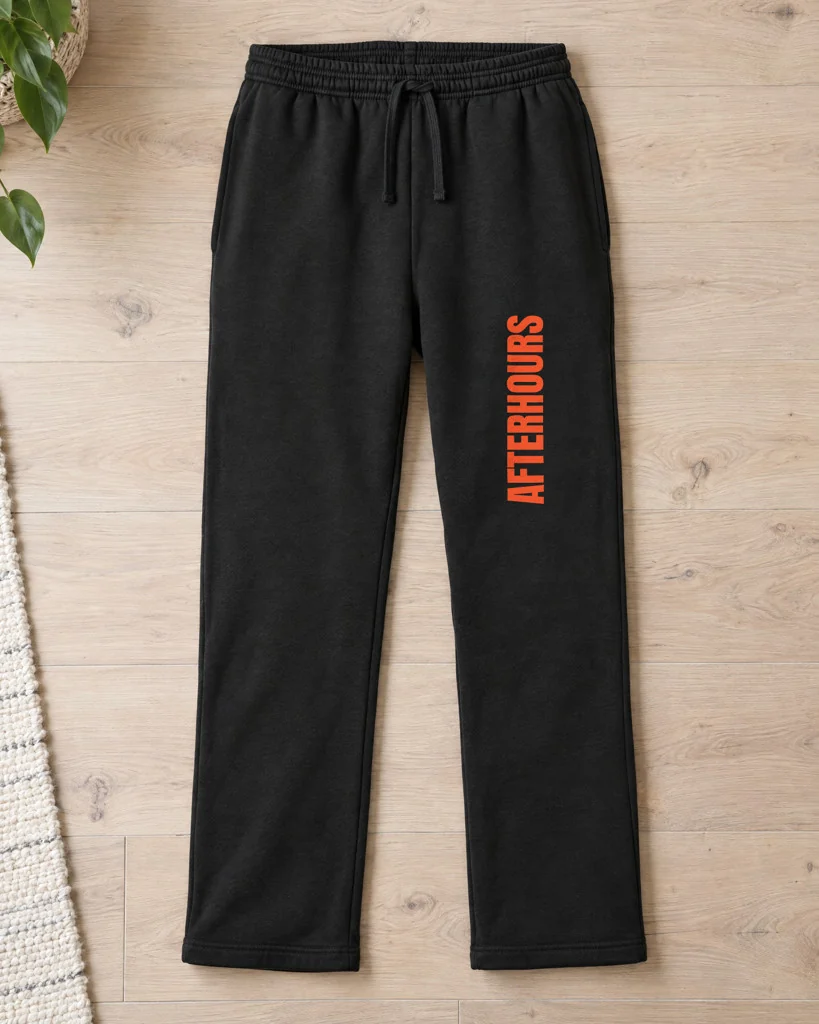 |
| Vintage Heather #A3A3A3 | 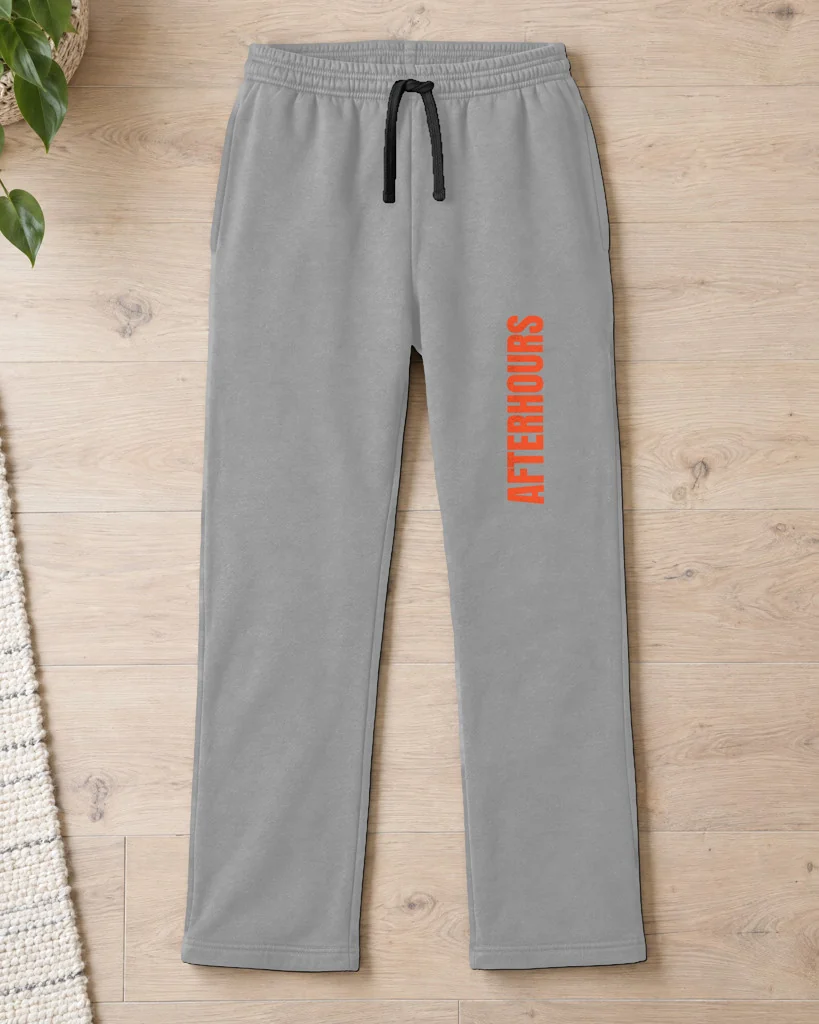 |
| True Navy #403F51 | 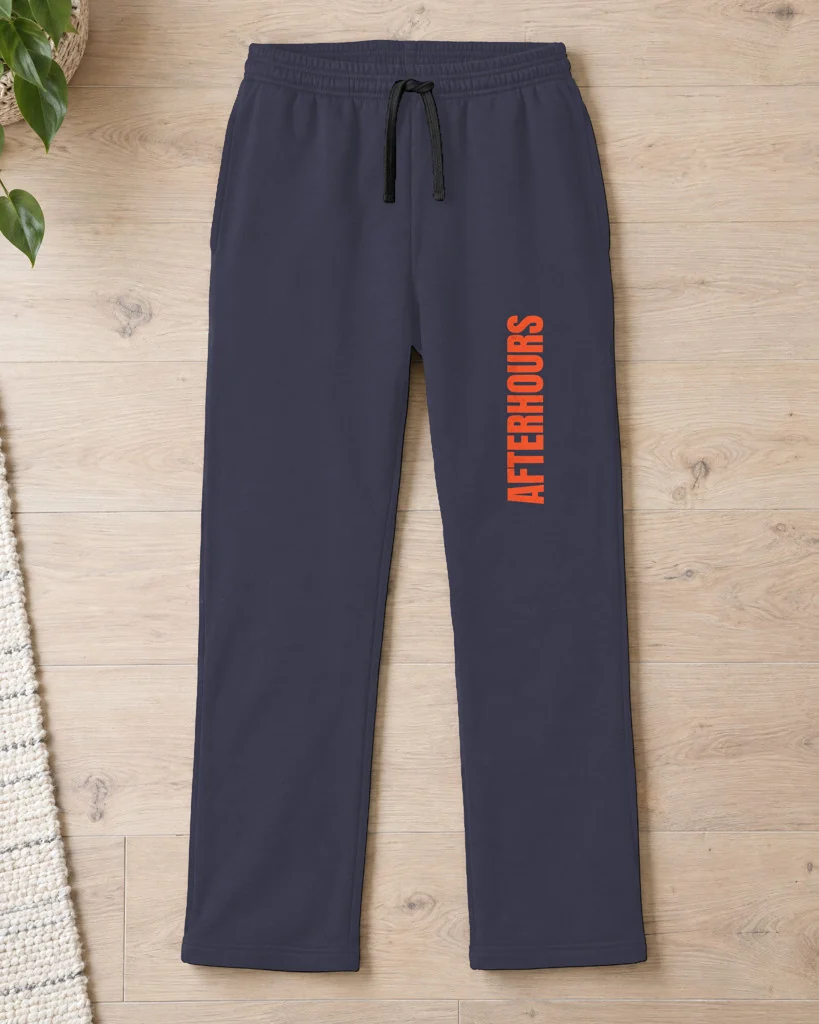 |
All three are SudoMock renders of the AFTERHOURS file on the left leg of the one ST257 photo, made on 21 November 2026. The leg print, folds and seams stay in place, the drawcord keeps its own color, and the orange kept its file color on black and True Navy with the default blend mode. For another blank, send the swatches your provider lists for it.
Render the catalog from a CSV
Each CSV row names a design's file for each leg, with the cell left empty when that leg stays plain, and the script renders the row in every color of the blank. Paste the mockup id, the two leg area ids and the surface id into the script, export your key as SUDOMOCK_API_KEY and pass the CSV path.
sku,left_png,right_pngSW-AFTERHOURS,https://cdn.example.com/legs/afterhours-st257.png,https://cdn.example.com/legs/moons-st257.pngSW-NORTHSIDE,https://cdn.example.com/legs/northside-st257.png,
import csv, os, sys, timefrom concurrent.futures import ThreadPoolExecutorimport requestsMOCKUP = "MOCKUP_ID"AREAS = {"left_png": "LEFT_LEG_AREA_ID", "right_png": "RIGHT_LEG_AREA_ID"}SURFACE = "SWEATPANTS_SURFACE_ID"COLORS = {"black": None, "vintage-heather": "#A3A3A3", "true-navy": "#403F51"}HEADERS = {"x-api-key": os.environ["SUDOMOCK_API_KEY"]}URL = f"https://api.sudomock.com/api/v1/photo-mockups/{MOCKUP}/render"def render(row, color):targets = [{"uuid": area, "artwork_url": row[col], "placement": {"fit": "fit"}}for col, area in AREAS.items() if row[col]]if COLORS[color]:targets.insert(0, {"surface_uuid": SURFACE, "color": COLORS[color]})body = {"print_areas": targets, "export_options": {"image_format": "jpg", "image_size": 1024}}for attempt in range(3):res = requests.post(URL, json=body, headers=HEADERS, timeout=120)if res.status_code != 429:breaktime.sleep(int(res.headers.get("Retry-After", 5)))if not res.ok:return f"{row['sku']} {color} failed {res.status_code} {res.text}"image = requests.get(res.json()["data"]["print_files"][0]["export_path"], timeout=60)if not image.ok:return f"{row['sku']} {color} download failed {image.status_code}"name = f"{row['sku']}-{color}.jpg"with open(name, "wb") as f:f.write(image.content)return f"{name} saved"with open(sys.argv[1], newline="") as f:rows = list(csv.DictReader(f))with ThreadPoolExecutor(max_workers=8) as pool:for line in pool.map(lambda job: render(*job), [(r, c) for r in rows for c in COLORS]):print(line)
The two rows above come out as six images, from SW-AFTERHOURS-black.jpg to SW-NORTHSIDE-true-navy.jpg, and a 429 answer is retried after the wait it names.
A sweatpants PSD of your own
A sweatpants PSD with a smart object on each leg takes both leg files in one request, one smart_objects entry per leg, as in front and back t-shirt mockups. In the dashboard, PSD uploads are capped at 300 MB, and API uploads support files up to Adobe's official PSD file size limit. SudoMock renders match Photoshop's own output.
Next step
Find the blank you sell in the table, set one design at its leg size with legword.py, save a straight-on photo of that blank with a leg area at the same shape, and render it on two of its colors before you run the CSV. The sweatpants templates hold the other blanks and views, among them the Gildan 18400 template for the 1,200 by 3,600 file, and the sweatpants mockup guide compares the views. The print areas guide covers replacing a saved area, and hoodie mockups shows what fit, crop and fill do to a file whose shape differs from its area.
Frequently asked questions
What size is a sweatpants leg print file?
It depends on the blank. Printify's catalog, read in September 2026, lists DTF leg files such as 1,200 by 3,000 pixels on the Sport-Tek ST257, 1,200 by 3,600 on the Gildan 18400, 1,200 by 4,200 on the Hanes P650 and 1,050 by 4,800 on the Port and Company LPC140P. Lay the file out at the size your provider lists for the blank you sell.
Why are there no mockups for some Printify sweatpants?
Printify's DTF leg sweatpants sit in its Early Access catalog, and on 21 November 2026 their product pages said there is no preview or pre-made mockup with your design. Printify asks sellers to create their own. A sweatpants photo saved with a leg print area renders your exact file in that area on every color.
How do I put a vertical word on sweatpants?
Set the word on its side inside a tall file at your provider's leg size, so it reads from the knee up or from the hip down. Then render that file into a leg print area drawn at the same shape. The word runs the full length of the area on every color you render.
Can I make sweatpants mockups in every color from one photo?
Yes. The Sport-Tek ST257 photo here is black fleece, and sending Printify's Vintage Heather #A3A3A3 or True Navy #403F51 for the pant's surface returned the sweatpants in those colors. The leg print, folds and seams stay in place, so each color is one more render of the same request.
Sources
- Create a mockup from a product photo (opens in new tab), SudoMock docs
- Render a photo mockup (opens in new tab), SudoMock docs
- Start From a Ready-Made Template: No File of Your Own (opens in new tab), SudoMock docs
- Print areas (opens in new tab), SudoMock docs
- What is the PSD file size limit (opens in new tab), SudoMock docs
- Anton (opens in new tab), Google Fonts
Beck
CTO
Related articles
Hoodie Mockups: A Wide Front File Above the Pocket, Every Color
Draw the front area above the pocket and the back area below the hood, then render each design, side and color by API.
9 min read
Front and Back T-Shirt Mockups: Both Prints in One Render
Put the chest badge and the back print of every design pair on one mockup, in every shirt color, with one render request each.
6 min read
Zip Hoodie Mockups: Across the Zipper or a Chest Pair, Every Color
Render each zip hoodie design across the zipper or as a chest pair, with the back and both sleeves, in every color from saved photos.
11 min read
Latest articles
Zapier Mockup Automation: Render Your Own PSD on Any Trigger
One Webhooks by Zapier request turns each trigger into a finished mockup on your own template, with real tee, hoodie, tote and color renders.
8 min read
Beanie Mockups: Lay the Logo Out at the Cuff File, Render Every Color
Lay the logo out at the cuff file of your blank, draw that area on one beanie photo, and render every knit color by API.
8 min read
Tote Bag Mockups: Print Sizes, Front and Back, Every Canvas Color
Render every tote design front and back at your bag's print file shape, in every canvas color, from one saved tote photo.
8 min read
Explore by use case
See SudoMock in action for your specific product category
Your own PSD, rendered via API
Render your own PSD through the API. Start with 500 one-time credits, no card.