Packaging Mockups for Every SKU: One Bag Photo, One Label per Flavor
Save one photo of the blank bag as a photo mockup with a label area, then send one render request per SKU with that SKU's label file. The label lands with its own colors on the bag, and the same request can recolor the bag for a variant, so a 30 flavor line is 30 calls against one mockup.
Published 6 min readBeck
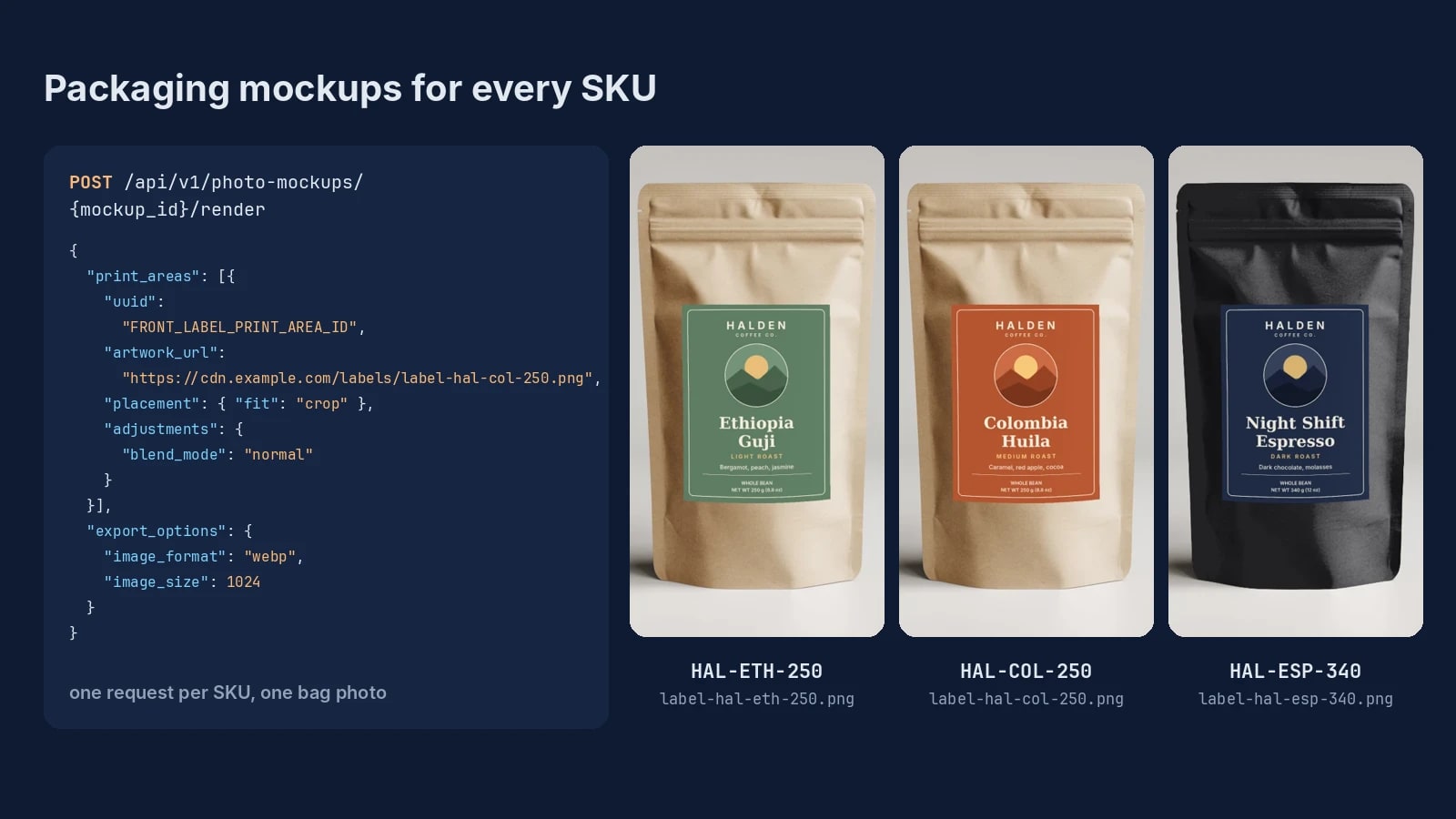
Key takeaways
- Draw the label area once in photo pixels; every SKU render reuses its print_area_id.
- For a long SKU list, add is_async true to each render and collect every result from its job.
- Name each file by its SKU row, and send jpg when the images go to a marketplace.
What one SKU needs
Every SKU of a line that shares one bag differs only in its label, so the inputs are one photo of the blank bag and one label file per SKU. Keep them in a list with the SKU, the label's public HTTPS link (or its bytes as base64) and the bag color, and that list drives every render.
| SKU | Label file | Bag color |
|---|---|---|
| HAL-ETH-250 | label-hal-eth-250.png | kraft |
| HAL-COL-250 | label-hal-col-250.png | kraft |
| HAL-ESP-340 | label-hal-esp-340.png | black |
Each label is one SKU's print file of a sample coffee line, exported as a PNG (JPEG and WebP work too): 900 by 1200 pixels for a 3 by 4 inch front label at 300 DPI, with the flavor name, the roast and the net weight already set by the designer. A new flavor adds a row and a label file, and the bag photo stays the same.
Save the bag photo with its label area
POST /api/v1/photo-mockups turns one product photo into a reusable mockup, and its optional print_areas list saves the label area in the photo's own pixels. Draw the area where the printed label sits on that bag, at the label's shape, with the corners from the top left clockwise.
curl -X POST https://api.sudomock.com/api/v1/photo-mockups \-H "x-api-key: $SUDOMOCK_API_KEY" \-H "Content-Type: application/json" \-d '{"source_url": "https://cdn.example.com/kraft-pouch-front.png","name": "Kraft pouch, front label","print_areas": [{ "points": [[450, 310], [700, 310], [700, 640], [450, 640]], "name": "Front label" }]}'
const response = await fetch('https://api.sudomock.com/api/v1/photo-mockups', {method: 'POST',headers: {'x-api-key': process.env.SUDOMOCK_API_KEY,'Content-Type': 'application/json',},body: JSON.stringify({"source_url": "https://cdn.example.com/kraft-pouch-front.png","name": "Kraft pouch, front label","print_areas": [{"points": [[450,310],[700,310],[700,640],[450,640]],"name": "Front label"}]}),});const data = await response.json();console.log(data);
import osimport requestsresponse = requests.post("https://api.sudomock.com/api/v1/photo-mockups",headers={"x-api-key": os.environ["SUDOMOCK_API_KEY"],"Content-Type": "application/json",},json={"source_url": "https://cdn.example.com/kraft-pouch-front.png","name": "Kraft pouch, front label","print_areas": [{"points": [[450,310,],[700,310,],[700,640,],[450,640,],],"name": "Front label",},],},)print(response.json())
package mainimport ("bytes""fmt""io""net/http""os")func main() {payload := []byte(`{"source_url": "https://cdn.example.com/kraft-pouch-front.png","name": "Kraft pouch, front label","print_areas": [{"points": [[450,310],[700,310],[700,640],[450,640]],"name": "Front label"}]}`)req, err := http.NewRequest("POST", "https://api.sudomock.com/api/v1/photo-mockups", bytes.NewBuffer(payload))if err != nil {panic(err)}req.Header.Set("x-api-key", os.Getenv("SUDOMOCK_API_KEY"))req.Header.Set("Content-Type", "application/json")resp, err := http.DefaultClient.Do(req)if err != nil {panic(err)}defer resp.Body.Close()body, _ := io.ReadAll(resp.Body)fmt.Println(string(body))}
<?php$payload = <<<'JSON'{"source_url": "https://cdn.example.com/kraft-pouch-front.png","name": "Kraft pouch, front label","print_areas": [{"points": [[450,310],[700,310],[700,640],[450,640]],"name": "Front label"}]}JSON;$ch = curl_init('https://api.sudomock.com/api/v1/photo-mockups');curl_setopt_array($ch, [CURLOPT_CUSTOMREQUEST => 'POST',CURLOPT_RETURNTRANSFER => true,CURLOPT_HTTPHEADER => ['x-api-key: ' . getenv('SUDOMOCK_API_KEY'),'Content-Type: application/json',],CURLOPT_POSTFIELDS => $payload,]);$response = curl_exec($ch);curl_close($ch);echo $response;
The call answers with the finished mockup, so there is nothing to poll before the first render. Keep data.mockup_id, the label's data.quads[0].print_area_id and the bag's data.surfaces[0].surface_uuid; the print areas and surfaces guide reads both lists field by field. On 29 October 2026 this call, sent with the studio photo of the kraft paper coffee bag template and a 250 by 330 pixel area on the front of the pouch, came back with the area saved as Front label and the pouch as one surface labelled kraft paper pouch.
Without a photo of your own bag, the coffee bag templates carry photos of blank kraft coffee bags, and their Use This Mockup button opens the chosen photo in Photo Mockups, where Edit areas draws the label area and the Code tab prints the mockup_id and print_area_id for the requests below.
Render one label per SKU
POST /api/v1/photo-mockups/{mockup_id}/render places one SKU's label file on the saved area. Set blend_mode to normal so the label keeps the exact colors of its file on a kraft, white or black bag, and fit to crop, which covers the area and matches fit when the area has the label's shape.
curl -X POST https://api.sudomock.com/api/v1/photo-mockups/MOCKUP_ID/render \-H "x-api-key: $SUDOMOCK_API_KEY" \-H "Content-Type: application/json" \-d '{"print_areas": [{"uuid": "FRONT_LABEL_PRINT_AREA_ID","artwork_url": "https://cdn.example.com/labels/label-hal-col-250.png","placement": { "fit": "crop" },"adjustments": { "blend_mode": "normal" }}],"export_options": { "image_format": "webp", "image_size": 1024 }}'
const response = await fetch('https://api.sudomock.com/api/v1/photo-mockups/MOCKUP_ID/render', {method: 'POST',headers: {'x-api-key': process.env.SUDOMOCK_API_KEY,'Content-Type': 'application/json',},body: JSON.stringify({"print_areas": [{"uuid": "FRONT_LABEL_PRINT_AREA_ID","artwork_url": "https://cdn.example.com/labels/label-hal-col-250.png","placement": {"fit": "crop"},"adjustments": {"blend_mode": "normal"}}],"export_options": {"image_format": "webp","image_size": 1024}}),});const data = await response.json();console.log(data);
import osimport requestsresponse = requests.post("https://api.sudomock.com/api/v1/photo-mockups/MOCKUP_ID/render",headers={"x-api-key": os.environ["SUDOMOCK_API_KEY"],"Content-Type": "application/json",},json={"print_areas": [{"uuid": "FRONT_LABEL_PRINT_AREA_ID","artwork_url": "https://cdn.example.com/labels/label-hal-col-250.png","placement": {"fit": "crop",},"adjustments": {"blend_mode": "normal",},},],"export_options": {"image_format": "webp","image_size": 1024,},},)print(response.json())
package mainimport ("bytes""fmt""io""net/http""os")func main() {payload := []byte(`{"print_areas": [{"uuid": "FRONT_LABEL_PRINT_AREA_ID","artwork_url": "https://cdn.example.com/labels/label-hal-col-250.png","placement": {"fit": "crop"},"adjustments": {"blend_mode": "normal"}}],"export_options": {"image_format": "webp","image_size": 1024}}`)req, err := http.NewRequest("POST", "https://api.sudomock.com/api/v1/photo-mockups/MOCKUP_ID/render", bytes.NewBuffer(payload))if err != nil {panic(err)}req.Header.Set("x-api-key", os.Getenv("SUDOMOCK_API_KEY"))req.Header.Set("Content-Type", "application/json")resp, err := http.DefaultClient.Do(req)if err != nil {panic(err)}defer resp.Body.Close()body, _ := io.ReadAll(resp.Body)fmt.Println(string(body))}
<?php$payload = <<<'JSON'{"print_areas": [{"uuid": "FRONT_LABEL_PRINT_AREA_ID","artwork_url": "https://cdn.example.com/labels/label-hal-col-250.png","placement": {"fit": "crop"},"adjustments": {"blend_mode": "normal"}}],"export_options": {"image_format": "webp","image_size": 1024}}JSON;$ch = curl_init('https://api.sudomock.com/api/v1/photo-mockups/MOCKUP_ID/render');curl_setopt_array($ch, [CURLOPT_CUSTOMREQUEST => 'POST',CURLOPT_RETURNTRANSFER => true,CURLOPT_HTTPHEADER => ['x-api-key: ' . getenv('SUDOMOCK_API_KEY'),'Content-Type: application/json',],CURLOPT_POSTFIELDS => $payload,]);$response = curl_exec($ch);curl_close($ch);echo $response;
The finished image is at data.print_files[0].export_path. Rendered on 29 October 2026 with the three label files of the table, one request each, the pouch came back as three WebP files with every label square on the front of the bag and the folds and studio light of the photo kept.
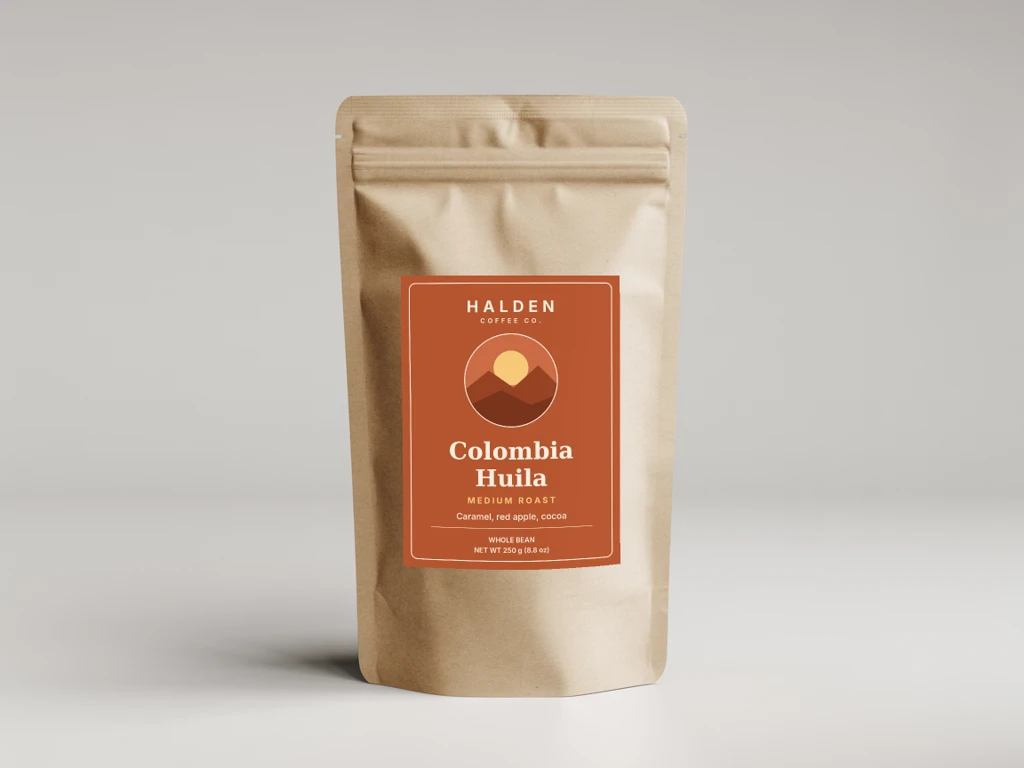 Rendered with SudoMock, SKU HAL-COL-250: the label file went to the saved front label area with blend_mode normal, so its terracotta and cream print as designed on the kraft.
The default blend mode, multiply, reads like ink printed into the material, which suits a design printed on the bag itself. A label is a printed sticker on top of the bag, and normal reproduces its colors whatever the bag color; the fit and blend modes guide describes each mode.
Change the bag color for a variant
A variant on another bag color is the same request with one more entry: the bag's surface_uuid with a color. That entry recolors the whole pouch, and the label entry still lands on top with its own colors.
curl -X POST https://api.sudomock.com/api/v1/photo-mockups/MOCKUP_ID/render \-H "x-api-key: $SUDOMOCK_API_KEY" \-H "Content-Type: application/json" \-d '{"print_areas": [{ "surface_uuid": "POUCH_SURFACE_UUID", "color": "#232326" },{"uuid": "FRONT_LABEL_PRINT_AREA_ID","artwork_url": "https://cdn.example.com/labels/label-hal-esp-340.png","placement": { "fit": "crop" },"adjustments": { "blend_mode": "normal" }}],"export_options": { "image_format": "webp", "image_size": 1024 }}'
const response = await fetch('https://api.sudomock.com/api/v1/photo-mockups/MOCKUP_ID/render', {method: 'POST',headers: {'x-api-key': process.env.SUDOMOCK_API_KEY,'Content-Type': 'application/json',},body: JSON.stringify({"print_areas": [{"surface_uuid": "POUCH_SURFACE_UUID","color": "#232326"},{"uuid": "FRONT_LABEL_PRINT_AREA_ID","artwork_url": "https://cdn.example.com/labels/label-hal-esp-340.png","placement": {"fit": "crop"},"adjustments": {"blend_mode": "normal"}}],"export_options": {"image_format": "webp","image_size": 1024}}),});const data = await response.json();console.log(data);
import osimport requestsresponse = requests.post("https://api.sudomock.com/api/v1/photo-mockups/MOCKUP_ID/render",headers={"x-api-key": os.environ["SUDOMOCK_API_KEY"],"Content-Type": "application/json",},json={"print_areas": [{"surface_uuid": "POUCH_SURFACE_UUID","color": "#232326",},{"uuid": "FRONT_LABEL_PRINT_AREA_ID","artwork_url": "https://cdn.example.com/labels/label-hal-esp-340.png","placement": {"fit": "crop",},"adjustments": {"blend_mode": "normal",},},],"export_options": {"image_format": "webp","image_size": 1024,},},)print(response.json())
package mainimport ("bytes""fmt""io""net/http""os")func main() {payload := []byte(`{"print_areas": [{"surface_uuid": "POUCH_SURFACE_UUID","color": "#232326"},{"uuid": "FRONT_LABEL_PRINT_AREA_ID","artwork_url": "https://cdn.example.com/labels/label-hal-esp-340.png","placement": {"fit": "crop"},"adjustments": {"blend_mode": "normal"}}],"export_options": {"image_format": "webp","image_size": 1024}}`)req, err := http.NewRequest("POST", "https://api.sudomock.com/api/v1/photo-mockups/MOCKUP_ID/render", bytes.NewBuffer(payload))if err != nil {panic(err)}req.Header.Set("x-api-key", os.Getenv("SUDOMOCK_API_KEY"))req.Header.Set("Content-Type", "application/json")resp, err := http.DefaultClient.Do(req)if err != nil {panic(err)}defer resp.Body.Close()body, _ := io.ReadAll(resp.Body)fmt.Println(string(body))}
<?php$payload = <<<'JSON'{"print_areas": [{"surface_uuid": "POUCH_SURFACE_UUID","color": "#232326"},{"uuid": "FRONT_LABEL_PRINT_AREA_ID","artwork_url": "https://cdn.example.com/labels/label-hal-esp-340.png","placement": {"fit": "crop"},"adjustments": {"blend_mode": "normal"}}],"export_options": {"image_format": "webp","image_size": 1024}}JSON;$ch = curl_init('https://api.sudomock.com/api/v1/photo-mockups/MOCKUP_ID/render');curl_setopt_array($ch, [CURLOPT_CUSTOMREQUEST => 'POST',CURLOPT_RETURNTRANSFER => true,CURLOPT_HTTPHEADER => ['x-api-key: ' . getenv('SUDOMOCK_API_KEY'),'Content-Type: application/json',],CURLOPT_POSTFIELDS => $payload,]);$response = curl_exec($ch);curl_close($ch);echo $response;
Rendered on 29 October 2026, the espresso label came back on a black pouch that keeps the zip, the creases and the light of the kraft photo.
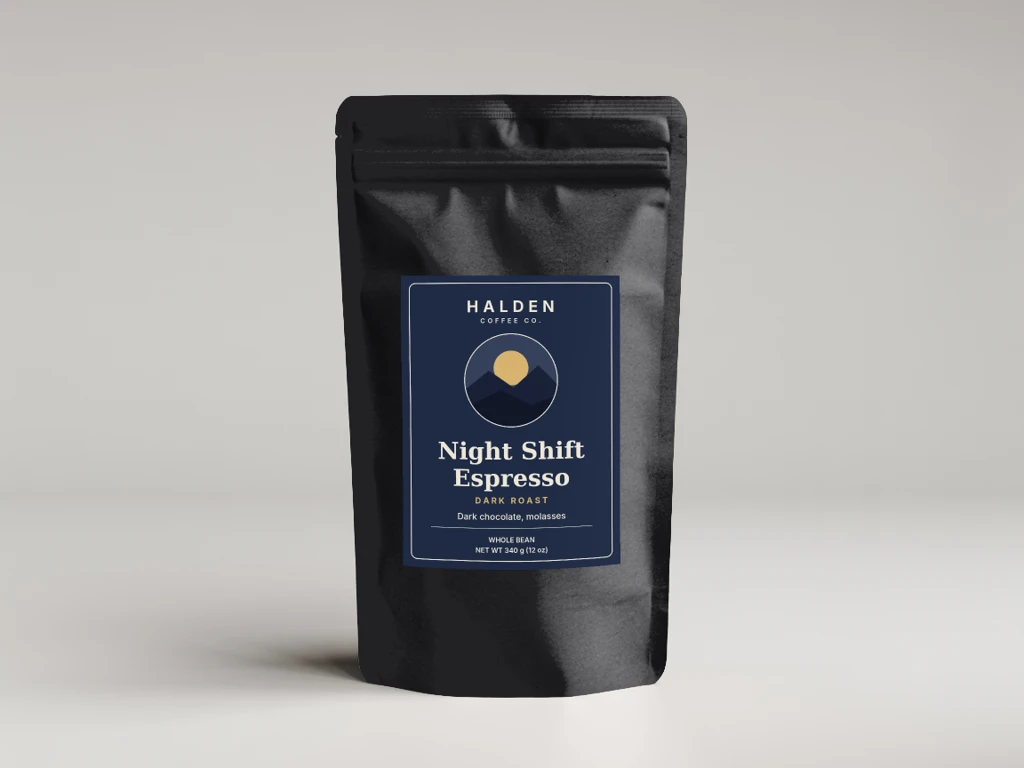 Rendered with SudoMock, SKU HAL-ESP-340 on a black pouch: a surface entry with color #232326 recolored the bag, and the label entry kept the label's navy as designed.
color takes a hex code or the name of a color saved on the mockup, so a line that comes back to the same bag colors can save them by name once.
Run the whole SKU list
The script below takes the SKU list, fires one request per row in parallel and saves each image under its SKU. For a large set, the render guide adds "is_async": true to each call and collects every result from its job.
sku,label_url,bag_colorHAL-ETH-250,https://cdn.example.com/labels/label-hal-eth-250.png,HAL-COL-250,https://cdn.example.com/labels/label-hal-col-250.png,HAL-ESP-340,https://cdn.example.com/labels/label-hal-esp-340.png,#232326
Fill in the three IDs from the create response, set SUDOMOCK_API_KEY, and run node skus.mjs skus.csv.
// skus.mjsimport { readFileSync, writeFileSync } from "node:fs";const MOCKUP = "MOCKUP_ID";const LABEL_AREA = "FRONT_LABEL_PRINT_AREA_ID";const BAG = "POUCH_SURFACE_UUID";const [header, ...lines] = readFileSync(process.argv[2], "utf8").trim().split(/\r?\n/);const keys = header.split(",");const rows = lines.map((line) => Object.fromEntries(line.split(",").map((v, i) => [keys[i], v.trim()])));await Promise.all(rows.map(async (row) => {const print_areas = [{ uuid: LABEL_AREA, artwork_url: row.label_url, placement: { fit: "crop" }, adjustments: { blend_mode: "normal" } },];if (row.bag_color) print_areas.unshift({ surface_uuid: BAG, color: row.bag_color });const send = () => fetch(`https://api.sudomock.com/api/v1/photo-mockups/${MOCKUP}/render`, {method: "POST",headers: { "x-api-key": process.env.SUDOMOCK_API_KEY, "Content-Type": "application/json" },body: JSON.stringify({ print_areas, export_options: { image_format: "webp", image_size: 1024 } }),});let res = await send();if (res.status === 429) {const wait = Number(res.headers.get("retry-after")) || 5;await new Promise((resolve) => setTimeout(resolve, wait * 1000));res = await send();}const json = await res.json();if (!res.ok) return console.error(row.sku, res.status, json);const image = await fetch(json.data.print_files[0].export_path);writeFileSync(`${row.sku}.webp`, Buffer.from(await image.arrayBuffer()));console.log(row.sku, "saved");}));
A row answered 429 waits for its Retry-After and is sent once more. Each SKU lands next to the CSV as its own file, such as HAL-COL-250.webp, ready for the store, a marketplace listing or a wholesale catalog. For marketplace uploads set image_format to jpg: the render guide notes that some marketplace upload pipelines read WebP colors with reduced contrast.
Without code, Photo Mockup: Render in the SudoMock n8n node takes a color and a blend mode per entry, so each Google Sheets row can carry its SKU's label link and bag color.
Flavor names and weights as text layers
When the packaging design lives in a PSD with the flavor name and the weight as type layers, the label art goes to the smart object and each SKU's words go to text_layers, with fit set to shrink for long names. Photoshop variables and data sets for mockups maps a spreadsheet row to those fields, and a color smart object takes the bag color per SKU through smart_objects[].color, as the smart objects reference shows. In the dashboard, PSD uploads are capped at 300 MB. API uploads support files up to Adobe's official PSD file size limit.
Next step
Start with three SKUs, one photo mockup, three label files and three requests, then send the whole list. The photo mockups overview walks through the create and render calls, the render reference holds the surface color and blend mode fields, and the packaging templates hold bags, boxes and pouches to start from. For boxes, labels and pouches across a whole brand, the packaging mockups use case covers rendering them from your own PSD templates.
Frequently asked questions
How do I make a packaging mockup for every flavor from one template?
Save one photo of the blank bag as a photo mockup with a label area, export one label PNG per flavor, and send one render request per flavor with that file's URL. The bag photo and the label area stay the same for the whole line, so a new flavor is one more request.
Will the label keep its exact colors on a kraft or black bag?
Yes, when the label entry sets blend_mode to normal. Normal reproduces the colors of the label file whatever the bag color, while the default multiply reads like ink printed into the material. A sticker label belongs on normal.
How do I change the bag color for one SKU?
Add an entry with the bag's surface_uuid and a color to the same render request. The surface entry recolors the whole bag and the label entry sits on top with its own colors. The color can be a hex code or the name of a color saved on the mockup.
How do I name each SKU's image?
The render answers with the image URL, and your script saves the file under the SKU of its row. A CSV with one row per SKU then gives one file per SKU, such as HAL-COL-250.webp. For marketplace uploads, set the image format to jpg.
Do I need a packaging PSD?
No. A photo of the blank bag is enough, because a photo mockup places the label on a saved area of the photo. When the design already lives in a PSD with text layers for the flavor and weight, those layers can be filled per SKU instead.
Sources
- Photo mockups (opens in new tab), SudoMock Docs
- Print areas and surfaces (opens in new tab), SudoMock Docs
- Render artwork onto a photo mockup (opens in new tab), SudoMock Docs
- Create a mockup from a product photo (opens in new tab), SudoMock Docs
- Render a photo mockup (opens in new tab), SudoMock Docs
- Fit and blend modes (opens in new tab), SudoMock Docs
- Render mockups with n8n and SudoMock (opens in new tab), SudoMock Docs
Beck
CTO
Related articles
Photoshop Variables and Data Sets for Mockups, Run by API
Map Photoshop's Text Replacement, Pixel Replacement and Visibility variables to render fields and run every CSV row against your mockup PSD.
8 min read
Every T-Shirt Color Variant Mockup from One PSD by API
One PSD with a color smart object renders every t-shirt colorway: one request per color, shown with six real renders.
4 min read
Product Mockups With ChatGPT or Claude From One Product Photo
Make product mockups in ChatGPT or Claude without a PSD: one product photo becomes a reusable mockup, and each design is one render on it.
7 min read
Explore by use case
See SudoMock in action for your specific product category
Your own PSD, rendered via API
Render your own PSD through the API. Start with 500 one-time credits, no card.