Etsy Personalization Orders: Render Each Buyer's Name on Your Own PSD
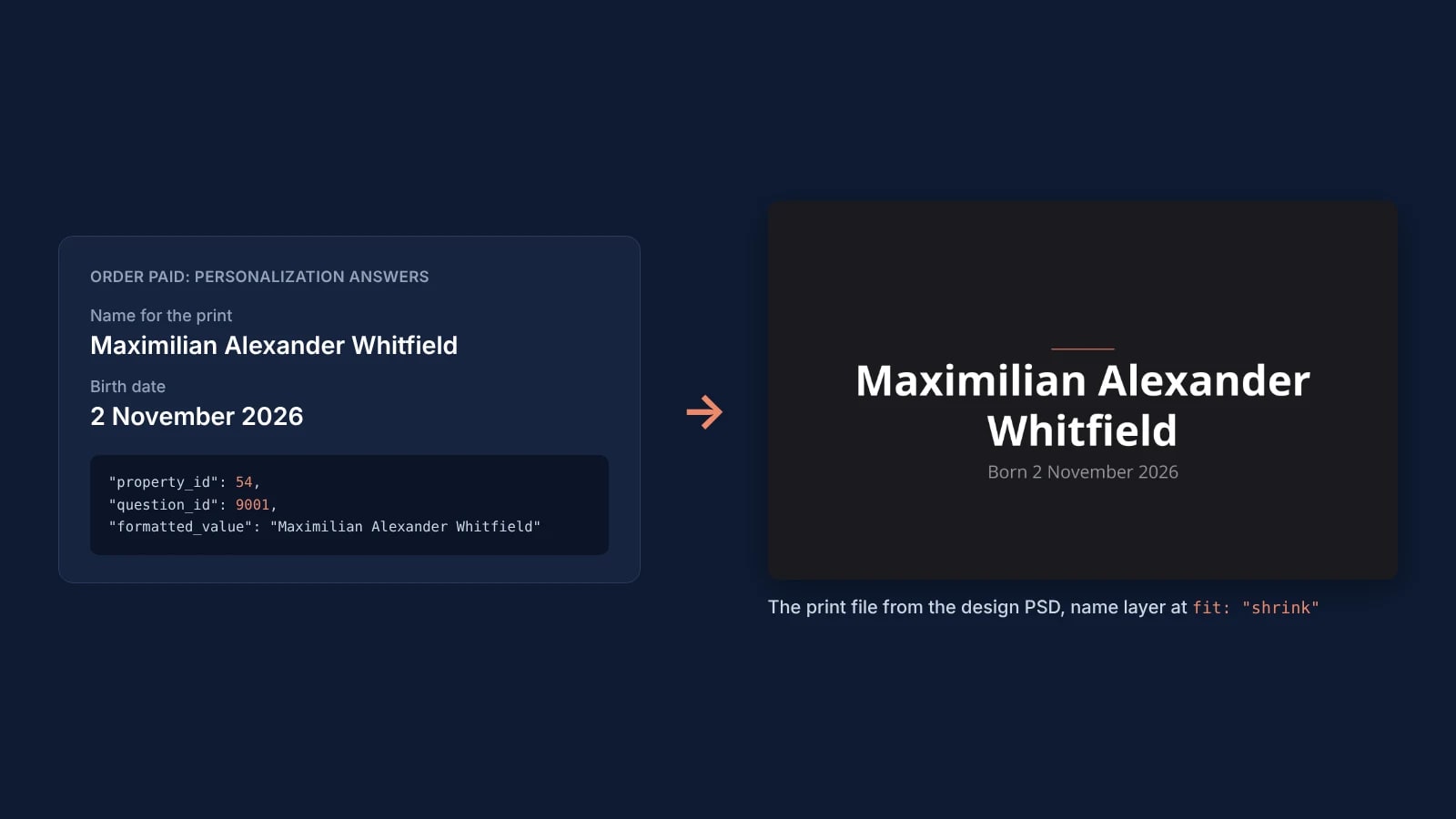
When an Etsy order is paid, read its receipt, take each personalization answer by its question_id and send it to the matching text layer of your PSD. One render returns the finished proof. Set fit to shrink and vertical_align to center, and a long name stays whole inside the box the designer drew.
Published 7 min readBeck
Key takeaways
- Map answers by question_id: formatted_name is the question in the seller's own words.
- Keep optional lines on hidden layers: a layer renders only when an order sends it.
- TEXT_FIT_SHRUNK in the response marks the proofs to open first.
Where Etsy puts the personalization answers
Every answer arrives in the order's receipt, inside the transaction it belongs to, as an entry of the variations array with property_id 54. A listing can ask up to five questions, so one order item can carry several of these entries, one per answer. Etsy's Personalization Migration Guide, read on 27 October 2026, says it directly: "There may be multiple objects with property_id: 54."
This is the part of a transaction the receiver reads, in the shape of Etsy's specification with sample values:
{"transaction_id": 4123456789,"listing_id": 1876543210,"title": "Personalized birth announcement print","variations": [{"property_id": 54,"question_id": 9001,"formatted_name": "Name for the print","formatted_value": "Maximilian Alexander Whitfield","value_id": null,"mime_type": null},{"property_id": 54,"question_id": 9002,"formatted_name": "Birth date","formatted_value": "2 November 2026","value_id": null,"mime_type": null}]}
formatted_value is the buyer's answer. formatted_name is the question in the seller's own words: the guide warns that it "may be a seller-configured value, not necessarily 'Personalization'". question_id is "the ID of the original personalization question" in Etsy's Open API specification, so it is the key to map by. For an upload question, "the formatted_value will be a URL", and mime_type names the file type. To put a buyer's photo on the product, store the uploaded file and pass its URL to a smart object of the same render as asset.url, next to the text layers.
Map each question to a text layer
Write the map once per listing: each personalization question points at one text layer of your PSD. Etsy's getListingPersonalization lists the listing's questions with their question_id and question_text, and the SudoMock upload response lists every text layer of the PSD with its uuid, as the text layers guide shows.
| Etsy question | Question type | PSD layer | Render fields |
|---|---|---|---|
| Name for the print | text input | the name layer, box text | text, fit: "shrink", vertical_align: "center" |
| Birth date, optional | text input | the date layer, hidden in the PSD | text, sent only when the buyer answered |
| Font style | dropdown | the name layer | font, one PostScript name per option |
| Text color | dropdown | the name and date layers | color, one hex value per option |
An optional question belongs on a layer you hide in Photoshop. The text layers guide puts it this way: "Targeting a hidden text layer renders it", and "Leave the entry out and the layer stays hidden, exactly as it was in the source file." An order without a birth date then shows the design without that line.
Each text takes 1 to 500 characters, while Etsy lets a text question allow from 1 to 1,024, so set the question's max_allowed_characters to the length your design can show. A dropdown answer arrives as text in formatted_value, so the map turns each option into a font or a color and adds it to the entry of the layer it styles, next to that layer's text. The receiver below maps the text questions, and a dropdown joins its layer's entry the same way.
Render one proof per order item
When order.paid arrives, read the receipt and send one render for each transaction that carries answers. Etsy's webhooks page, read on 27 October 2026, says the event is "delivered when an order receives payment", and its resource_url calls getShopReceipt, "which returns the receipt object for the order."
This is the render for the order item above, with the UUIDs of the template we rendered. Yours come from your own template's upload response:
curl -X POST https://api.sudomock.com/api/v1/renders \-H "x-api-key: $SUDOMOCK_API_KEY" \-H "Content-Type: application/json" \-d '{"mockup_uuid": "7740f25e-f30b-4528-a12f-aaa985c90330","text_layers": [{ "uuid": "5550fb56-d569-43b2-98de-88f3fd915651","text": "Maximilian Alexander Whitfield","font_size": 140, "fit": "shrink", "vertical_align": "center" },{ "uuid": "fdbda494-376a-4768-b0af-361b877d21f8","text": "Born 2 November 2026", "font_size": 56 }],"export_options": { "image_format": "png", "image_size": 1024 }}'
const response = await fetch('https://api.sudomock.com/api/v1/renders', {method: 'POST',headers: {'x-api-key': process.env.SUDOMOCK_API_KEY,'Content-Type': 'application/json',},body: JSON.stringify({"mockup_uuid": "7740f25e-f30b-4528-a12f-aaa985c90330","text_layers": [{"uuid": "5550fb56-d569-43b2-98de-88f3fd915651","text": "Maximilian Alexander Whitfield","font_size": 140,"fit": "shrink","vertical_align": "center"},{"uuid": "fdbda494-376a-4768-b0af-361b877d21f8","text": "Born 2 November 2026","font_size": 56}],"export_options": {"image_format": "png","image_size": 1024}}),});const data = await response.json();console.log(data);
import osimport requestsresponse = requests.post("https://api.sudomock.com/api/v1/renders",headers={"x-api-key": os.environ["SUDOMOCK_API_KEY"],"Content-Type": "application/json",},json={"mockup_uuid": "7740f25e-f30b-4528-a12f-aaa985c90330","text_layers": [{"uuid": "5550fb56-d569-43b2-98de-88f3fd915651","text": "Maximilian Alexander Whitfield","font_size": 140,"fit": "shrink","vertical_align": "center",},{"uuid": "fdbda494-376a-4768-b0af-361b877d21f8","text": "Born 2 November 2026","font_size": 56,},],"export_options": {"image_format": "png","image_size": 1024,},},)print(response.json())
package mainimport ("bytes""fmt""io""net/http""os")func main() {payload := []byte(`{"mockup_uuid": "7740f25e-f30b-4528-a12f-aaa985c90330","text_layers": [{"uuid": "5550fb56-d569-43b2-98de-88f3fd915651","text": "Maximilian Alexander Whitfield","font_size": 140,"fit": "shrink","vertical_align": "center"},{"uuid": "fdbda494-376a-4768-b0af-361b877d21f8","text": "Born 2 November 2026","font_size": 56}],"export_options": {"image_format": "png","image_size": 1024}}`)req, err := http.NewRequest("POST", "https://api.sudomock.com/api/v1/renders", bytes.NewBuffer(payload))if err != nil {panic(err)}req.Header.Set("x-api-key", os.Getenv("SUDOMOCK_API_KEY"))req.Header.Set("Content-Type", "application/json")resp, err := http.DefaultClient.Do(req)if err != nil {panic(err)}defer resp.Body.Close()body, _ := io.ReadAll(resp.Body)fmt.Println(string(body))}
<?php$payload = <<<'JSON'{"mockup_uuid": "7740f25e-f30b-4528-a12f-aaa985c90330","text_layers": [{"uuid": "5550fb56-d569-43b2-98de-88f3fd915651","text": "Maximilian Alexander Whitfield","font_size": 140,"fit": "shrink","vertical_align": "center"},{"uuid": "fdbda494-376a-4768-b0af-361b877d21f8","text": "Born 2 November 2026","font_size": 56}],"export_options": {"image_format": "png","image_size": 1024}}JSON;$ch = curl_init('https://api.sudomock.com/api/v1/renders');curl_setopt_array($ch, [CURLOPT_CUSTOMREQUEST => 'POST',CURLOPT_RETURNTRANSFER => true,CURLOPT_HTTPHEADER => ['x-api-key: ' . getenv('SUDOMOCK_API_KEY'),'Content-Type: application/json',],CURLOPT_POSTFIELDS => $payload,]);$response = curl_exec($ch);curl_close($ch);echo $response;
The request has no smart_objects at all. The text layers guide explains why that is enough: "A render needs at least one entry across smart_objects, text_layers, group_layers or hidden_layers, which means a text-only personalisation renders without any smart object at all." The proof comes back as a URL in data.print_files[0].export_path, and a warnings array names, by its name in the PSD, any layer that was scaled down:
"warnings": [{"code": "TEXT_FIT_SHRUNK","message": "Text for layer 'DEMO_TEXT' was scaled to 95% to fit its area."}]
The same answers also give the print file. Sent with image_size set to "original", the render comes back at the template's own size and resolution, ready for production. To show the buyer the name on the product, send the print file to the smart object of your mockup PSD in a second render, or, when your mockup PSD keeps the name layer inside its smart object, one render fills that layer by its UUID, as the text layers guide describes.
What happens to a long name
With fit set to shrink, a name too long for its box comes down in size until every word fits, and font_size sets the largest size a short name gets. Leave fit out and the box keeps its designed size and shows the lines that fit, as in Photoshop, so the end of a long name drops out of the image.
We rendered the name layer of one print design three times on 27 October 2026, each at font_size 140 and at the template's own size. "Ava Rose" kept the full size. "Maximilian Alexander Whitfield" without fit lost its last line, so the surname never reached the image. The same name with fit: "shrink" came back whole on two lines at 95%, with TEXT_FIT_SHRUNK in the response.
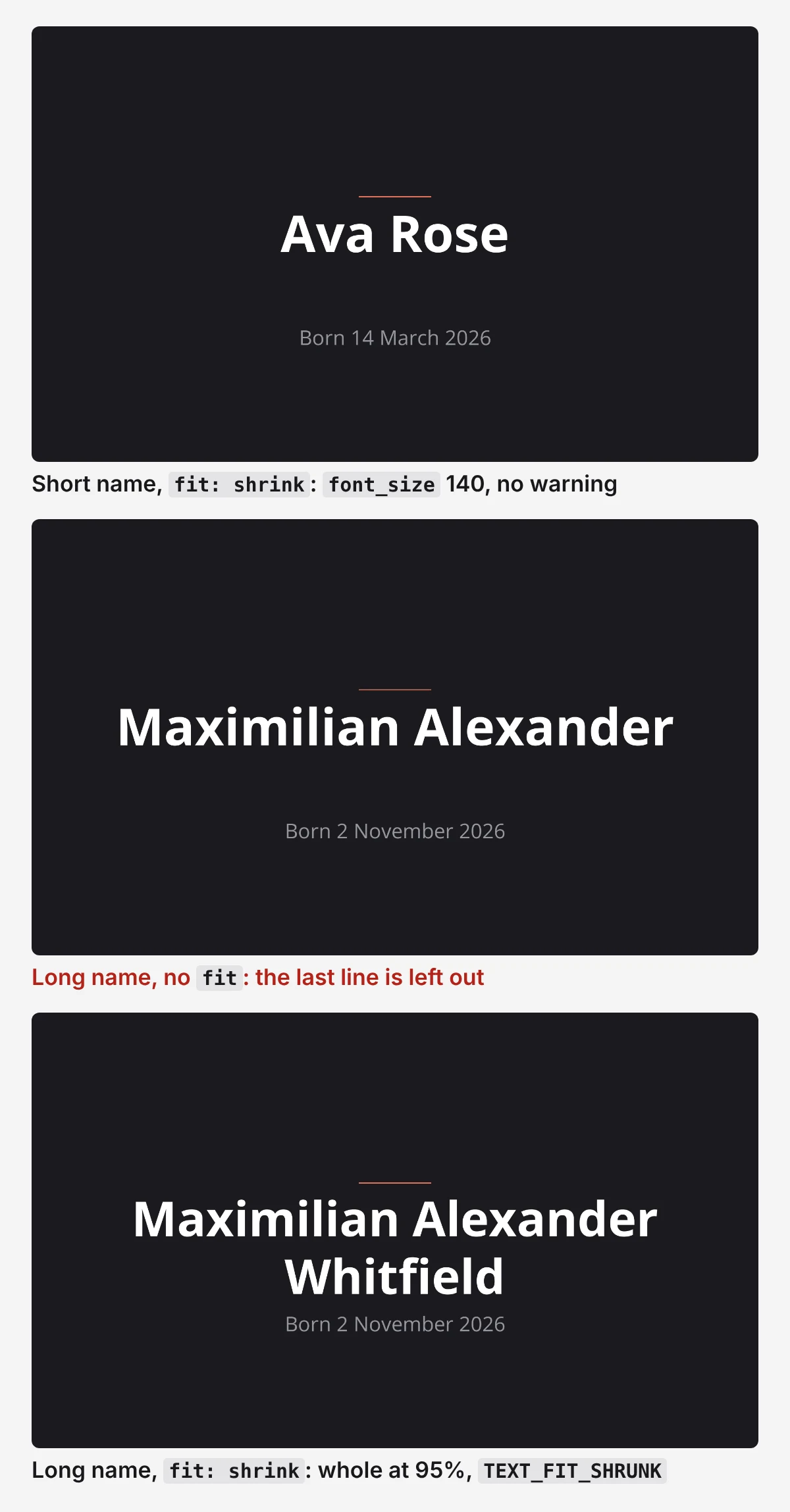 The name layer of one print design rendered three times on 27 October 2026, font_size 140: a short name, a long name without fit, and the same long name with fit set to shrink.
vertical_align: "center" keeps the smaller text in the middle of the box; the fitting guide calls shrink with center "the pairing that keeps a personalised run looking composed at any length." Store the warning with the proof, and the orders that carry it are the ones to open first.
The receiver
The receiver checks the signature, answers 200, then reads the receipt and renders one proof per order item. It reuses the signature check from Etsy Webhooks: Render Listing Photos When a Listing Is Created, saved as verify.mjs, and its token needs the transactions_r scope that getShopReceipt asks for in the specification.
Save it as orders.mjs. It runs on Node.js 18 or later with Express 4:
import express from 'express'import { verify } from './verify.mjs' // the signature check from the Etsy webhooks postconst ETSY_API = 'https://openapi.etsy.com/v3/application'const ETSY_HEADERS = {'x-api-key': `${process.env.ETSY_KEYSTRING}:${process.env.ETSY_SHARED_SECRET}`,Authorization: `Bearer ${process.env.ETSY_ACCESS_TOKEN}`,}// Your own map: per listing, the template and the text layer behind each question_id.const LISTINGS = {1876543210: {mockup: '7740f25e-f30b-4528-a12f-aaa985c90330',questions: {9001: { uuid: '5550fb56-d569-43b2-98de-88f3fd915651', font_size: 140, fit: 'shrink', vertical_align: 'center' },9002: { uuid: 'fdbda494-376a-4768-b0af-361b877d21f8', font_size: 56, format: (answer) => `Born ${answer}` },},},}async function renderProof(listing, variations) {const text_layers = variations.filter((v) => v.property_id === 54 && listing.questions[v.question_id] && v.formatted_value).map((v) => {const { format, ...layer } = listing.questions[v.question_id]return { ...layer, text: format ? format(v.formatted_value) : v.formatted_value }})if (text_layers.length === 0) return nullconst res = await fetch('https://api.sudomock.com/api/v1/renders', {method: 'POST',headers: { 'x-api-key': process.env.SUDOMOCK_API_KEY, 'Content-Type': 'application/json' },body: JSON.stringify({mockup_uuid: listing.mockup,text_layers,export_options: { image_format: 'png', image_size: 1024 },}),})const body = await res.json()if (!res.ok) throw new Error(`SudoMock ${res.status}: ${JSON.stringify(body)}`)return {url: body.data.print_files[0].export_path,shrunk: (body.warnings ?? []).some((w) => w.code === 'TEXT_FIT_SHRUNK'),}}// Webhook IDs already handled and the proof of each order item. Keep both in your database in production.const handled = new Set()const proofs = new Map()async function renderOrder(resourceUrl) {const path = new URL(resourceUrl).pathname.replace('/v3/application', '')const res = await fetch(`${ETSY_API}${path}`, { headers: ETSY_HEADERS })if (!res.ok) throw new Error(`Etsy ${res.status}: ${await res.text()}`)const receipt = await res.json()for (const t of receipt.transactions) {const listing = LISTINGS[t.listing_id]if (!listing) continueconst proof = await renderProof(listing, t.variations ?? [])if (!proof) continueproofs.set(`${receipt.receipt_id}:${t.transaction_id}`, proof)console.log(receipt.receipt_id, t.transaction_id, proof.url, proof.shrunk ? 'TEXT_FIT_SHRUNK' : '')}}const app = express()app.post('/etsy/orders', express.raw({ type: '*/*' }), (req, res) => {const id = req.header('webhook-id')if (!verify(id, req.header('webhook-timestamp'), req.header('webhook-signature'), req.body)) {return res.sendStatus(401)}res.sendStatus(200)if (handled.has(id)) returnhandled.add(id)const event = JSON.parse(req.body)// Etsy's page writes order.paid; deliveries quoted in https://github.com/etsy/open-api/discussions/1509 carried ORDER_PAID.if (String(event.event_type).toLowerCase().replace('_', '.') === 'order.paid') {renderOrder(event.resource_url).catch(console.error)}})app.listen(3000)
The receiver keeps each proof with its receipt and transaction, and the seller looks at it before production. Etsy itself returns the answers as text: in July 2026 a developer asked in Etsy's Open API discussions for an endpoint that generates a preview image from a shopper's personalization inputs, and the thread is still marked unanswered. Etsy's Open API specification, read on 27 October 2026, has no endpoint for messages, so when a listing promises the buyer a proof, it goes out from the Etsy inbox. Etsy's access token lasts an hour, so a receiver that runs for days refreshes it as the webhooks post shows.
Next step
Upload the PSD your personalized product sells with (up to 300 MB in the dashboard, with no file size limit over the API), keep each answer on its own text layer, and note the layer UUIDs from the upload response. Then add renderOrder('https://api.etsy.com/v3/application/shops/{shop_id}/receipts/{receipt_id}') with a receipt you already have at the end of orders.mjs, run it, open the proof URLs it logs to check the map, and add an endpoint for order.paid in Etsy's Webhooks Portal. Fit and recolour PSD text layers covers fit, alignment and color, and the render reference lists every field.
For a personalized mug, the mug templates show what a SudoMock render on a mug looks like, while the buyer's proof and your listing photos come from your own file, and text on mug mockups shows the name request on a mug wrap. Without code, the SudoMock render modules for n8n and Make take the same text layers with fit set to shrink. On Shopify, the same PSD gives the buyer a live preview before checkout, which How to Add a Product Customizer to Shopify builds.
Frequently asked questions
How do I automate Etsy personalization proofs?
Subscribe to Etsy's order.paid webhook, read the receipt it points to, and send each order item's personalization answers to the matching text layers of your PSD in one SudoMock render. The render returns the finished proof as an image URL. Keep the proof with the order and check it before production.
How do I get the personalization text from an Etsy order by API?
Call getShopReceipt with a token that has the transactions_r scope. Each transaction in the receipt carries a variations array, and every entry with property_id 54 is one personalization answer, with the buyer's text in formatted_value and the question in question_id. A listing with several questions gives several such entries.
What happens when a buyer's name is too long for the design?
Set fit to shrink on the text layer and the name scales down until every word fits its box, while a short name keeps the size you set. Without it, a box text layer keeps its designed size and leaves out the lines that do not fit. A shrink adds TEXT_FIT_SHRUNK to the response, so you know which proofs to check.
Can a personalized order render without a design image?
Yes. A SudoMock render needs at least one entry across smart objects, text layers, group layers or hidden layers, so a request with only text layers is complete. The PSD's own artwork stays as designed and only the text changes.
Can the proof be sent to the buyer through Etsy by API?
Etsy's Open API v3 specification, read on 27 October 2026, has no endpoint for messages, so the proof goes to the buyer from the Etsy inbox. Keep each proof with the receipt and transaction it belongs to, so it is ready to attach.
Sources
- Personalization Migration Guide | Etsy Open API v3 (opens in new tab), Etsy
- Webhooks | Etsy Open API v3 (opens in new tab), Etsy
- Etsy Open API v3 (opens in new tab), Etsy
- Text layers (opens in new tab), SudoMock docs
- Fit and recolour PSD text layers (opens in new tab), SudoMock docs
- Render a PSD mockup (opens in new tab), SudoMock docs
- Open API Support for Personalization Preview Image (opens in new tab), Etsy Open API discussions on GitHub
- New Release: Webhooks for Paid Orders (opens in new tab), Etsy Open API discussions on GitHub
Beck
CTO
Related articles
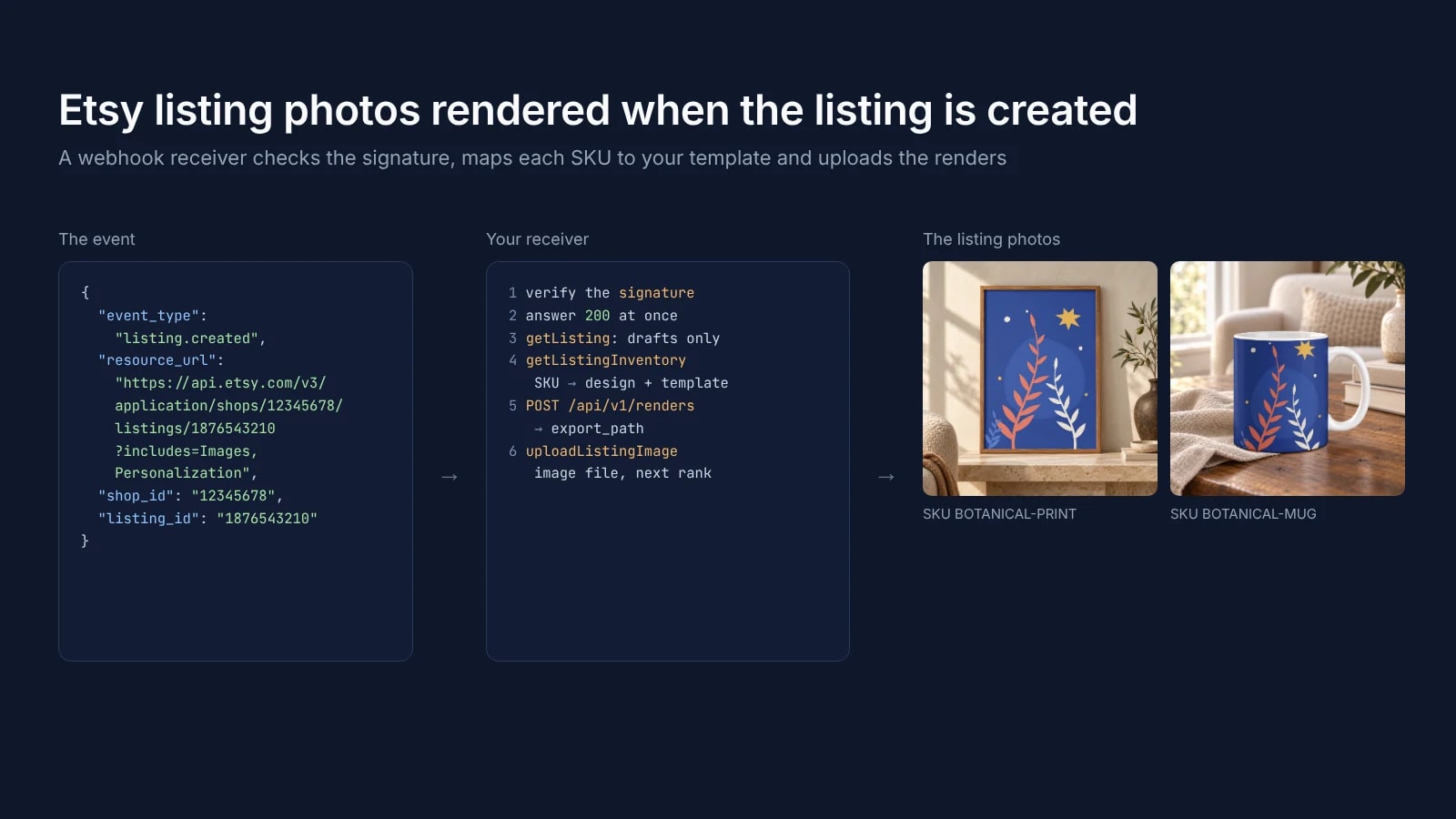
Etsy Webhooks: Render Listing Photos When a Listing Is Created
Etsy listing webhooks: the events, the four-field payload, the signature check and a receiver that uploads photos rendered from your own PSD template.
6 min read
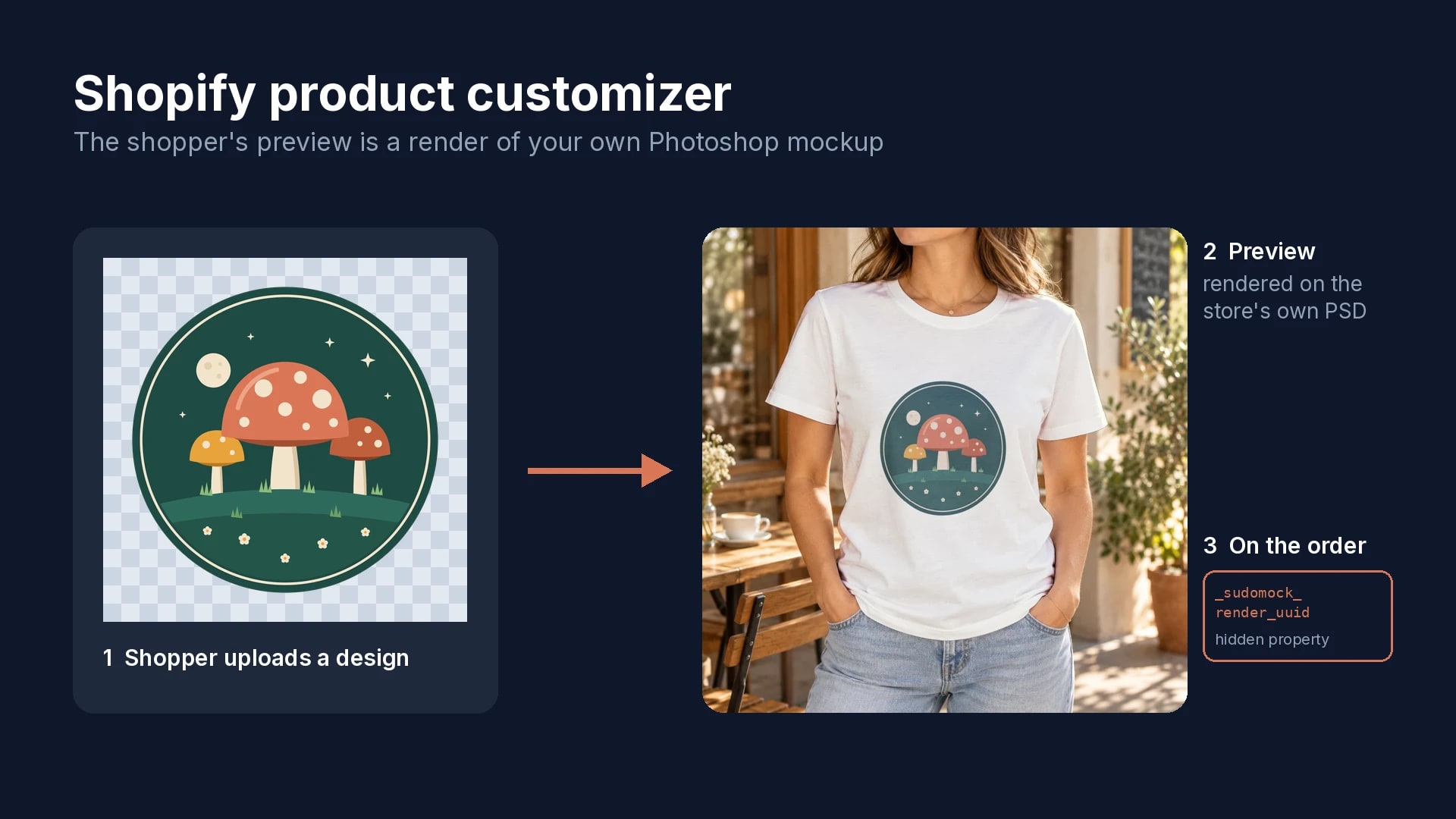
How to Add a Product Customizer to Shopify With a Live Preview
Five setup steps, a live preview rendered from your own mockup, and the two hidden properties that tie each order to the approved design.
6 min read
Can You Use Mockups on Etsy? The Rule by Listing Type
Etsy's own sentences on mockups by listing type, dated, and a render setup for the option photos of a personalized listing.
9 min read
Explore by use case
See SudoMock in action for your specific product category
Your own PSD, rendered via API
Render your own PSD through the API. Start with 500 one-time credits, no card.